1
Configure Protocol Settings
Configure Protocol Settings
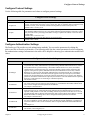
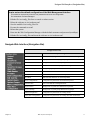
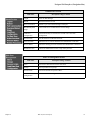
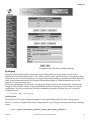
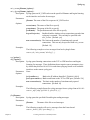
Use the following table for parameters and values to configure protocol settings.
Configure Protocol Settings
Parameter
Value
all.protocol
For the console server profile, the possible protocols are socket_server (when telnet is used),
socket_ssh (when ssh version one or two is used), raw_data (to exchange data in transparent mode
similar to socket_server mode but without telnet negotiation, breaks to serial ports, etc.)
Default value is socket_server
all.ipno
This is the default IP address of the PortServer CM's serial ports. The "+" indicates that the first
port should be addressed as 192.168.1.101 and the following ports should have consecutive values.
Any host can access a port using its IP address as long as a path to the address exists in the host's
routing table.
Default value is 192.168.1.101+
all.break_sequence
Send Break to the TTY when this string is received (ssh only).
Default value is break.
Configure Authentication Settings
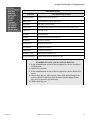
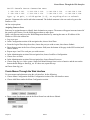
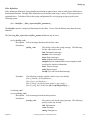
The PortServer CM provides several authentication methods. You can set the parameters by editing the
pslave.conf file or from the web interface. The following table lists the various parameters used in configuring
the authentication settings. Information in the table will be helpful in choosing your authentication method and
values.
.
Configure Authentication Settings
Parameter
Value
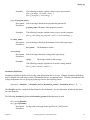
all.authtype
There are several authentication type options: local (authentication is performed using the
/etc/passwd file), radius (authentication is performed using a Radius authentication server), TacacsPlus (authentication is performed using a TacacsPlus authentication server), none, local/radius
(authentication is performed locally first, switching to Radius if unsuccessful), radius/local (the
opposite of the previous option), RadiusDownLocal (local authentication is tried only when the
Radius server is down), local/TacacsPlus (authentication is performed locally first, switching to
TacacsPlus if unsuccessful), TacacsPlus/local (the opposite of the previous option), TacacsPlusDownLocal (local authentication is tried only when the TacacsPlus server is down). Note that this
parameter controls the authentication required by the PortServer CM. The authentication required by
the device to which the user is connecting is controlled separately.
The default is radius.
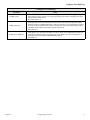
all.authhost1
This address indicates the location of the Radius/TacacsPlus authentication server and is only necessary if this option is chosen in the previous parameter. A second Radius/TacacsPlus authentication
server can be configured with the parameter all.authhost2.
An example is 200.200.200.2.
all.accthost1
This address indicates the location of the Radius/TacacsPlus accounting server, which can be used to
track how long users are connected after being authorized by the authentication server. Its use is
optional. If this parameter is not used, accounting will not be performed. If the same server is used
for authentication and accounting, both parameters must be filled with the same address. A second
Radius/TacacsPlus accounting server can be configured with the parameter all.accthost2.
An example is 200.200.200.2.
all.radtimeout
This is the timeout (in seconds) for a Radius/TacacsPlus authentication query to be answered. The
first server (authhost1) is tried "radretries" times, and then the second (authhost2), if configured, is
contacted "radretries" times. If the second also fails to respond, Radius/TacacsPlus authentication
fails.
An example is 3.
all.radretries
Defines the number of times each Radius/TacacsPlus server is tried before another is contacted.
The default, if not configured, is 5.
Chapter 2
Configuring Serial Ports
11