1
2
INTRODUCTION
Thank you for choosing the JABLOTRON 100 security system. This system
is a unique flexible indoor solution for commercial and home security that offers
the use of both wired and wireless devices.
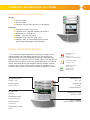
The JABLOTRON 100 is very easy to use. Everything is controlled by pressing
individual control segments on a keypad and subsequent authorization.
The control segments use a simple traffic light logic which everyone can understand. The number of segments can be flexibly adapted based on the customer’s needs. The JABLOTRON 100 offers a wide range of detectors housed in
a timeless design and can be operated from anywhere thanks to complete
remote control access. The J-Link program, the MyJABLOTRON web interface
and the MyJABLOTRON application for smart phones allow you to control,
program and monitor the system remotely.
The JABLOTRON 100 is designed for up to 300 users and it can be divided
into 15 separate sections. Up to 120 detectors can be connected and the
system offers up to 32 multi-purpose programmable outputs (e.g. home
automation).
OPERATING THE JABLOTRON 100 SYSTEM
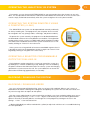
The security system can be controlled in a number of different ways. To set or unset the alarm, authorization in the form of user identification is always required. The system detects the identity of the user and
allows them to operate those parts of the system which they have been authorized to control (pre-programmed). The user ID, date, and time are recorded and stored in the system‘s memory each time the system is
accessed. This data history is available indefinitely.
Any authorized user can also cancel an alarm (turning the alarm sound off) in any part of the system
regardless of their access rights. However, that does not automatically unset the system (unless the default
setting is changed).
Users and Their Access Rights
Access Code Type
Description
Service
Allows the user to program the system and add/define users. This code is given to the installation or
security company that is responsible for correct system installation and configuration.
Administrator
Allows the user access to the entire system including adding/defining users. This code allows access to
all sections and is given to the owner or building/property manager.
User
Allows the user to operate designated system sections and programmable outputs. This code is given
to standard system users (e.g. employees).
Set
Allows the user to set designated system sections and programmable outputs. This code is given, for
example, to employees who do not have the right to unset the alarm.
PG only
Allows the user to operate only programmable outputs. This is intended for automated processes like
opening doors, for example.
Panic
This code activates a silent panic alarm.