1
1
Introduction
Copy number changes, such as deletions and amplifications, are common
aberrations in cancer and are known to involve genes that play a crucial role
in the development and progression of the malignant disease [5]. The copy
number changes span usually large regions of the genome and therefore influence multiple genes at the same time. Comparative genomic hybridization
(CGH) on DNA microarray allows simultaneous monitoring of copy numbers
of thousands of genes throughout the genome [6], [7].
CGH-Plotter is a versatile software that allows the user to plot CGH
copy number data as a function of the position of the genes along the human genome, and to rapidly determine the exact locations of copy number
changes, such as amplicons and deletions.
In this user manual we explain in details:
1. How to install CGH-Plotter,
2. How to use CGH-Plotter,
3. How to store and analyze the results,
4. What are the assumptions behind the analysis.
We also provide several examples on the use of CGH-Plotter.
2
Installation
CGH-Plotter requires Matlab 6.1 or higher in order to operate. Accordingly,
all data must be in Matlab (*.mat) format or in tab delimited text (*.txt)
format.
2.1
Installation Instructions
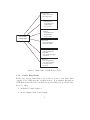
Archive ’CGH-Plotter.zip’ consists of five folders: CGH-Plotter, gui, ampli math, data structs and ampli data.
• Main folder CGH-Plotter contains the following folders and files:
– gui
2