1
ConnectX®-3 Pro VPI Single and Dual QSFP+ Port Adapter Card User Manual
6.3
Rev 1.4
Windows
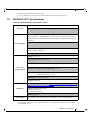
Environment
Information
From the Windows desktop choose the Start menu and run:
msinfo32
To export system information to a text file, choose the Export
option from the File menu.
Assign a file name and save.
Download and install MFT: http://www.mellanox.com/content/pages.php?pg=management_tools&menu_section=34
Refer to the User Manual for installation instructions.
Mellanox Firmware
Tool (MFT)
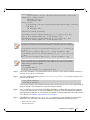
Once installed, open a CMD window and run:
cd C:\Program Files\Mellanox\WinMFT
mst start
mst status
flint –d <mst_device> q
Ports Information
vstat
Firmware Version
Upgrade
Download the latest firmware version using the PSID/board
ID:
http://www.mellanox.com/supportdownloader/
flint –d <mst_device> –i <firmware_bin_file> b
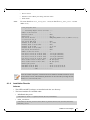
• Event log viewer
• MST device logs:
• mst start
Collect log file
• mst status
• C:\Users\Administrator> flint –d <mst_device> dc > dump_configuration.log
• C:\Users\Administrator> mstdump <mst_device> dc > mstdump.log
Mellanox Technologies
59