1
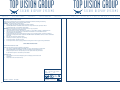
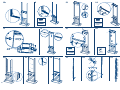
C O N T E NT S FO R 6 CO LU M N E D D ISPLA Y E S96-2-REM
USER
BOX 1
76 x 53 x 21 cm
Article:
Quantity:
Size:
Voet essence 3/6
72404
90205
90206
90211
1x
1x
2x
2x
4x
660 x 400 mm
453 x 30 mm
42 mm
42 mm
M8 x 14
transp.
orange
73410
73411
2x
2x
400 x 130 400 x 130
73901
6x
1x
73911
420 x 100 mm
2x
2x
1025 x 28 mm
4x
4x
2x
1x
M5 x 8
798 x 60
2,5 mm
Size:
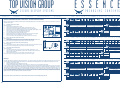
To open or lock the columns, aim the remote control at the
receiver eye and press the button. The led lights on the columns
will then light up and the columns will produce a short sound
signal.
TXT strips
6x
6 x 16
1436 mm
180 x 38
58 x 120 x 1,5cm
E Blok 420 6K
E Blok 420 6K rem
1x
1x
420 x 100 mm
420 x 100 mm
BOX73902
1
2x
70040
70041
REMOTE
70088
70089
6x
6x
1x
1x
1x
4 x 16
4 x 20
1500 mm
1500 mm
72451
Article:
INSTRUCTION
1x
Quantity:
Quantity:
Size:
transp.
orange
Voet essence 5/10
72405
90205
90206
90211
73410
73411
E Blok 800
73901
73911
95627
95021
95088
95610
1x
1x
2x
2x
4x
2x
2x
6x
1x
4x
1x
4x
4x
2x
1x
1040 x 400 mm
833 x 30 mm
42 mm
42 mm
M8 x 14
M5 X 50
140 x 3,6
4,8 x 16
M5 x 8
798 x 60
2,5 mm
400 x 130 400 x 130
800 x 100 mm
BOX 2
BOX 4
187 x 9,5 x 9,5 cm
154,5 x 19 x 10 cm
Article:
72021
Quantity:
Size:
Article:
72052
Quantity:
2x
2x
1830 x 60 mm
1025 x 28 mm
BOX 3
Quantity:
Size:
FREESTANDING
DISPLAYS
Size:
K-TXT 16 rem (SI)
RECEIVER EYE
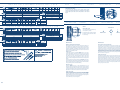
Remove safety screws
The adjustig buttons are protected by a
screw, preventing misuse.
94060
If adjustements are required, first loosen
the screw covering the buttons next to
the receiver eye.
+
MODE BUTTON
-
TIMER BUTTON
TXT strips
10x
10 x 16
1436 mm
180 x 38
BOX 5
83,5 x 39 x 17,5 cm
Article:
ESSENCE
SAFETY
BOX 1
76 x 53 x 21 cm
MANUAL;
420 x 1050 mm
Size:
C O N T E NT S FO R 1 0 CO LU M N E D D ISPLA Y E S160-2- REM
Article:
DISPLAYS
BOX 5
BOX 3
Quantity:
K-TXT 16 rem (SI)
Size:
45,5 x 39 x 17,5 cm
Article:
FREESTANDING
94060
4,8 x 16
Quantity:
1830 x 60 mm
95610
1x
Article:
72052
95088
140 x 3,6
BOX 4
Size:
95021
4x
154,5 x 19 x 10 cm
Quantity:
95627
M5 X 50
BOX 2
72021
ESSENCE
Opening and locking:
E Blok 420
187 x 9,5 x 9,5 cm
Article:
MANUAL;
96 x 120 x 1,5cm
E Blok 800 10K
E Blok 800 10K rem
1x
1x
800 x 100 mm
800 x 100 mm
BOX73904
1
2x
70040
70041
REMOTE
70088
70089
10x
10x
1x
1x
1x
4 x 16
4 x 20
1500 mm
1500 mm
Article:
Quantity:
Size:
72452
1x
800 x 1050 mm
MODE BUTTON
TIMER BUTTON
Adding or removing remote controls codes:
Each production order is given a unique remote control code to prevent misuse of the security system by third parties. Upon delivery,
the code is pre-programmed in the remote control and the receiving
electronics. If desired, it is possible to add extra codes later. It is also
possible to erase programmed codes, for example in case of loss or
theft of one of the remote controls.
Timer function, locking automatically:
Upon delivery, the timer function is on and set at an interval of 120 seconds (2
minutes). When the frame security is unlocked the timer automatically locks
it again after the interval. The timer interval can be changed using the + and
- buttons on the receiver unit (in stages of 30 seconds). The maximum interval
is 300 seconds (5 minutes). The minimum (0 seconds) switches the timer off.
When pressing the + or - buttons a high (+) or low (-) sound signal is produced. When the the maximum or minimum is reached, a double sound signal
is produced. The maximum and minimum can be quickly reached by pressing
the + or - button for a longer time.
Adding a code:
To add codes, press the embedded “mode” button on the receiver for three seconds. This will be confirmed by a long sound signal
and the green led will light up. Then, aim the new remote controls at
the receiver eye, one at a time and press the button on the remote
control. The remote control is accepted if you hear a short sound
signal. A double sound signal will be heard if it was an existing remote
control.
Leave the programming mode by pressing the “mode” button again.
This is confirmed by three short sound signals and the led turning off.
When no programming action is executed for more than 60 seconds,
the programming mode is closed automatically.
Comfort timer function:
Just before the automatic closure, the green led on the receiver will blink and
a tripple sound signal will be heard. If desired to continue your sales pitch and
keep the column(s) opened, one push of the button on the remote control will
extend the timer interval by 5 minutes. A second push of the button on the
remote control during this 5-minute extension will lock the columns again. The
sales progress will not be interferred but security of the frames remains guaranteed. During the timer interval it will always be possible to lock the frame
security using the remote control.
Removing a code:
Press the “mode” and the “-” button simultaneously for a few
seconds, to erase all programmed remote controls. This is confirmed
by three sound signals. The led will stay on during erasure, followed
by a long sound signal to confirm that all remote controls codes have
been erased. You can add new codes with the procedure above.
Switch sound on/off:
To turn the sound singals on or off, press the embedded “mode”
button on the receiver for three seconds. This will be confirmed by a
long sound signal and the green led will light up. Then, press the button to switch the sound off. This is confirmed by three light signals.
Press the + button to switch the sound back on.
This is confirmed by three sound signals.
.3
.8