1
4. Operation
4-1 : Battery Type Selection
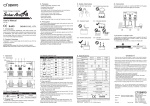
Follow the white arrow when you push the MODE SW (White Button).
Follow the black arrow when you push the SELECT SW (Red Button).
Battery
Type Selection
Sealed
STATUS LED
MODE LED
Flooded
LVD Voltage
Compensation
Normal
Operation
STATUS LED
MODE LED
AGM
Night Light
Type Selection
STATUS LED
MODE LED
Timer
Detail Settings
Normal
Operation
Gel
STATUS LED
*1
MODE LED
(1) To start setting, push the MODE SW during normal operation, and MODE
LED will blink.
(2) Push the SELECT SW, and the number of MODE LED blinks will change.
(3) Check the MODE LED 1 blink, then push the MODE SW.
(4) Check the number of MODE LED and STATUS LED blinks.
(5) Push the SELECT SW, and the number of STATUS LED blinks will
change.
(6) The STATUS LED blinks indicate the battery type as below. Push the
SELECT SW to desired type.
・STATUS LED 1 blinks : Sealed
・STATUS LED 2 blinks : Flooded
・STATUS LED 3 blinks : AGM
・STATUS LED 4 blinks : Gel
(7) Check the number of STATUS LED blinks, then push the MODE SW to
finish the setting.
(8) All of the LEDs blink twice, and return to normal operation.
*1
Timer Detail Settings can not be selected at this stage. To access, please see 4-3 Night
Light Type Selection before.
6