1
User configuration
You can program four phone numbers into the device. The first three numbers are user numbers,
and the fourth is the installer’s number. Installer doesn’t receive any SMS-messages (excluding replies
on some commands) and has full rights to control and program the module. Installer’s rights are
hardcoded and cannot be changed.
In order for module to function correctly numbers of the first user and installer must be programmed.
Other two numbers can be added if needed. First users and installer’s numbers can be the same.
Device inputs and outputs.
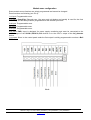
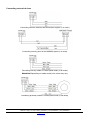
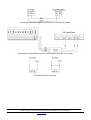
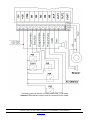
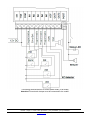
Device inputs can be loaded to «0» or to «+». Choice is made using the jumper. If jumper is
removed, inputs are loaded to «+» (reacts to «0»/«break» signals), if set – loaded to «0» (reacts to
«+»/«break» signals). Maximum voltage on the input - +30V.
By default all general purpose inputs (IN1-5) are programmed as NO and power supply control input
(I6) as NC.
Attention! When jumper is set all the inputs change their status to opposite.
If you need to change input type, you have to connect all external devices, make sure they are in the
normal state and send the following command to the module: 00.хххх where хххх – module security
code. After receiving this command, module will set all input state as normal.
Device outputs can work either as manually activated outputs or PGM outputs.
Manually activated output is activated and deactivated using SMS-message. You can also activate it
on time.
PGM-output can react to the following troubles: GSM-signal lost, cannot connect to server or cannot
establish GPRS connection.
Outputs are configured using USB_Reader software. By default – manually activated.
First start and general programming.
Make sure that no phone numbers are saved in the SIM memory and the SIM card is activated. If
PIN request is activated, make sure it is set as „0000”. After that you can insert the SIM into module.
After that you can start module programming. Module is programmed using USB_Reader
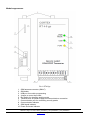
software. To turn on programming mode, just connect the USB cable and power the module. When
POWER/MODE indicator will turn red you can start programming.
First you must program installer’s and the first user’s numbers, module account and, if you are
going to use module in GPRS mode, server IP-address, TCP-port, APN and module Online ID. In order
for the module to work correctly with TLF_Server and WinSC software, OnlineID must be set the same
as the module telephone number (without international code).
In case if it is not possible to use USB_Reader software, you can program the module using
SMS messages.
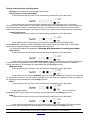
To do so, power the module and, after successful initialization (green ST indicator is on), send to
the module the following message: 94.хх...хх where хх...хх – installer’s phone number (if the phone is
registered with the international code, you must use + before it).
After that, installer will receive “Reply SECURITY CODE” message. Installer must reply to that
message with the module security code (default – 1234). It must be done within 10 minutes after
receiving the message. Otherwise phone number will be deleted from the device memory and you will
have to start all over. If the number is successfully programmed, installer will receive „OK” message.
Note! If the installer’s phone is not programmed, module will ignore all SMS-messages except
for 94.хх...хх.
After programming installer’s number, you have to program first user’s (Central Unit) number. To
do so, send from installer’s phone the following message 91.хх...хх where хх...хх – first user’s phone
number (if the phone is registered with the international code, you must use + before it).
Then you have to change device account. To do so, send from installer’s phone the following
message 95.xxxxyyyy where xxxx – module security code (default – 1234) and yyyy – new account.
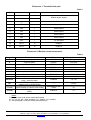
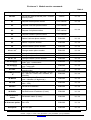
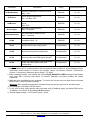
After that you can program the module to connect to the TLF_Server software. Full command list
is set in the “Working in GPRS mode” paragraph.
5
©Korteks
Liksnas 7, Riga, LV-1003, Latvia, phone/fax: (+371)-67505604, (+371)-67505603
E-mail: [email protected], http://www.cortex.lv