1
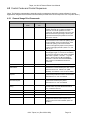
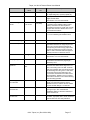
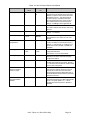
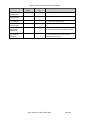
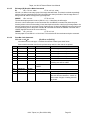
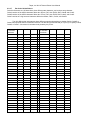
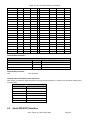
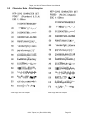
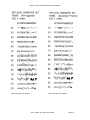
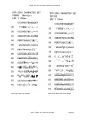
Telpar, Inc. Mini 8 Thermal Printer User Manual Name Command ASCII Command hex Description Reverse Video OFF ESC US 1B 1F Printing is set to default mode of black print on white background. (Same as GS B 00). Set Print mode ESC ! +n 1B 21 +n Set Print mode = font A or B, Double high, Double wide. See Section 4.2.2.2 for more details. Select Bit Image mode ESC +m +n1 +n2 +d1dn 1B 2A +m +n1 +n2 (data) Select Bit Image mode. +m = ?. n2*256 + n1 = Number of DOT LINES of data to follow. (data) = the amount of data required to complete the sequence. Telpar does not fully support this command. Please refer to US * command which follows. Underline ESC - +n 1B 2D +n Bit 0 of n = 0 turns underlining OFF. Bit 0 of n = 1 turns underlining ON. Default is OFF. Set 1/6” line spacing ESC 2 1B 32 Set 1/6 inch line spacing. Set Line feed pitch ESC 3 +n 1B 33 +n Set line spacing to n dot lines. If the n specified is less than the height to print text using the currently selected character set then printing will cause enough paper feeds to print the entire line but a print command with no data in the buffer will cause paper to feed by this amount. Default is 1/8 inch Printer reset ESC @ 1B 40 Initialize the printer. See Section 4.2.2.3 for more details. Set page length ESC C +n 1B 43 +n Set page length to n character lines using the current font. Overwrites the page length defined by US C. Set Horizontal Tab positions ESC D +d1dn NUL 1B 44 (data) 00 Set from 1 to 32 tab positions in the current character size. Data values range from 1 to 255 in ascending order. The NUL character (00 hex) terminates this command if less than 32 tab settings are being set. If a data value is less than the previous data value, this command is terminated. ESC D NUL clears all tab positions. Default is every 8 columns. Print after a tab starts in the column following the tab setting specified. Forward paper feed for n dot lines ESC J +n 1B 4A +n Feed paper n dot lines. If there is data in the buffer, it is printed and paper is fed the difference of the +n and the amount needed to print the data. Range = 0 to 255 dec. Select International character set ESC R +n 1B 52 +n Select international character set. Range = 0 through 15 dec. See International Character Sets for characters affected for each character set. Select justification for bar code ESC a +n 1B 61 +n n=00hex, left justify. n=01hex, center justify. n=02hex, right justify. GS L, GS W, and ESC \ will also affect the bar code justification. 2011 Telpar, Inc. (Rev.201211029) Page 17