1
Quartus II keeps track of projects by the name of the top level design entity. This should
generally be the same as the project name and it will need to be the name of the first Verilog
module. In this case it is Example1.
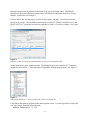
Click on Next. We can skip page 2 so click on Next again. On page 3 we need to select the
device we are using. The DeoNano board uses the Cyclone IV E family and the device is the
EP4CE22F17C6. Verify that you have the right device with a 1.2 volt core voltage. See Figure
2.
Figure 2
Select the Cyclone IV E family and the EP4CE22F17C6 device for the DeoNano board.
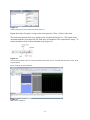
At this point we are done with the wizard. Click Finish to get back to Quartus II. To add our
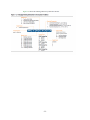
design file click on File → New and select Verilog HDL from the pop-up menu. See Figure 3.
Figure 3
In Quartus II click on File → New to get this menu. Select Verilog HDL file.
Click OK on the menu to get back to the main Quartus screen. You can type on the Verilog file
you just created. Enter the following code.
module Example1(f, a, b);
-2-