1
3.
GETTING TO KNOW YOUR PHONE
3.1
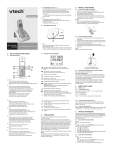
Overview of your handset
1. Earpiece
2. Menu/Select
In idle mode: press to access main menu.
In menu/editing mode: press to confirm and save
the settings.
During a call: press to access the sub-menu list.
In phonebook/call list entry: press to edit the entry.
3. Scroll up/ Volume up/ Phonebook
In idle mode: press to access the phonebook.
In menu mode: press to scroll up.
In editing mode: press to move the cursor to the right.
During a call: press to increase volume.
Call list/phonebook/redial list entry: press to scroll
up the list.
4. Talk off/ Clear/ Back
In idle mode: press and hold to power on/off the
handset.
In menu mode: press to exit to previous level.
In pre-dial mode: press to backspace.
In phonebook/call list/redial list entry: press to exit
to idle.
During an incoming call: press to silence the ringer
temporarily.
During a call: press to end a call.
5. Scroll down/ Volume down/ Call List
In idle/pre-dial mode: press to access the call list.
In menu mode: press to scroll down.
In editing mode: press to move the cursor to the left.
During a call: press to decrease volume.
Call list/phonebook/redial list entry: press to scroll
down the list.
6. Alphanumeric keypad
In idle/pre-dial/editing mode/during a call: press to
enter characters/ numbers.
#
In idle/pre-dial/during a call mode: press to insert
a "#".
In phonebook entry name editing mode: press and
hold to toggle between uppercase and lower case.
In phonebook entry view mode: press to view the
next digits when the number is longer than a line to
display.
5
*
In idle/pre-dial/during a call mode: press to insert a "*".
In phonebook entry view mode: press to view the
previous digits when the number is longer than a
line to display.
During a call: press to turn to tone temporarily when
in pulse dialing mode.
7. Intercom
Press to make an intercom conversation between
handsets or transfer a call.
8. Microphone
9. Mute/Remove
During a call: press to mute/unmute the
microphone.
Call list/phonebook/redial list entry: press to delete
the selected entry.
In editing/pre-dial mode: press to backspace.
During message playback: press to delete the
message currently playing.
10.Redial/Pause
In idle mode: press to view the redial list.
In editing/pre-dial mode: press and hold to insert a
dialing pause.
11.Talk on/ Flash
In idle/menu/pre-dial mode: press to make a call.
In phonebook number editing mode: press to insert
a flash.
Call list/phonebook/redial list entry: press to make a
call to the selected entry.
During an incoming call: press to answer the call.
During a call: press to make a flash.
12.Speaker
In idle/menu/pre-dial mode/during a call: press to
turn on/off the speakerphone.
Call List/phonebook/redial list entry: press to make
a call with speakerphone.
13.CHARGING LED
Steadily On: when the handset is put into base
cradle for charging.