1
EDT User Manual
Send OBEC File Screen (OBECUP)
The System Message Line will display status information.
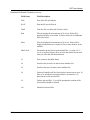
Send OBEC File Screen Functions
Use this function to send or transfer your OBEC file to the ministry. At the Ministry of
Health Menu, key ‘2’ and press <enter> to arrive at the Send OBEC File screen.
Field Name
Field Description
The first three fields are automatically populated and cannot be changed:
From:
To:
Subject:
automatically populated with your GONet EDT user ID
automatically populated to deliver file to MOH for OBEC
processing
automatically populated with “OBEC Submission File”
The last three fields are mandatory but can be changed as required:
File Format:
File Name:
Protocol:
EDT Service and Screen Layouts
blank or populated with the last value received T or B
key ‘T’ for a text (ASCII) file or ‘B’ for a binary file
blank - key in the name of file to be uploaded
blank or populated with the last value received X, Y, Z or K
4.13