1
Programming
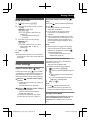
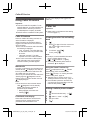
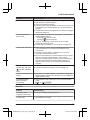
Alarm
An alarm sounds at the set time for 1 minute
and is repeated 5 times at 5 minute intervals
(snooze function). A text memo can also be
displayed for the alarm. A total of 5 separate
alarm times can be programmed. You can set
one of 3 different alarm options (once, daily, or
weekly) for each alarm time.
Important:
R Make sure the unit’s date and time setting
is correct (page 11).
1
2
3
M
N (right soft key) #720
Select an alarm by pressing 1 to 5. a
MOKN
MbN: Select the desired alarm option. a
MOKN
“Off”
Turns alarm off. Go to step 9.
“Once”
An alarm sounds once at the set time.
“Daily”
An alarm sounds daily at the set time.
Go to step 5.
“Weekly”
Alarm sounds weekly at the set time(s).
4
Proceed with the operation according to
your selection in step 3.
n Once:
Enter the desired date and month. a
MOKN
n Weekly:
MbN: Select the desired day of the week
and press M N. a MOKN
5
6
7
Set the desired time. a MOKN
Enter a text memo (30 characters max.).
a MOKN
MbN: Select the desired alarm tone. a
MOKN
R We recommend selecting a different
ringer tone from the one used for
outside calls.
8
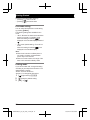
MbN: Select the desired snooze setting.
a MOKN
9
MOKN a M
N
Note:
R Press M N to stop the alarm completely.
R When the handset is in use, the alarm will
not sound until the handset is in standby
mode.
R Press any dial key, M
N, or M
N to stop
the sound but keep the snooze function
activated.
R If you want to make an outside call when
the snooze function is activated, please
stop the snooze function before making the
call.
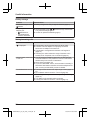
Do not disturb mode
Do not disturb mode allows you to select a
period of time during which the handset will
not ring for outside calls. This feature is useful
for time periods when you do not want to be
disturbed, for example, while sleeping. Using
the phonebook’s category feature (page 16),
you can also select categories of callers
whose calls override do not disturb mode and
ring the handset (Caller ID subscribers only).
Important:
R Make sure the unit’s date and time setting
is correct (page 11).
R If you have set the alarm, the alarm sounds
even if do not disturb mode is turned on.
Turning do not disturb mode on/off
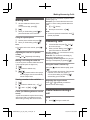
1
2
M
N (right soft key) #238
MbN: Select the desired setting. a MOKN
R If you select “Off”, press M
N to exit.
3
Enter the desired hour and minute you
wish to start this feature. a MOKN
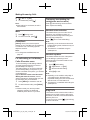
4
Enter the desired hour and minute you
wish to end this feature. a MOKN a
M
N
25
TGH210HK(en)_for_zh_2503_ver001.pdf 25
3/25/2014 6:43:21 PM