1
Envision Tomorrow+ Green Infrastructure App
Prototype Builder
Appendix B: Prototype Builder Local Customization
Changing the Local Stormwater Model
If local water quality required volumes are based on impervious cover and runoff coefficients, the Green
Infrastructure app can be customized to reflect local standards for water quality capture. Initially calibrated for
Austin, Texas, the app references two sets of requirements that can also be adapted to reflect other two-tiered
standards. Because of the sensitive karst aquifer in the area, the Edwards Aquifer, the city has more stringent
requirements for areas in the Barton Springs Zone, which are hydrologically connected to the aquifer.
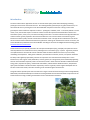
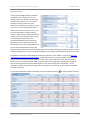
1.
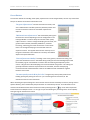
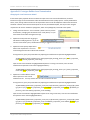
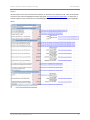
Change the local reference. Go to cell A199. (These rows may need to
be unhidden.) Changing the cell contents from “Local (Austin)” to your
local reference will reflect throughout the app.
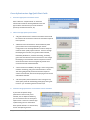
2.
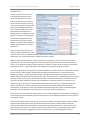
Update the local special zone by going to
cell A30 and modifying the text. (If you do
not have a two-tiered system, conditional formatting is suggested to hide these cells.)
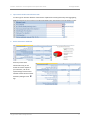
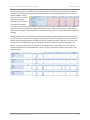
3.
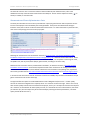
Update the water quality depth cells to
reflect local requirements. Go to cell
C3 and change the formula to reflect local standards.
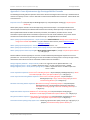
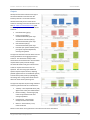
If using two tiers, input your special district by adjusting the coefficients and operators highlighted below:
=IF(B29=A200,GI_Runoff_Coefficient*GI_rainfall_depth,IF(GI_Recharge_Zone="yes",(1.8*GI_Impervious_
Cover+0.6),(0.5+GI_Impervious_Cover-0.2)))
Input the rest of the standards as highlighted below (Note: If not using a second tier, enter the same
coefficients and operators in the section highlighted above.):
=IF(B29=A200,GI_Runoff_Coefficient*GI_rainfall_depth,IF(GI_Recharge_Zone="yes",(1.8*GI_Impervious_
Cover+0.6),(0.5+GI_Impervious_Cover-0.2)))
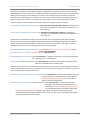
4.
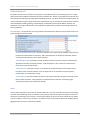
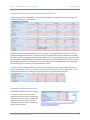
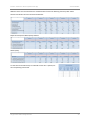
Update the runoff coefficient cells to
reflect impervious cover-runoff
coefficient curves. You may need to do a curve fit to create the formula.
If using two tiers, input your special district by adjusting the coefficients and operators highlighted below:
=IF(B29=A200,IF((0.05+0.9*GI_Impervious_Cover)<0.2,0.2,(0.05+0.9*GI_Impervious_Cover)),IF((GI_Recha
rge_Zone="yes"),(0.6072*GI_Impervious_Cover^2+0.2899*GI_Impervious_Cover+0.0075),(0.5463*GI_Im
pervious_Cover^2+0.328*GI_Impervious_Cover+0.0296)))
Input the rest of standards as highlighted below (Note: If not using a second tier, enter the same coefficients
and operators in the section highlighted above.):
=IF(B29=A200,IF((0.05+0.9*GI_Impervious_Cover)<0.2,0.2,(0.05+0.9*GI_Impervious_Cover)),IF((GI_Recha
rge_Zone="yes"),(0.6072*GI_Impervious_Cover^2+0.2899*GI_Impervious_Cover+0.0075),(0.5463*GI_Im
pervious_Cover^2+0.328*GI_Impervious_Cover+0.0296)))
City of Austin Urban Design Division
17