1
Use the radio buttons to select a frame rate, and click
to begin recording. The file will be saved in AVI format at the location defined in the Save as field.
Click
to end recording.
Zoom
Click zoom to open the zoom function. Use the mouse to drag a square that will be
zoom on the screen.
Motion detection
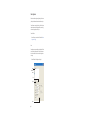
You can also use right click control to set two predefined motion detection areas,
and set motion detection levels for each area. Right click on the image to display
the drop down menu and select on the Motion detection option with the mouse. Motion detection must be enabled ont the alerts page for motion detection to operate.
See page 15.
Click 1 to set motion detection area 1. Use the mouse to draw a square on the
screen. Click and hold the left mouse button and drag the square across the area to
be monitored. Repeat the procedure to set area 2.
Click Motion Detect Set to set a sensitivity level for each area, 15 is most sensitive,
1 is least sensitive.
Enable motion detection on the alerts page, see “Alerts” on page 15 for details.
Page 18