1
◆ No account:Sale accounts over 300 or Disabled Authentication
◆ Reserved:Reserved
◆ No WAN:Internet Access failure
◆ Printer Problem:No paper、Printer malfunction、Lack of paper
◆ Coin box full:Coin box full
◆ Coin box steal:Coin box pulled over 25 seconds
◆ Coin machine error:Coin mechanism malfunctions
◆ Keypad error:Stuffed keypad
◆ RS232 error: communication failure between Control Board and Gateway
1.6. System
1.6.1. Specifying Operational Mode
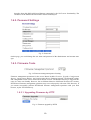
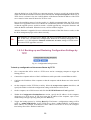
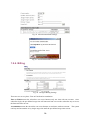
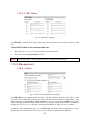
Fig. 32. Operational modes.
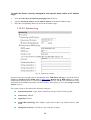
On this page, you can specify the operational mode for the Router. Currently, 5 modes are available:
Router with a PPPoE-based DSL/Cable Connection. In this mode, the Router assumes
that a DSL or cable modem is connected to its Ethernet WAN interface. The client computers
can therefore share this DSL/cable-based Internet connection by the NAT server functionality.
The IP address of the Ethernet WAN interface is obtained automatically by PPPoE from the ISP.
Router with a DHCP-based DSL/Cable Connection. In this mode, the Router assumes
that a DSL or cable modem is connected to its Ethernet WAN interface. The client computers
can therefore share this DSL/cable-based Internet connection by the NAT server functionality.
The IP address of the Ethernet WAN interface is obtained automatically by DHCP from the ISP.
Router with a Static-IP DSL/Cable Connection. In this mode, the Router assumes that a
DSL or cable modem is connected to its Ethernet WAN interface. The client computers can
18