1
1. Installation and Configuration
1.1. Power Supply
1.
The TYA-192 is powered by DC 5V / 8A and DC 12V / 6A power supply.
2.
After power is supplied, check the “POWER” LED on (Green light).
1.2. Preparing for Configuration
To configure a TYA-192, a managing computer with a Web browser is needed. For first-time configuration of a TYA-192, an Ethernet network interface card (NIC) should have been installed in the
managing computer. For maintenance-configuration of a deployed TYA-192, either a wireless computer or a wired computer can be employed as the managing computer.
NOTE:
If “Opera” browser is used to configure an TYA-192, click the menu item File, click
Preferences... click File types, and edit the MIME type, text/html, to add a file extension “.sht” so that Opera can work properly with the Web management pages of the
TYA-192.
Since the configuration/management protocol is HTTP-based, you have to make sure that the IP address of the managing computer and the IP address of the managed TYA-192 are in the same IP subnet
(the default IP address of an TYA-192 is 192.168.0.1 and the default subnet mask is 255.255.255.0.)
1.2.1. Connecting the Managing Computer and the TYA-192
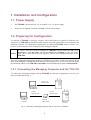
To connect the managing computer and the TYA-192 for first-time configuration, you have two
choices as illustrated in Fig. 1.
Crosss-over
Ethernet cable
Normal
Ethernet cable
Managing
Computer
Normal
Ethernet cable
Ethernet
Hub / Switch
Managed
TYA-192
Fig. 1. Connecting a managing computer and an TYA-192 via Ethernet.
1