1
1.5 Downloading Python Scripts to Terminus
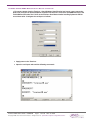
Connect the Terminus serial port (DB9 connector) to the development computer serial port. The
serial port of the development computer should be the serial port configured as the MDM interface in
the Telit COM Port Selection Tool. Refer to the Terminus User Manual under Installing Pythonwin IDE
for more information.
Æ
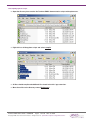
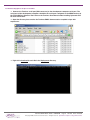
Æ Open the directory that contains the Terminus EMAIL demonstration compiled scripts with explorer.exe.
Æ Right click download for each file in the Deployment directory.
Terminus EMAIL Demo Guide - GSM864Q
Page Rev: 00
Date: 12/16/08
© Copyright 2008 Janus Remote Communications All Rights Reserved Specifications subject to change without notice