1
Terminus T2
Products User Manual
Bulletin
Revision
Date
JA15-UM
A01
08 July 2014
TABLE OF CONTENTS
TABLE OF CONTENTS and DISCLAIMER.............................................................................................................................. 2
T2 General Description........................................................................................................................................................... 3
Block Diagram......................................................................................................................................................................... 3
T2 Overview............................................................................................................................................................................. 3
Connections
Power Supply
T2 Peripherals......................................................................................................................................................................... 4
RS232
USBOTG
Reset
LED Indicators
Antenna Connections
30P Header Access
SD Card
SIM Card
Getting Started with the Cellular Modem........................................................................................................................... 5-7
Starting a Terminal Session
Modem Registration
Sending an SMS
Making a GPRS data call (Socket dial)
GPS ........................................................................................................................................................................... 7-8
Getting started with T2 Terminus Applications................................................................................................................ 9-20
Setting up the Toolchain
Features
Virtual COM Port Demo
Setting up the file tree
Compiling and uploading the project
Uploading hte compiled demo
Running the demo
Erasing the demo
Ordering Information............................................................................................................................................................. 21
Revision History.................................................................................................................................................................... 21
DISCLAIMER
The information contained in this document is the proprietary information of Connor-Winfield Corporation and its affiliates (Janus Remote Communication). The contents are confidential and any disclosure to
persons other than the officers, employees, agents or subcontractors of the owner or licensee of this document, without the prior written consent of Connor-Winfield, is strictly prohibited. Connor-Winfield
makes every effort to ensure the quality of the information it makes available. Notwithstanding the foregoing, Connor-Winfield does not make any warranty as to the information contained herein, and does
not accept any liability for any injury, loss or damage of any kind incurred by use of or reliance upon the information. Connor-Winfield disclaims any and all responsibility for the application of the devices
characterized in this document, and notes that the application of the device must comply with the safety standards of the applicable country, and where applicable, with the relevant wiring rules. ConnorWinfield reserves the right to make modifications, additions and deletions to this document due to typographical errors, inaccurate information, or improvements to programs and/or equipment at any time and
without notice. Such changes will, nevertheless be incorporated into new editions of this application note.
All rights reserved 2011 Connor-Winfield Corporation
Terminus T2 User Guide JA15-UM
Page 2
Rev: A01
Date: 07/08/14
© Copyright 2014 Janus Remote Communications Specifications subject to change without notice
All Rights Reserved See website for latest revision.
Not intended for life support applications.
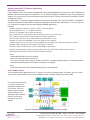
T2 Terminus General Description
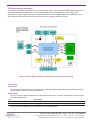
The Terminus T2 provides a complete wireless communication device with an integrated ARM Cortex M3 processor,
expanded peripheral set, and cellular communications protocols to fit any application. The ARM Cortex M3
processor has a large support community available to reference while developing applications. Additionally, Janus
offers hardware and software assistance to aid users in quickly getting a product to market.
Figure 1: T2 Block diagram, denotes external connections and internal routing
T2 Overview:
Connections
This section briefly describes the T2 interfaces, for a more detailed description, electrical specifications, and full
pinouts please see the T2 Hardware User Manual.
Power Supply
The 2.1mm center conductor power jack accepts input voltages from 7 to 28VDC, and requires a nominal current
sourcing capacity of 5W.
Pin Description
Center Pin
Outer Conductor
Supply (+)
Supply (-)
Power can also be applied to the unit through the 30 Pin locking header.
Terminus T2 User Guide JA15-UM
Page 3
Rev: A01
Date: 07/08/14
© Copyright 2014 Janus Remote Communications Specifications subject to change without notice
All Rights Reserved See website for latest revision.
Not intended for life support applications.
T2 Peripherals:
RS232
The DB9 port follows the standard for RS-232 communications and gives the connections for serial interaction
with hardware handshaking. It is, however, pinned as the DCE (host) as the application running ability make the T2
an autonomous unit that can control external components.
USB OTG
The Mini AB USB connector allows for a more simplified connection to the T2. It’s directly connected to the full
speed device/host/OTG port of the Cortex M3 processor. The USB OTG FS peripheral is compliant with USB 2.0
and has software configurable endpoint settings.
Reset
The reset button is connected to the reset pin of the Cortex M3 processor.
LED Indicators
GPIO controlled LED stack. These can be application controlled but do have a default behavior.
LED Color
Default function
Red
Yellow
Green
N/A
Cellular status
N/A
The cellular status behavior is expounded in the Plug in Modem user manual.
Antenna Connections
These are bulkhead antenna connections for wireless communication to cellular and GPS technology.
SMA
Cellular antenna connection
Pin
Description
Center Pin
Shield
Signal
Ground
MCX
GPS antenna connection
Pin
Description
Center Pin
Shield
Signal
Ground
For details on these connections, see the Plug in Modem user manual.
30P Header Access
The T2’s header gives access to many signals not available through standardized connectors. It uses a Samtec
polar and locking connector that allows the user to create their own harness to suit the application.
SD Card
Standard MicroSD card slot
SIM Card
The SIM card port is located on the underside of the T2. Remove the cover to access the locking slot.
G20 User Manual.
Terminus T2 User Guide JA15-UM
Page 4
Rev: A01
Date: 07/08/14
© Copyright 2014 Janus Remote Communications Specifications subject to change without notice
All Rights Reserved See website for latest revision.
Not intended for life support applications.
Getting started with the cellular modem
This will take you through the basic steps required to power the Terminus T2 and communicate with the cellular
Plug in Modem.
Please confirm that you have these items before continuing. If you are evaluating the GSM or HSPA based T2
ensure that you have an active SIM card. If evaluating the CDMA or EVDO based T2 you will not have a SIM card,
but will need an account attached to your device’s MEID which can be found on the bottom of the T2. You can
evaluate the basic functions without these steps, but in order to fully evaluate cellular connectivity it is required.
• Power Supply with 2.1mm barrel connector termination
• RS232 cable with a null modem adapter
• Cellular Antenna
Starting a Terminal Session
Step 1
• Attach the cellular antenna to the SMA bulkhead connector.
• If applicable, insert the SIM card to the underside locking connector
• Connect the RS232 cable with null modem adapter to the DB9 port
Step 2
Open HyperTerminal or an equivalent terminal emulator and start a new session. Use the following settings as
they are the default for T2 communications.
Bits per second: 115200
Data Bits: 8
Parity: None
Stop Bits: 1
Flow control: Hardware
Step 3
Apply power to the T2 via the barrel connector. You will see the Green LED light, and the Red LED begin to blink.
After roughly 2 seconds you should see the Yellow LED begin to blink, which is the cellular status indication from
the cellular modem.
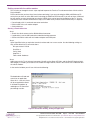
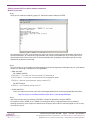
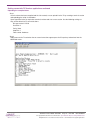
In the terminal window you will see similar to the following.
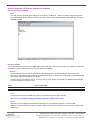
The bootloader will load and
search for an application.
Since this is a new unit, there
will be no application found.
It will boot the modem up
and begin an AT Command
passthrough session.
Figure 2: Bootloader loading, finding no application
Terminus T2 User Guide JA15-UM
Page 5
Rev: A01
Date: 07/08/14
© Copyright 2014 Janus Remote Communications Specifications subject to change without notice
All Rights Reserved See website for latest revision.
Not intended for life support applications.
Getting started with the cellular modem continued
Modem Registration
Step 1
Verify you can send commands by typing “AT” without the quotes and press ENTER.
You should receive an “OK” in the terminal, this means you can now communicate to the modem and continue
to cellular operations. All commands will be entered in this fashion and respond with an OK unless they have a
specialized function. Please refer to the AT Command Guides that accompany each modem type for a further
explanation on particular commands.
Step 2
The next thing is to set the modem for proper operation and wait for registration. Although many are set by default
to work in a wide range, setting these is still a good idea.
• GSM and HSPA
For T-Mobile & MVNO
AT#SELINT=2 – This makes use of the most recent AT command set
AT#AUTOBND=2 – This lets the unit automatically find an appropriate bands
AT#ENS=0 – Removes some automatic settings used for AT&T
For AT&T/Cingular
AT#ENS=1 – Uses automatic settings for AT&T
• CDMA and EVDO
These units require some extra steps that are thoroughly detailed in our Provisioning App Note found here:
http://www.janus-rc.com/Documentation/JA01-AN111_Provisioning-CDMA.pdf
Step 3
Check the network status by entering “AT+CREG?” without the quotations and press ENTER.
The response will be +CREG: 0,1 or +CREG: 0,5 meaning the device is registered to the home network or
roaming, respectively. If the response is different than this please refer to the AT Command guide as well as verify
the account is active.
Terminus T2 User Guide JA15-UM
Page 6
Rev: A01
Date: 07/08/14
© Copyright 2014 Janus Remote Communications Specifications subject to change without notice
All Rights Reserved See website for latest revision.
Not intended for life support applications.
Getting started with the cellular modem continued
Modem Registration continued
Step 4
Check the signal quality by entering “AT+CSQ” without the quotations and press ENTER.
The response will be +CSQ: <rssi>,<ber>
<rssi> 99
0-31
Signal Strength
Not known or detectable
dBm = (rssi*2) – 113
Example: A result of 31 indicates -51dBm or greater.
An rssi value of >=10 in typical applications if fine and you will usually see about 12-20 in normal to good signal,
but note that worst case it can be lower but still register and perform normal functions.
Sending an SMS
SMS (Select Message Service) mode allows you to send a text message (max 160 characters) to an SMS capable
subscriber unit.
Set the SMS mode to text. This must be entered every power cycle.
AT+CMGF=1<cr>
To enter the receiving subscriber unit phone number and message enter:
AT+CMGS=”8885551234”
Wait for response”>” then enter message text
Enter “ctrl z” <cr> to end the message
Making a GPRS data call (socket dial)
GPRS is a data service that uses Packet Data Protocol (PDP).
Set up the PDP context parameters
Enter AT+CGDCONT=1, “IP”, “APN”, “0.0.0.0”,0,0<cr>
Where APN is specific to the service provider being used.
Activate the PDP context
Enter AT#SGACT=1,1,”v”, “p”
Where v is your user ID and p is your password.
If there are none required for your account you can leave them blank.
Open the socket connection
Enter AT#SD=1,0,IPP,IPA,0,0,0
Look for response “CONNECT”. This opens a remote connection via socket
IPP = the remote host port of the server you are trying to connect to. (0 to 65535)
IPA = the IP address of the server hyou are trying to connect to in the format:
“xxx.xxx.xxx.xxx”
At this point a data session is active and data can be sent from the Terminus to the remote device and visa versa.
To exit the data session and return to command mode, send the characters”+++” and wait for the OK response
Enter AT#SH=1 to close the socket
Terminus T2 User Guide JA15-UM
Page 7
Rev: A01
Date: 07/08/14
© Copyright 2014 Janus Remote Communications Specifications subject to change without notice
All Rights Reserved See website for latest revision.
Not intended for life support applications.
Getting started with the cellular modem continued
GPS
GSM865T2 — N/A Currently
CDMA864T2
The data can be acquired in two methods.
• Select Antenna Path:
Send command AT AT$GPSPATH=1<CR>
• Define Antenna Type:
Send command AT$TPSAT=1<cr>
Method 1:
• Send command AT$GPSP=1<cr>
• Send command AT$GPSACP<cr>
$GPSACP can retrieve GPS data at any point when $GPSP=1
Method 2:
• Configure Unsolicited NMEA Data:
Send command to enable NMEA stream
AT$GPSNMUN=<enable><gga><gsa><gsv><rmc><vtg><cr>
Select parameter “1” to enable or “0” to disable for your NMEA stream requirements
EXAMPLE: AT$GPSNMUN=3,1,1,1,1,1
• Start NMEA Stream:
Send command AT$GPSP=1<cr>
• End NMEA Stream:
Send command AT$GPSP=0<cr>
HSPA910T2
The data can be acquired in two methods.
Method 1:
• Send command AT$GPSP=1<cr>
• Send command AT$GPSACP<cr>
$GPSACP can retrieve GPS data at any point when $GPSP=1
Method 2:
•Configure Unsolicited NMEA Data:
Send command to enable NMEA stream
AT$GPSNMUN=<enable><gga><gll><gsa><gsv><rmc><vtg><cr>
Select parameter “1” to enable or “0” to disable for your NMEA stream requirements
EXAMPLE: AT$GPSNMUN=1,1,1,1,1,1,1
• Start NMEA Stream:
Send command AT$GPSP=1<cr>
• End NMEA Stream:
Send command AT$GPSP=0<cr>
EVDO910T2
The data can be acquired in two methods.
Method 1:
• Send command AT$GPSP=1<cr>
• Send command AT$GPSACP<cr>
$GPSACP can retrieve GPS data at any point when $GPSP=1
Method 2:
• Configure Unsolicited NMEA Data:
• Send command to enable NMEA stream
AT$GPSNMUN=<enable><gga><gll><gsa><gsv><rmc><vtg><cr>
Select parameter “3” to enable or “0” to disable for your NMEA stream requirements
EXAMPLE: AT$GPSNMUN=3,1,1,1,1,1,1
• Start NMEA Stream:
Send command AT$GPSP=1<cr>
• End NMEA Stream:
Send command AT$GPSP=0<cr>
Terminus T2 User Guide JA15-UM
Page 8
Rev: A01
Date: 07/08/14
© Copyright 2014 Janus Remote Communications Specifications subject to change without notice
All Rights Reserved See website for latest revision.
Not intended for life support applications.
Getting started with T2 Terminus applications
Setting up the toolchain
For the purposes of this user manual, the application writing and debugging will be done with the Keil™ ARM tools in
Windows. We will be focusing on this toolchain as it is an accessible industry standard with easy set up and plenty of
support. This is not the only way to accomplish writing scripts for the T2 Terminus, but the other methods will not be
covered here in detail.
The MDK-ARM is a complete software development environment for Cortex™-M, Cortex-R4, ARM7™ and ARM9™
processor-based devices. MDK-ARM is specifically designed for microcontroller applications, it is easy to learn and
use, yet powerful enough for the most demanding embedded applications.
Features
Complete support for Cortex-M, Cortex-R4, ARM7, and ARM9 devices
Industry-leading ARM C/C++ Compilation Toolchain
µVision4 IDE, debugger, and simulation environment
Keil RTX deterministic, small footprint real-time operating system (with source code)
TCP/IP Networking Suite offers multiple protocols and various applications
USB Device and USB Host stacks are provided with standard driver classes
Complete GUI Library for embedded systems with graphical user interfaces
ULINKpro enables on-the-fly analysis of running applications and records every executed Cortex-M instruction
Complete Code Coverage information about your program’s execution
Execution Profiler and Performance Analyzer enable program optimization
Numerous example projects help you quickly become familiar with MDK-ARM’s powerful, built-in features
CMSIS Cortex Microcontoller Software Interface Standard compliant
Step 1
Download MDK-ARM v4 from this location:
https://www.keil.com/demo/eval/arm.htm
This is the evaluation version, which is limited to 32KB. This is enough for demo purposes, the licensed versions
can be purchased through the Keil website if more space is required.
Step 2
Install Keil uVision and associated tools following the on screen prompts.
Virtual COM Port Demo
The first demonstration application for the T2 Terminus is the virtual COM port demo. This demo, when run, allows
access to the cellular modem via the external USB connection instead of relying on the RS232 DB9.
This virtual COM Port Demo
is extremely simple, and
designed to introduce the
user to tools. Janus will
provide further and more
advanced demos and
application notes separate
from this user manual,
available on the Janus
website.
Figure 3: VCP Demo block diagram, denotes internal routing
Terminus T2 User Guide JA15-UM
Page 9
Rev: A01
Date: 07/08/14
© Copyright 2014 Janus Remote Communications Specifications subject to change without notice
All Rights Reserved See website for latest revision.
Not intended for life support applications.
Getting started with T2 Terminus applications continued
Setting up the file tree
Step 1
Download the file tree skeleton and extract it to your directory of choice
TODO – Add hyperlink to download page
Example: C:\Keil\ARM\Examples\ST
The file tree will help ensure you have the proper libraries and structure for the STM32F2 and the demos.
Step 2
Download the VCP Demo and extract it to the .\Project subdirectory
TODO – Add hyperlink to download page
Example: C:\Keil\ARM\Examples\ST\Project
Compiling and uploading the Project
Step 1
Open Keil uVision, and load the project file which will be the /MDK-ARM subdirectory of the VCP Demo folder.
Step 2
Ensure the proper information is set by going to Project -> Options for target
Under the “Target” tab, these values should be set:
Xtal (MHz): 16.0
IROM1: Start = 0x8020000 Size = 0x20000
IRAM1: Start = 0x20000000 Size = 0x20000
Terminus T2 User Guide JA15-UM
Page 10
Rev: A01
Date: 07/08/14
© Copyright 2014 Janus Remote Communications Specifications subject to change without notice
All Rights Reserved See website for latest revision.
Not intended for life support applications.
Getting started with T2 Terminus applications continued
Compiling and uploading the Project continued
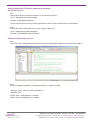
Under the C/C++ tab, these values should be set:
Define: USE_JANUS_T2, STM32F2XX, USE_STDPERIPH_DRIVER, USE_USB_OTG_FS, HSE_VALUE=16000000
Terminus T2 User Guide JA15-UM
Page 11
Rev: A01
Date: 07/08/14
© Copyright 2014 Janus Remote Communications Specifications subject to change without notice
All Rights Reserved See website for latest revision.
Not intended for life support applications.
Getting started with T2 Terminus applications continued
Compiling and uploading the Project continued
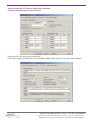
The include path should contain the following:
..\
..\..\..\Libraries\CMSIS\Include
..\..\..\Libraries\CMSIS\Device\ST\STM32F2xx\Include
..\..\..\Libraries\STM32F2xx_StdPeriph_Driver\inc
Under the User tab, the following should be set:
Run #1: ..\T2APPACK TERMINUS2\T2_VCP_Demo.HEX
Run #2: AppPackRename.bat
These are optional, however they make the initial build very straightforward as they automatically take the compiled
hex file, create a signed .bin file that the T2’s production bootloader can use, and rename it to an obvious output file.
Terminus T2 User Guide JA15-UM
Page 12
Rev: A01
Date: 07/08/14
© Copyright 2014 Janus Remote Communications Specifications subject to change without notice
All Rights Reserved See website for latest revision.
Not intended for life support applications.
Getting started with T2 Terminus applications continued
Compiling and uploading the Project continued
Step 3
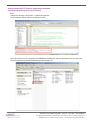
Compile the demo by using Project -> Rebuild all target files
Once complete it will be shown in the bottom window.
Normally the built .hex file is located in the TERMINUS2 subdirectory; however the optional run files now place
the file for upload in the \MDK-ARM directory with the project file.
Terminus T2 User Guide JA15-UM
Page 13
Rev: A01
Date: 07/08/14
© Copyright 2014 Janus Remote Communications Specifications subject to change without notice
All Rights Reserved See website for latest revision.
Not intended for life support applications.
Getting started with T2 Terminus applications continued
Uploading the compiled demo
Step 1
Once the demo has been compiled and the .bin created, we can upload it to the T2 by creating a terminal session
and uploading the script via X-Modem.
Open HyperTerminal or an equivalent terminal emulator and start a new session. Use the following settings as
they are the default for T2 communications.
Bits per second: 115200
Data Bits: 8
Parity: None
Stop Bits: 1
Flow control: Hardware
Step 2
Apply power to the T2 and when the on screen instructions appear press the Escape key to break out into the
bootloader menu.
Terminus T2 User Guide JA15-UM
Page 14
Rev: A01
Date: 07/08/14
© Copyright 2014 Janus Remote Communications Specifications subject to change without notice
All Rights Reserved See website for latest revision.
Not intended for life support applications.
Getting started with T2 Terminus applications continued
Uploading the compiled demo
Step 3
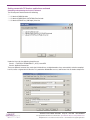
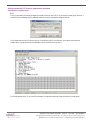
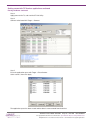
Press X (case does not matter) to begin the xmodem transfer. Once the T2 is put into this mode, go to Transfer ->
Send File. Select XModem for the protocol and browse to the compiled and signed .bin file.
Press Send and wait for the transfer to finish, it should only take a few moments. Once back at the terminal
window press escape to back out of XModem transfer and into the main menu.
Turn off the power to the T2, the next time it boots it will go into the demo. Keep the terminal session open.
Terminus T2 User Guide JA15-UM
Page 15
Rev: A01
Date: 07/08/14
© Copyright 2014 Janus Remote Communications Specifications subject to change without notice
All Rights Reserved See website for latest revision.
Not intended for life support applications.
Getting started with T2 Terminus applications continued
Running the Demo
Step 1
Install the ST VCP Windows drivers, and then plug in a mini USB cable to the T2 OTG port and the other end to
your host PC.
Step 2
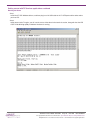
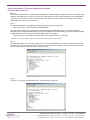
Apply power to the T2 again, you will see the status of the demo in the terminal session, along with that the LED
stack will be blinking rapidly to indicate the demo is running.
Terminus T2 User Guide JA15-UM
Page 16
Rev: A01
Date: 07/08/14
© Copyright 2014 Janus Remote Communications Specifications subject to change without notice
All Rights Reserved See website for latest revision.
Not intended for life support applications.
Getting started with T2 Terminus applications continued
Running the Demo continued
Step 3
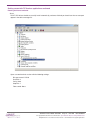
The ST VCP drivers should successfully install automatically, and once finished you should see the new com port
appear in the device manager list.
Open a second terminal session with the following settings:
Bits per second: 115200
Data Bits: 8
Parity: None
Stop Bits: 1
Flow control: None
Terminus T2 User Guide JA15-UM
Page 17
Rev: A01
Date: 07/08/14
© Copyright 2014 Janus Remote Communications Specifications subject to change without notice
All Rights Reserved See website for latest revision.
Not intended for life support applications.
Getting started with T2 Terminus applications continued
Running the Demo continued
Step 4
The USB channel should be open and you can test this by sending “AT” without the quotes and pressing Enter.
You should receive the OK from the modem. You now have AT access to the modem via the USB port instead of
requiring the DB9.
Erasing the demo
The T2 will automatically boot into an application it finds valid upon starting up and bypass the ability to escape into
the menu. In order to remove the demo you can follow two methods.
Method 1
The first method utilizes the ST Link hardware and utility program. This method requires access to the T2
internally, so a torx bit must be used to open the bottom of the case. Please ensure the power is off before taking
the T2 apart and attaching the ST Link dongle.
To attach the ST Link dongle to the T2, a JTAG 20 Pin to 10 pin adapter is required. This adapter and the dongle
can be purchased on the Janus store.
Item
Janus Part Number
ST-LINK/V2 JTAG 20P to 10P adapter MC-0371-G
MC-0372-G
Step 1
Install the ST Link utility and USB driver, both are available from the ST Micro website:
http://www.st.com/web/catalog/tools/FM146/CL1984/SC724/SS1677/PF251168
Step 2
Connect the ST Link dongle with attached JTAG 20 pin to 10 pin adapter to the PC via the mini USB.
Connect the 10 pin connector to the P1 header in the T2, located next to the DB9. The connector is polarized to
avoid issues.
Terminus T2 User Guide JA15-UM
Page 18
Rev: A01
Date: 07/08/14
© Copyright 2014 Janus Remote Communications Specifications subject to change without notice
All Rights Reserved See website for latest revision.
Not intended for life support applications.
Getting started with T2 Terminus applications continued
Earsing the Demo continued
Step 3
Apply power to the T2, and start the ST-Link Utility.
Step 4
Connect to the board with Target -> Connect
Step 5
Erase the application space with Target -> Erase Sectors
Select sector 5, then click Apply
The application space has been erased and the demo is now removed from the device.
Terminus T2 User Guide JA15-UM
Page 19
Rev: A01
Date: 07/08/14
© Copyright 2014 Janus Remote Communications Specifications subject to change without notice
All Rights Reserved See website for latest revision.
Not intended for life support applications.
Getting started with T2 Terminus applications continued
Earsing the Demo continued
Method 2
The second method utilizes a function of the bootloader to avoid entering the application space immediately upon
finding a valid application. Instead, it waits for an escape sequence and if found will drop back to the bootloader
where the user can choose to erase the application. This allows for easy and tool-less testing of various demo
applications that Janus may have to offer.
Step 1
Ensure your bootloader is up to date by comparing the title to the one listed here:
http://www.janus-rc.com/T2Terminus.html#downloads
v2.4 contains this ability, if your unit contains an older production bootloader than this, you must follow the
directions here to update the bootloader. If you have the application already loaded, you will not be able to update
the bootloader from the menu and must go through the ST Link method.
http://www.janus-rc.com/Documentation/JA01-AN112_Guide_Terminus-2_DFU.pdf
NOTE: Pay attention to the STM32xx value, as F2 and F4 will have different production bootloaders.
Step 2
The bootloader looks for 3x “Escape” keypresses for 1 second upon boot up. The easiest manner to ensure you
drop into this is to simply press Escape a few times at the same time as you press the reset button. You may find
a few extra Escape (BL>) notations come up but that is OK.
Step 3
Press the “E” key to Erase Application Flash, when finished it will tell you.
Terminus T2 User Guide JA15-UM
Page 20
Rev: A01
Date: 07/08/14
© Copyright 2014 Janus Remote Communications Specifications subject to change without notice
All Rights Reserved See website for latest revision.
Not intended for life support applications.
Terminus T2
Products User Manual
Revision History
Revision Revision Date
Note
A00
A01
Advanced Release - User Manual
Updates to Running the Demo
02/12/14
07/08/14
Division of The Connor-Winfield Corporation
2111 Comprehensive Drive • Aurora, Illinois 60505
630.499.2121 • Fax: 630.851.5040
www.janus-rc.com
Janus Remote Communications Europe
Bay 143
Shannon Industrial Estate
Shannon, Co. Clare, Ireland
Phone: +353 61 475 666