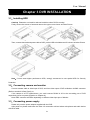
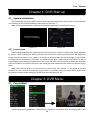
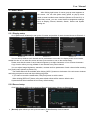
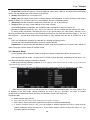
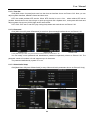
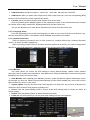
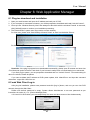
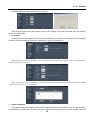
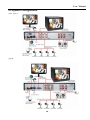
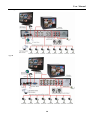
1
User Manual Contents SAFETY INSTRUCTION ........................................................................................................................................................ 3 CHAPTER 1 FEATURES .................................................................................................................................................... 4 CHAPTER 2: OVERVIEW .............................................................................................................................................. 5 2.1 FRONT PANEL ........................................................................................................................................................................... 5 2.1.1、4‐CH DVR Front Panel ................................................................................................................................................ 5 2.1.2、8‐CH DVR Front Panel ................................................................................................................................................ 6 2.2 REAR PANEL ............................................................................................................................................................................. 7 2.2.1、4‐CH Rear Panel layout .............................................................................................................................................. 7 2.2.2、8‐CH Rear Panel layout ........................................................................................ Fout! Bladwijzer niet gedefinieerd. 2.3 REMOTE CONTROLLER ............................................................................................................................................................... 7 CHAPTER 3 DVR INSTALLATION .......................................................................................................................................... 9 3.1 INSTALLING HDD ................................................................................................................................................................. 9 3.2 CONNECTING CAMERA AND MONITOR ........................................................................................................................................... 9 3.3 CONNECTING POWER SUPPLY ....................................................................................................................................................... 9 CHAPTER 4: DVR START UP ...................................................................................................................................... 10 4.1 SYSTEM INITIALIZATION ............................................................................................................................................................ 10 4.2 LIVE SCREEN ........................................................................................................................................................................... 10 CHAPTER 5: DVR MENU .................................................................................................................................................... 10 5.1 POP‐UP MENU ....................................................................................................................................................................... 10 5.2 MAIN MENU GUIDE ................................................................................................................................................................ 11 5.3 MAIN MENU ......................................................................................................................................................................... 12 5.3.1 Display setup ............................................................................................................................................................ 12 5.3.2 Record setup ............................................................................................................................................................ 12 5.3.3 Network Setup .......................................................................................................................................................... 13 5.3.4 Record Search ............................................................................................................................................................. 15 5.3.5 Playback Player ........................................................................................................................................................... 17 5.3.6 Device Manage ........................................................................................................................................................ 18 5.3.6.1 HDD Manage ............................................................................................................................................................................ 19 5.3.6.2 Alarm Setup ............................................................................................................................................................................. 19 5.3.6.3 PTZ setup ................................................................................................................................................................................. 21 5.3.6.4 Mobile setup ............................................................................................................................................................................ 22 5.3.6.5 Motion Detection ..................................................................................................................................................................... 22 5.3.7 System ........................................................................................................................................................................ 22 5.3.7.1 Time Set ................................................................................................................................................................................. 23 1 User Manual 5.3.7.2 Password .................................................................................................................................................................................. 23 5.3.7.3 Video/Audio Setup .................................................................................................................................................................. 23 5.3.7.4 Language Select ....................................................................................................................................................................... 24 5.3.7.5 System Information .................................................................................................................................................................. 24 5.3.7.6 Maintain ................................................................................................................................................................................... 24 5.4 MENU LOCK .......................................................................................................................................................................... 25 5.5 RECORD SEARCH ..................................................................................................................................................................... 25 5.6 PTZ CONTROL ........................................................................................................................................................................ 25 5.7 RECORD ................................................................................................................................................................................ 26 5.8 STOP RECORD ........................................................................................................................................................................ 26 CHAPTER 6: WEB APPLICATION MANAGER ........................................................................................................... 27 6.1 PLUG‐INS DOWNLOAD AND INSTALLATION .................................................................................................................................... 27 6.2 WEB WEB CLIENT LOG‐IN ......................................................................................................................................................... 27 6.3 WEB CLIENT INTERFACE ........................................................................................................................................................... 28 6.3.1 Menu Bar .................................................................................................................................................................... 28 6.3.1.1 Live mode ................................................................................................................................................................................ 28 6.3.1.2 Playback................................................................................................................................................................................... 29 6.3.1.3 Remote Set ............................................................................................................................................................................... 29 Display set .............................................................................................................................................................................. 30 Record Set .............................................................................................................................................................................. 30 Alarm Parameters .................................................................................................................................................................. 30 Network Configuration .......................................................................................................................................................... 31 Device Parameters ................................................................................................................................................................. 32 Device Manage ...................................................................................................................................................................... 33 6.1.3.4 Local set ................................................................................................................................................................................... 33 6.3.1.5 Logout ..................................................................................................................................................................................... 33 CHAPTER 7: SPECIFICATIONS ................................................................................................................................... 34 CHAPTER 8: APPENDIX ............................................................................................................................................... 35 8.1 RECORD ALARM SETTING .......................................................................................................................................................... 35 8.2 SUSTAINABLE RECORD TIME LIST ................................................................................................................................................ 35 8.3 MAIL BOX SERVER LIST ............................................................................................................................................................. 35 8.4 TROUBLESHOOTING ................................................................................................................................................................. 36 8.5 SYSTEM CONFIGURATION ......................................................................................................................................................... 38 8.6 ACCESSORIES ....................................................................................................................... FOUT! BLADWIJZER NIET GEDEFINIEERD. 2 User Manual Safety Instruction 1. Power sources This equipment should be operated only from the type of power source indicated on the marking label. If you are not sure of the type of power, please consult your equipment dealer. 2. Objects and Liquid Never push objects of any kind through openings of this equipment and / or spill liquid of any kind on the equipment as they may touch dangerous voltage points or short out parts that could result in a fire or electric shock. 3. Water and / or Moisture Do not use this equipment near water or in contact with water. If any liquid is spilled into the equipment, please unplug it from the wall outlet and refer servicing to qualified service personnel. 4. Cleaning Unplug this equipment from the wall outlet before cleaning it. Do not use liquid aerosol cleaners. Use a damp soft cloth for cleaning. 5. Heat sources Do not install near any heat sources such as radiators, heat registers, stoves or other apparatus (including amplifier) that produce heat. 6. Open Cover WARNING: Do not remove cover (or back) to reduce the risk of electric shock 7. Moving Disconnect the power before moving the equipment. And the equipment should be moved with care. 8. Accessories Do not place this equipment on an unstable cart, stand or table. When a cart is used, use caution when moving the cart / apparatus combination to avoid injury from tip-over. 9. Correct Batteries Risk of explosion occurs if battery is replaced by an incorrect type. Therefore you must use the same type of battery as the one being used in the product. WARNING: Do dispose of the waste batteries properly to prevent possible harm to the environment or human health from uncontrolled waste disposal. 10. Ventilation Do not block any ventilation openings, installation of the equipment in the rack should be such that the amount of airflow required for safe operation of the equipment is not compromised. 11. Circuit Overloading Consideration should be given to connect of the equipment to supply circuit and the effect that overloading of circuit might have on over-current protection and supply wiring. 12. Reliable Earthlings (Grounding) Reliable grounding of rack mounted equipment should be maintained. Particular attention should be given to supply connections other than direct connections to the branch circuit. 3 User Manual Chapter 1 Features Function Brief and Description Real-time Monitoring 2 CH video output, support VGA virtual output, Net-viewer and Mobile Live monitor, and also support zoom in/out, auto sequence and PIP display. Record Function H.264 video compression format; record quality adjustable, multiple record modes (Always, Scheduled, Manual, Alarm, Motion detection and remote record) Record storage Support SATA large capacity HDD and save real-time record image to HDD. Playback Support DVR single CH and multiple CH Search/Playback of recorded files. Backup Support DVR backup via USB flash drive, removable drive, Recorder and network. Alarm Setting Supports HDD & video input alarm management. Network operation Supports remote surveillance by authority users to increase system security. Mouse Operation Supports Mouse operation for faster menu navigation. PTZ Control Supports PTZ camera operations through RS-485. List 1-1 Features: H. 264 video compression format; supports D1, HD1 and CIF resolutions; ADPCM audio compression format; Windows Graphical interface; embedded real-time Linux 2.6 operation system; Multiple operations (Preview, record, playback, backup, network and 3G MP monitoring simultaneously); Supports Double Encode bit network transmission; Supports remote live viewing via 3G mobile network; The video package time is adjustable; Friendly Menu reminder; Multiple alarm record mode Rear USB2.0 ports for back-up, record, upgrade and mouse operation; With IR remote control; Multiple language OSD; Supports auto maintenance 4 User Manual Chapter 2: Overview 2.1、Front Panel 2.1.1、4-CH DVR Front Panel Item Key title or Indicator Remark Function & Description 1 2 3 Power button Power IR Receiver PWR Power on/off If the “Green” indicator is on the system is getting power Receives IR signal from Remote Controller 4 HDD Indicator HDD When the “Red” indicator flashes it means the hard drive is being read or written to. 5 CH select Key: CH1 CH2 CH3 CH4 CH select key 6 QUAD On Live display or Playback mode, switch to Quad display. 7 REW Left arrow key, Rewind key; Pressing the key to decrease PTZ rotation speed and parameter value. On preview mode, Hold pressing the key to switch to GUI operation device 8 PAUSE Pause / play frame by frame manually 9 PLAY Enter into [Record Search] Menu; Play recorded file. 10 FWD Right arrow key, Forward key; Pressing the key to increase PTZ rotation speed and Parameter value. 11 STOP Stop Playing and/or manual record. 12 REC ● Start manual record 13 MENU/ESC Enter Main menu or Exit 14 Up key Move to up 15 SEL/EDIT Enter into pop-up menu; Select or Enter menu; Edit menu. 16 Down Key Move to down 17 PTZ: Enter into PTZ control interface 5 User Manual List 2-1 2.1.2、8-CH DVR Front Panel Item 20 Key title or Indicator Remark Function & Description Power on/off 1 Power button 2 Power Indicator 3 IR Receiver 4 HDD Indicator 5 SEARCH When the “Red” indicator flashes it means the hard drive is being read or written to Record search 6 MUTE Mute on/off 7 CH- Switch to previous channel 8 CH+ Switch to next channel 9 QUAD On Live mode, switch to 4-split and 8-split display 10 PWR HDD If the “Green” indicator is on the system is getting ll Receives IR signal from Remote Controller REW Move to left; Multiple speed rewind playing; Decrease parameter value of image setting. 11 PAUSE Pause/play frame by frame manually 12 PLAY Enter into pop up menu; Play recording file 13 FWD Move to right; Multiple speeds forward playing; Increase parameter value of image setting 14 STOP Stop playing; Stop manual record 15 REC ● Start manual record 16 MENU/ESC Enter into Main menu/Exit 17 Up arrow key Move to up 18 SEL/EDIT Enter into pop-up menu; Confirm the selected operation 19 Down arrow key Move to down PTZ: Enter into PTZ Control interface List 2-2 6 User Manual 2.2、Rear Panel 2.2.1、4-CH Rear Panel layout A B 2.3 Remote Controller Item 1 Key title Key function Channel select 1-8; Numeric key 1-8 9、0 Numeric key; Clicking numeric “0” allow you switch to GUI function 3 ALL Multiple display mode 4 Menu 5 ▲ Up arrow key, Volume adjust 6 ▼ Down arrow key, Volume adjust ◄/ Left/Down key, Decrease/increase parameter value of control bar SEL Select key/Edit key; Confirm the selected operation. 2 7 8 Enter into Main menu/Exit 9 Rewind key 10 Enter into record search menu; Play key 11 Forward key 12 ● Record key Pause/Sequence key 13 14 ■ 15 Audio Testing 16 Mute Mute on/off Stop manual record; stop playing List 2-4 7 User Manual Mouse Operation In addition to the buttons of front panel or remote controller, you also can use mouse to perform system operation. TYPE Function In menu lock mode, Enter into pop-up menu and clicking any sub menu to pop up Log-in window; on menu unlock mode, enter into pop-up menu, and then clicking left key to enter into any sub menu directly. Click left key of Mouse Click right key of Mouse Double-click Left key of Mouse Moving Mouse Sliding Mouse After entering into main menu, clicking left key could enter into any sub menu; On [Detailed file] menu mode, clicking left key could playback one recording file. Change the status of check box and motion detection area. Clicking combo box to access pull-down menu; Click left key to stop dwell time display when dwell time display is activated. By clicking left key you can adjust Color control bar and volume control bar. Clicking combo box to access pull-down menu By clicking left key you can select values in edit boxes or pull-down menu and supports Chinese word input, special symbol, numeric and character input, use instead of [Enter] or [Backspace ] In live display mode, clicking right key will display pop-up menu (shown as Picture 5-1). In Main menu or sub menu mode, clicking right key will exit current menu. In live display or playback mode, double-clicking left key will maximize the screen. Select menu item On motion mode, sliding mouse will select motion area; On [Color set] menu mode, sliding mouse will adjust color control bar and volume control bar. List 2-5 8 User Manual Chapter 3 DVR INSTALLATION 3.1、Installing HDD Caution:Please do not Install or take out hard drive when DVR is running! Firstly, loosen the screws of case and remove the upper cover shown as below Picture. Then, connect data cord and power cable of HDD, put the HDD to its holder and fix it shown as below Picture. Lastly, tighten the screws of the upper cover. Note:If users need higher performance HDD, strongly recommend to use special HDD for Security Protection. 3.2、Connecting camera and monitor Connect camera cable to video input of DVR, and from video output of DVR to Monitor via BNC connector (Refer to section2.2-Rear Panel); or If the camera is a PTZ speed dome, you could connect RS485 A & B to the according port of DVR respectively (refer to system figuration on Chapter 8). Note: BNC connector will differ depending on different video input port of Monitor. 3.3、Connecting power supply Please only use the power adapter supplied with the DVR. After power on please make sure the video I/O connection well and select microphone and audio device with RCA cable. 9 User Manual Chapter 4: DVR Start up 4.1、System Initialization After connecting the Power cable of DVR to wall outlet and pressing the Power button on the front panel, you will enter into the system initializing screen shown as Picture 4-1. Note: The pictures illustrated by this manual will differ depending on your different monitor. Picture 4-1 Picture 4-2 4.2、Live screen After finishing initialization the system will enter into Live screen. Picture 4-2 is the 9-split display defaulted by system, which is showing no video input status. Once there are video inputs, the screen will display live images from the cameras. In Live mode, if you use the mouse to double-click the live image of any channel, the image will be maximized to full screen, by double-clicking again, image will be come back to 4-split or 9-split display mode; clicking the right button of the mouse will enter into Pop-up Menu; clicking the left button of the mouse allows you select menu items; and clicking any area outside the menu allows you exit the Pop-up menu. Note: When internal HDD is not connected or an error occurs, the character “H” will appear on the first channel of the live screen and accompany buzzer alarm. If you want to close the buzzer alarm, please enter into [Device manageAlarm setting] to set HDD loss and HDD space to “off”. Chapter 5: DVR Menu 5.1、Pop-up Menu Picture 5-1a Picture 5-1b Picture 5-1c After finishing system initialization, click right key of mouse on Live mode to enter into Pop-up Menu. Now 10 User Manual you could perform parameter setting and operate on Main Menu, Multi-Pics, PTZ, PIP, Rec. Search, Mute, Manual record, Start Rotate, Start Cruise and GUI to VGA etc. Note: options of the Pop-up menu will differ depending on different parameter setting and application environment. 5.2 Main Menu Guide Title Set Camera Color Set Display set Resolution Record Scheduled Static set DHCP set Network PPPoE set DDNS set Search/Playback Main Menu Search File List File Backup Log Search Log Export HDD Alarm set Email set PTZ set Device Manage 3G Network Motion Area set Time Password Volume A/V System Language Margin Information Maintain 11 Back to Factory User Manual 5.3 Main Menu After clicking right button of mouse, pop-up menu appears on the screen. You can click [main menu] option on pop-up menu mode to enter into Main menu interface (Shown as Picture 5-2). In Main Menu mode, you can control device management settings, such as Display, Record, Network, Search, Device and System setting etc. Picture5-2 5.3.1 Display setup Go to [Main menuCamera] to set up the CH name and position for each channel shown as Picture 5-3. Picture 5-3 Picture 5-4 Picture 5-5 You can set up whether each channel can be previewed or not under Live display and/or record mode, enable live time or not under live screen and set up record time or not on the record history. Please note that the name of each channel supports up to eight characters or four Chinese characters. Copy function: allow you copy all data of one channel to any other channel. You can adjust image brightness, saturation, contrast and hue parameters of each channel after entering into [Color] menu.(shown as picture 5-4). The modifications will be available after clicking [APPLY] button on the bottom of the sub-menu windows and being prompted to save and then clicking [ok] button. If you want to cancel the modification, click [Exit] button to exit the menu. When clicking [DEFAULT] button, all system default values will be reset to default value. System default value indicates the ex-factory default setting. 5.3.2 Record setup Click [Main Menu] [Record] to enter into [Record Setup] menu (Shown as Picture 5-6). Picture 5-6 Picture 5-7 [Record] option allows you set up record status (Enable/Disable) of each channel. 12 User Manual [Bit rate] include three options – Best, Good and Normal. [Frame rate] include two options – Fixed and Manual. When set to “Manual” and click [Frame rate setup] option, you may allocate the frame rate for each channel. [Audio] option allows you turn audio on/off. [Mode] allow you select record modes, including Always and Scheduled. To record 24 hours a day set the [Mode] to Always. To record on motion or a set schedule, select the [Schedule] option. [Pack time] indicates maximum continuous record time (15, 30, 45 and 60 min). [Copy to] allow you copy current settings to any other channel. When setting [Mode] to Schedule, the schedule screen will appear as shown in Picture 5-7. [Record CH] options include All, CH-1, CH-2, CH-3 and CH-4 in turn. Please click the channel you need. To setup weekly schedules, tick-select the box of the record status you want (Alarm, General, or No Record) and then click on each box in the schedule time line that you want this method to apply to. You can use the [From – To] pull-down menus and Copy button to copy settings from one day to another day or all days. After you complete the schedule you activate it by clicking the [Apply] button. You can also click the [Default] button to use the system defaults. Explanation: On the [record] Set and [Search] mode, original color stands for no record, “Red” stands for alarm record and “Green” stands for normal record. 5.3.3 Network Setup Enter into [Main MenuNetwork Setup] to setup the network configuration (Shown as picture 5-8): After selecting network mode - such as DHCP, PPPOE or static allocation- and setting up web ports,you can visit DVR remotely through a network or internet. UPnP (Universal Plug and Play) function: If router supports UPnP function and set <UPnP> to On, system will automatically forward port to router. DNS: DNS server is generally provided by local ISP. Herein please enter the IP address of your DNS. Picture 5-8 Picture 5-9 When selecting DHCP the router will allocate DVR IP address automatically after you exit the menu. The IP address of the DVR might change whenever the unit is turn on. Therefore, you need to forward corresponding IP address and web port when you remotely visit the DVR each time. Processing step: 1. Select network type (DHCP); 2. Input media port and web port and media port is not equal to web port; 3. Click <Save> button and restart, now DVR will capture IP address automatically; 4. If <UPnP> function is set to “Off”, you can forward IP address captured by DVR to router and set relative parameter shown as Picture 5-11; If your router support <UPnP> function and set to “on”, you no need to perform this step 4; 13 User Manual 5. You visit the DVR remotely. http://internet IP: web port (such as 8080) http:// intranet IP: web port (such as 8080 only available at the same intranet) When selecting Static from the Type, user can directly set IP address, Subnet Mask, Gateway, Web Port and DNS shown as Picture 5-9. Media Port: manually forward this port to router, details please refers to Picture 5-12. Web port: equal to Web Application Manager’s web port no and manually forward this port to router. IP Address: Input a special IP address, and the IP address is unique in full service intranet. Net Mask: consistent with router’s Gateway: consistent with router’s DNS: Input DNS server Click <save> button and restart DVR, all above parameters will be effective. Now you visit the DVR remotely via below IP: http://public IP: web port (such as 8080) http://intranet IP: web port (such as 8080 ) Picture 5-10 Picture 5-11 When selecting PPPoE form the Type, user can input user name and password provided by ISP and set Media and Web port (details please refer to the Picture 5-10). You can visit your DVR via public network without port forwarding when network type is set to “PPPoE” and web port is right. DDNS (Dynamic DNS) is a service that register a domain name and the floating IP address with the DDNS server so that the domain name can be routed to the IP address even if the IP address is changed in a dynamic IP system. At the bottom of the NETWORK SETUP window there is an option to setup the DVR to be accessed through a DDNS service. When you click on the DDNS button it brings up the window displayed as Picture 5-11. You can access the DVR through a static or dynamic IP address; however a dynamic address can change from time to time. How often depends on your service provider When it changes you need to go to a website such as www.myipaddress.com from a computer attached to the same router as the DVR to find out what the new IP address is. 1、 Server: select a Dynamic domain name server provided by ISP; 2、 Host Name: Input host name registered from Dynamic Domain Naming System, for example: DVR2009.3322.org; 3、 User Name: Input a user name registered before applying for a domain name; 4、 Password: Input a password you set when registering a user name. User can enter below website or domain name as per current PC network environment to visit the remote DVR. http://public IP: Web port(such as 0080) 14 User Manual http://intranet IP: Web port(such as 0080)(only available at the same LAN) http://superdvr.3322.org: Web port(such as 0080) Router’s Port Forwarding Port forwarding is required when you want to access the DVR connected to the router from outside of the router’s network. 1. Input router’s IP address from IE-based browser to open the Router configuration interface; 2. Click [Transmittal rule] option to take you to the port forwarding instructions for your router; 3. Set the corresponding parameters illustrated in Picture 5-11. When server port and web port forwarding the DVR IP address, user can visit the DVR remotely. Picture 5-12 Friendly Reminder: The router’s port forwarding interface may be different; however, when entering into virtual server, user will always need forward port 8080 and port 9000 of router to IP address of DVR allocated or automatically captured, and select [All] or [Both] in corresponding protocol column and save the above setting. Above steps may differ from the router device depending on the manufacturer. 5.3.4 Record Search Click [Main MenuRecord Search] to enter into the <Record Search> interface shown as Picture 5-13. Time Search: In the Video Search screen, user can search for a specific date and time for a record and view it in Playback mode. This is useful for hunting a specific recording of an incident if you know the date and time it occurred. Date Search: In the Video Search screen, user can search for all the records in a specific date. To execute a video search, highlight and select the date numeric field,and then click a detailed time quantum of the specific date, system will start the playback from the first recoding of the time quantum. File List: click [File list] button to enter into the [File List] screen shown as Picture 5-14, the video recordings for the time quantum will appear in the screen. Playback Mode: You can use the Playback Control bar to operate the Fast Forward (X2, X4 and X8), Slow play (1/2, 1/4 and 1/8 speed), Play, Pause/Frame, Rewind(X2, X4 and X8). When ending playback, DVR will return back to previous menu. Picture 5-13 Picture 5-14 15 User Manual And you also can filter the records you want to view by the Channel or record mode based on date/time search. First:Indicates the first page of recording history you have searched. When you view other pages, clicking [First] button brings you back to Page one. PREV (Previous page): When viewing event list, clicking [Previous page] button will take you back to page before the one you are currently viewing (except the first page). NEXT (Next page): When viewing event list, clicking [Next page] button will take you to the page after the one you are currently viewing (except the last page). LAST (Last page): Indicates the last page of recording history you have searched. When you view other pages, clicking [Last page] button will take you to the Last page. ALL (Select All): Allows you to select all the events on the current page. INVERSE (Select Invert): Allows you to select other events on the current page except those you have currently selected. Backup: In [File List] mode, if you wish to backup records, please tick-select the [Select] check-boxes which corresponds to the records and click [Backup] button to enter into the below windows illustrated in Picture 5-15. When backup processing ends, system will prompt you “Backup finished!” shown as Picture 5-16. Picture 5-16 Picture 5-15 Note: Backup file will be saved as H264 format; you can playback the recorded files using the Multimedia Player program that comes with the DVR or through the net-viewer program. Please make sure you have connected backup device, such as USB and DVD, well before backing-up. Log Search In the <Record Search> screen, Click [Log Search] to pop up the Log search screen shown as Picture 5-17(a). Select log type, enter start date & end date, and then click the [Search] button on the bottom of the interface to search all the logs you need shown as Picture 5-17(b). 16 User Manual Picture 5-7(a) Picture 5-17(b) Picture 5-18 Picture 5-19 Export: User can export all the logs which have been searched to U flash disk and save it as TXT format. Before exporting the logs, please make sure you have connected the U flash disk well. Detail operations please refer to Picture 5-18. After Log export success, please click [OK] button shown as Picture 5-19. 5.3.5 Playback Player 1. Copy backup file to your PC; 2. Open Playback Player, and then click [+] button to open the file shown as Picture 5-20 Note: Please select the file with *.264 or *.nvr format. The record file backed-up by U flash disk or removable disk is with *.264 format, and DVD Recorder with *.nvr format. Picture 5-20 Picture 5-21 3. Select the playback file you desired from the file shown as Picture 5-21. (1) Double-click the record event at the right side of screen to start record file playback shown as Picture 5-22. 17 User Manual Picture 5-22 (2) The button functions from left to right in turn are as follows: [Play] button: start playing record file [Pause] button: pause the record file playback [Stop] button: stop the record file playback [Rewind] button: rewind playing the record file at X2, X4, X8 and X16 speeds. [Forward] button: forward playing the record file at X2, X4, X8 and X16 speeds. [Frame by frame]: Play the record file frame by frame. [Snapshot]: click the button to capture the record image and save the image to a specified position. [Add]: click the button to add one record file [Del]: click the button to delete one record file. [Del all]: click the button to delete all the record files in the event list. 5.3.6 Device Manage Objects in <device manage> include HDD, Alarm, PTZ, Mobile and Motion. Click [Main MenuDevice Management] option to enter into the window shown as Picture 5-23. Picture 5-23 18 User Manual 5.3.6.1 HDD Manage In the [Device Manage] screen, highlight and click [HDD] icon to enter into the window shown as Picture 5-24. Picture 5-24 Picture 5-23 When DVR is connected to a HDD, the system will automatically detect if HDD is normal or not; If the cable connected to HDD is loosen or HDD is abnormal, HDD status will be shown as “No Disk”, or, If HDD need to be formatted, status will be shown as “no format”, otherwise, the HDD status will be shown as “Normal” (refer to Picture 5-23). NO:HDD number defaulted by system State:Available Hard drive. You could use HDD only when formatting the HDD and inspect its status normal. TOTAL/AVAIL: Indicates total space available on Hard Drive. / Unused space available on the Hard Drive. AVAIL TIME: Based on current image detail/quality and frame rate, system will show you how many record time you have left on the Hard Drive. OVERWRITE: If you select “on” the system will automatically overwrite the oldest recordings once the hard drive is full; if you select “off”, recording will stop once the hard drive is full. HDD FORMAT: You use this option to format the hard drive, you can not record files to the hard drive until it has been formatted. Click [Format HDD] button to start formatting. When selecting [Format HDD] option the system will prompt you – “Format HDD will loss all the data, do you confirm?” ; click “OK”, system will prompt you – “Is formatting…” and “successful format”; and then system will restart automatically. USB FORMAT: Use this option to format USB devices. Note: It is an important first step when configuring your DVR to make sure that the hard drive (HDD) options are correctly set. So, it is strongly recommended that you do format the HDD before start the first record. 5.3.6.2 Alarm Setup Picture 5-25 Click [Alarm Config] on the bottom of the [Alarm setup] screen to enter into the interface shown as Picture 5-26.Now you are allowed to set detailed alarm parameters. HDD Loss: When setting [Buzzer] to ON and there be no HDD detected or the HDD is not formatted, a small “H” appears on the screen with buzzer sound. Setting this to OFF will only show the “H” on the screen but the buzzer will not sound. HDD Space: When setting [Buzzer] to ON and the DVR is running out of storage space the buzzer will sound. No alarm will sound if it is set to OFF. 19 User Manual Video Loss: When setting [Buzzer] to ON and when a camera has been disconnected. “Video Loss” icon will also appear on the screen with buzzer sound. Set to OFF, you will only see the “Video Loss” appear but no sound. Alarm Manage Buzzer time: you can set how long the buzzer will sound when alarm is triggered (0s, 10s, 20, 40s, 60s); Alarm duration time: you can set how long alarm record will last when alarm ends (0s, 30s, 1m,2m,5m); Pre-record time: you can set how long record will last before alarm occurs (Off, on). Full screen Alarm: The function is defaulted to “On". When the motion detection or external alarm is triggered, the corresponding channel will be displayed on the full screen mode. Email:The option allows you set the alarm images is issued to a specified email or not. You could freely select buzzer alarm or not and alarm output time for all the alarm types, and for the MD alarm and I/O status alarm you could set email and full screen reminder. Alarm Type Video Loss Motion Detection HDD loss Function Sends alarm when DVR can’t receive video signal (such as camera damage, cable broken or damaged or power supply malfunction). When an object moves into motion detection area, alarm will be triggered. You can adjust sensitivity level to suit the needs of your actual application environment. When Hard Drive is not detected (HDD damage, power supply malfunction), or HDD auto-overwrite is off, and free space is not enough, an alarm will be triggered. List 5-1 EMAIL Setup Click [Email Set] to enter into the interface shown as Picture 5-26. Picture 5-26 Picture 5-27 On the [EMAIL] screen, when Enabling [Email] option, you can set its parameters shown as Picture 5-27. SSL: is a security link transport protocol. You can encrypt your communication info (including your email) using SSL to prevent hackers from monitoring your email or communication info and even your password. Generally Gmail.com server set SSL to [On], and other mail server to [Off]. If your setting is still not right, please contact the web site where you have applied for your email box to get SMTP port and SSL of mail box. SMTP Port: indicates sender port of SMTP server. Generally the SMTP port value is 25, but there are exceptions, for example, SMTP port of G-mail server should be 465. SMTP server: indicates email server address you use. Sender email: indicates sender’s email address. The email address should be consistent with the server you use. That is to say, when you use email address – [email protected], the according server should be smtp.gmail.com. Receiver address: indicates receiver’s email address. The email address is used to receive image 20 User Manual transmitted from motion detection alarm of DVR. Please clear the images you have received as soon as possible to avoid overloading your email account. Email Test: clicking the button check your SMTP port, server, sender and receiver address. Once the parameters are wrong, system will return misinformation back to inform user modified. Note: Sender email is required to enable IMAP/POP3/SMTP function (details please refer to Picture 5-28 & Picture 5-29 (a & b), which show IMAP/POP3/SMTP Enable setting function for Gmail, QQ and SINA mail). Login your GMAIL ID and turn to Settings page. Find out Forwarding and POP/IMAP option and then tick-select [enable IMAP] option. If you can’t receive email alarm information successfully, please check below points: DVR connection is normal or not; The receiver and sender email support SMTP protocols or not; Emails account setting is correct or not; Email alarm parameters configuration is right or not; DVR is on the status of I/O alarm or Motion detection or not. Picture 5-28 Pi t ( ) Pi t (b) 5.3.6.3 PTZ setup Enter into [Main menuDevice PTZ Setup] to select the channel you desire to control and set PTZ protocol (Pelco-D or Pelco-P), Baud Rate (1200, 2400, 4800, 9600), Data bit (8, 7, 6, 5), Stop bit (1, 2), Parity Check (None, Odd, Even, Mark, Space), Address Code and Cruise status respectively. 21 Picture 5-30 Picture 5-31 User Manual 5.3.6.4 Mobile setup The DVR is currently compatible with mobile phones running Andriod, Windows Mobile,Symbian, Iphone and Blackberry operating systems on 3G networks. Details access methods please refer to separate Mobile phone Access Instructions. Click [Main menuDeviceMobile] to enter into [Mobile] menu shown as Picture 5-31. User Name: indicate user name of DVR, and system supports up to 15 characters. User password: indicate user password of DVR, and system supports up to 15 characters. Server port: Mobile monitoring port. Setting value is adjustable between 1024 and 65535. Explanation: Please connect DVR to Internet before setting DVR port number and the server port no is not equal to network menus. 5.3.6.5 Motion Detection Click [Main menuDeviceMotion] to enter into the [Motion Detection] menu shown as Picture 5-32. The [Motion detection] Menu has three sections, including Channel Status, Sensitivity and Motion area. Channel: This option allow you enable motion detection on any channel. SENSITIVITY: This option allows you to set sensitivity level of motion detection from higher to low with 8 being the most sensitive. MD AREA: This option allows you select the area you want to be sensitive to motion. Copy to: allow you copy current channel parameters to any other channel or all channels. Picture 5-32 Picture 5-33 The channel is separated into a 15X12 grids for PAL system and 1 15X10 grids for NTSC system. When any object moves into the motion detection area, and the area where the object is located is displayed in red recording will be triggered. In the semi-transparent area the motion detection is off. 5.3.7 System <System> menu include the sub-menu-Time set, User password, A/V set, Language, System Information and system maintain. After entering into <System> menu, you are allowed to set time/date, password, language and A/V, check system information and perform system maintenance. Picture 5-34 22 5-35 Picture Picture 5-36 User Manual 5.3.7.1 Time Set Click [Main menu system] and enter into the time set interface shown as Picture 5-35. Now you can adjust system date/time, date/time format and time zone. NTP: the model provides NTP service. When NTP function is set to <On> , select relative NTP server (include: time.windows.com; time.nist.gov or pool.ntp.org) and click <Update now>, and system will check and adjust system time at every 23:50:00pm and/or each restart DST: Click <DST set> to set DST (day saving time) status and mode shown as Picture 5-36. 5.3.7.2 Password Click [Main menuSystemPassword] to enter into [user manage] interface shown as Picture 5-37. Picture 5-39 Picture 5-37 Picture 5-38 Click [Edit user] to enter into password set interface shown as Picture 5-38. You can setup a user password and administrator password respectively shown as Picture 5-39. The password consist of numbers 0~9 and supports up to 6 characters. The password defaulted by system is 123456. 5.3.7.3 Video/Audio Setup Click [Main MenuSystemVideo/Audio] to setup Video and Audio parameters shown as Picture 5-39 (a). Picture 5-40 Picture 5-41 Picture 5-42 Picture 5-43 23 User Manual Video System: allow you set Camera system (PAL, NTSC). VGA Resolution: include four options - 1280×1024、1024×768、800×600 and 1440×900. OSD Device: allow you select video output device, Main output and VGA. User can hold pressing [Rew] button on the front panel to convert output device quickly. Poll time: allow you select sequence time between from 5s and 300s. Click the [Volume] and/or [Margin] options on the right-bottom corner of the Video/Audio screen to adjust the volume and/or margin respectively. Details please kindly find the Picture 5-41. And you are allowed to set <video blind> area shown as Picture 5-42 and Picture 5-43. 5.3.7.4 Language Select Enter into [Language] menu to select the language you want to use on the DVR (shown as Picture 5-40), and then click [APPLY] button. The selection will be available after system Auto restarts. 5.3.7.5 System Information Enter into [System Information] menu to view system info, including Device type, Software (firmware) version, IE version and MAC address etc. When connecting multiple DVRs to the same local area network environment, you need to change MAC address for each DVR respectively; otherwise, you may not connect these DVRs to network. Picture 5-44 Picture 5-45 5.3.7.6 Maintain This option allows you recover the DVR settings to factory default settings, update system software (firmware), and set system auto-maintenance. Click [Main menuSystemMaintain] to enter into the [System Maintain] menu shown as Picture 5-42(a) Auto Maintain: After enabling [Auto Maintain] function, system will perform regular maintenance as per the schedule you have set. Please note the [Auto Maintain] function will be available only when DVR is on the Main interface and have no user online. System Update: Copy the file named with “DVR upgrade” to U flash drive; and connects U flash drive to USB port of DVR, and third click [System upgrade] menu. Default: Click the [Load Default] button to recover all the DVR settings back to factory set shown as Picture 5-46(b). Reboot: Click the [Reboot] button to restart the device manually. Power off: the button allows you cut the power after making sure the DVR shutdown. 24 Picture 5-46(a) Picture 5-46(b) Picture 5-47 User Manual Note: 1. Please obtain the updated program from local supplier before system updating. 2. Please not cut power and unplug U flash disk during the update. 3. System will automatically restart after finishing system update. 4. User needs to manually recover the ex-factory default setting after restarting. 5.4 Menu Lock Considering a system safety feature you can click [Menu Lock] menu to lock menu when leaving the DVR shown as Picture 5-44(a). If you want to login in the DVR again, you would input device code and password shown as Picture 5-44 (b). Explanation: Common user only has the authority to search records, but Administrator has full authority over Main Menu operations. Picture 5-48(a) Picture 5-48(b) 5.5 Record search You could enter into [Record Search] menu via Pop-up menu conveniently and quickly and search/playback the record histories. We introduced Record search details previously in section 5.2.4. 5.6 PTZ Control Picture 5-49 Picture 5-50 Picture 5-51 Open auto cruise function on PTZ setting menu if you want to setup cruise function (system default: on), and set up cruise channel, cur point and total quantity and stop time etc. Channel: select one channel with PTZ camera Total: set up pre-set bit quantity Pre: indicates starting point cruised. System default point is 01. STP:sets the stop time at each point : allow you go to a specific preset point. : allow you set a set of specific preset points of a PTZ camera. 1. Select a camera you desire to set a preset point; 2. Adjust the camera in a desired direction 3. Click [Set] to set the point as preset point 4. Click [Save] to save the preset point 5. Follow the above steps to add one more preset point. 25 User Manual : allow you delete one selected preset. : allow you save relative parameters : allow you exit PTZ control interface Note: Up to 255 preset bits for the DVR can be stored. However, actual preset quantity differs depending on PTZ performance. 5.7 Record Enter into Pop-up menu to select the [Record] option. Now you can start manual record function, or you also can click [Rec.] button on the Front panel or Remote controller to activate manual record. Please stop record manually once you activate manual record. 5.8 Stop Record To stop record quickly, please enter into pop up Menu to select [Stop] option. 26 User Manual Chapter 6: Web Application Manager 6.1 Plug-ins download and installation 1. Open your web browser and input the IP address and web port of DVR; 2. If your computer is connected to internet, you will be prompted to download and install “ActiveX Control”; 3. You may have “Windows Security Alert” that attempts to block this with the windows Firewall. In that case, click [Unblock] button to continue your installation processing. 4. The Vista and Win7 system user may need to set user authority. For Vista user, please click <StartSetupControl Panel> to enter into the below Picture: For Win7 user, please set your user authority as per below pictures. WIN7-1 WIN7-2 Reminder: If the plug-in program is not downloaded successfully, please open IE browser and enter into <ToolInternet optionCustom> and check if your browser’s safety level or firewall setting is too advanced. If you firstly log-in system, you are prompted to download and run “ActiveX Control”. You need waiting for about one minute, Please be patient. If you want to delete old IE webcam at DVR system update, click <StartRun> and input the command characters: “regsvr32/u HiDvrOcx.ocx. 6.2 web Web Client Log-in After plug-ins installation, please enter password and click [Log-in] button, and now you can view DVR remotely through the Web Client. Please note default password is empty. System allows Administrator to set new password as per instructions in section 6.3.1.3 - [Device Manage] menu. 4-CH and 8-CH DVR allow you have respectively five users and three users on-line simultaneously. Picture 6-1 27 User Manual 6.3 Web Client Interface 6.3.1 Menu Bar Menu bar: include [Live], [Playback], [Remote setting], [Local Setting] and [Logout] option on the left-up corner. 6.3.1.1 Live mode After successful web client log-in, you will enter into the Live interface shown as Picture 6-3 and simultaneously Audio / Video will be automatically connected well (Shown as Picture 6-2(a) and (b). Picture 6-2(a) Picture 6-2(b) User can open or close live image by Play control bar, and select display modes, including full screen mode, 4-split mode and 9-split mode. Click the [ ] icon of each channel to display the channel’s image. Click the [ ] icon to start manual record. Capture:Clicking the button will capture the live image from one selected channel and save the image with *.bmp format to PC. Record:Clicking the button will remotely record the live images and automatically save the record to a specified position. CH display mode:The icons respectively stand for the Single CH display, Quad display, 9-split mode, 16-split mode and full screen mode. Volume Control: Click the icon or slide the volume control bar to adjust sound 28 User Manual volume. PTZ Control 1. PTZ direction control: the buttons allows you control PTZ moving direction. 2. Zoom, Focus and Iris control: the buttons allows you control PTZ moving direction, zoom, focus and iris. 3. Preset bit control Pan and Tilt Pos: indicates starting point you desire to cruise firstly. : On Live mode, enter preset point No you want to display and click the icon to load the last preset point you set. : allow you set a series of specific preset points of a PTZ camera, and click [ preset point you set. ] icon to save the : On live mode, input the preset point no you want to display and click the icon to quickly go to the preset point. Clicking the icon allows you delete the current preset point. : allow you enable/disable the [Cruise] function. 6.3.1.2 Playback Click [Playback] option to playback record files from remote DVR by selecting relevant date, channel and type. Details please refer to below Picture 6-3. Picture 6-3 Double-click any file listed or highlight any file and click [ ] button to play the selected record file. Click [Download] button to download and save selected record file to specified saving path shown as Picture 6-4. Picture 6-4 You can set [Save Path] option on the [Local Setting] menu. The [Play control] bar is located at the bottom of the interface, include [Play], [Pause], [Stop], [Slow Play], [Fast Play], [Next Frame] and [Volume adjust] option. 6.3.1.3 Remote Set Click [Remote Set] menu to enter into the interface shown as Picture 6-5a and pop up the sub-menu: Display, Record, Alarm, Network, Device manage and parameter etc. 29 User Manual Display set Enter into [Channel] menu shown as Picture 6-5(a). Picture 6-5(a) Picture 6-5(b) Click [Copy to] option on the right-bottom corner of the interface to copy all the remote set to any channel shown as Picture 6-5(b). Record Set Enter into [Record Set] option to set record control parameters, including record enabling, audio enabling, Pack time, Record mode and Timer Rec. schedule etc. (shown as Picture 6-6). Picture 6-6 When frame rate is set to <adjustable>, you are allowed freely to adjust image quality, frame rate, resolution and package time shown as Picture 6-7. Picture 6-7 When record mode is set to <Scheduled>, you are allowed to enter into the interface shown as Picture 6-8. Details please refer to section 5.3.2 – <Record set>. Picture 6-8 Alarm Parameters Click [Alarm Parameters] option to enter into the Alarm interface shown as Picture 6-9. You are allowed to set buzzer time, Post Record time, Alarm out time, and open Pre-record function for each channel, and also 30 User Manual tick-select if the alarms can be sent to email or transferred to full screen mode. Picture 6-9 Network Configuration Click [Network Configuration] option to enter into the interface shown as Picture 6-10, and allow you set <Basic character>, <PPPoE>, <DDNS>, <Mobile> and <Email > items. Details please refer to section 5.2.3 – <Network Set>. Picture 6-10 Click <Basic character> item to allow you set basic network parameters and network type shown as Picture 6-11. Picture 6-11 Click <PPPoE> item to allow you enable <PPPoE> protocol and set its user name and password shown as Picture 6-12. Picture 6-12 Click <DDNS> item to allow you enable <DDNS> protocol and set its domain name, user name and password shown as Picture 6-13. Picture 6-13 Click <Email Set> item to allow you set Email enable, alarm sender and receiver’s address, SSL and time etc shown as Picture 6-14. Picture 6-14 31 User Manual Device Parameters <Device Parameters> item include HDD info (Picture 6-15), PTZ (Picture 6-16), 3G network (Picture 6-17) and Motion parameters (Picture 6-18 and Picture 6-19) etc. Click <HDD info> and check out current HDD information. Picture 6-15 Click <PTZ> to set PTZ parameter value, details please refer to section 5.3.6.3-<PTZ set>. Picture 6-16 As for 3G network and motion parameters set, please refer to the previous section. Picture6-17 Picture 6-18 Picture 6-19 32 User Manual Device Manage Extend [Device Manage] option to enter into sub menus – System set shown as Picture 6-20, Picture 6-20 and Authority set shown as Picture 6-21, and DST set shown as Picture 6-22, Picture 6-21 Picture 6-22 and version information shown as Picture 6-23. 6.3.3.4 Local set Picture6-23 The option allows you set [Record Save Path], [Frame Save Path] and [File Save Path] shown as Picture 6-24. Picture 6-24 Note: <Record save Path>: save remote manual record file <Frame save Path>: save remote manual snapshot picture <File save Path>:save local record file. 6.3.3.5 Logout Click [Logout] option to return back Log-in Interface shown as Picture 6-2. 33 User Manual Chapter 7: Specifications Device Parameter D9104 D9108 Video System Video/Audio Compression Format Video I/O NFSC/PAL(Optional) Video:H.264 Audio:8kHz*16bit ADPCM 4-CH input/2-CH BNC output; VGA (Optional) Audio I/O 4-CH input / 2-CH output Display Resolution D1:704×576(PAL) Display frame rate Record Resolution BNC Single Channel 8-CH BNC input/2-CH BNC output ; VGA(Optional) 8-CH input / 1-CH output 704×480 (NTSC) PAL:25 fps ,NTSC:30 fps PAL: CIF(352*288) HD1(704*288) D1 (704*576) NTSC:CIF(352*240) HD1(704*240) D1 (704*480) PAL:50 fps@D1、100 fps@HD1、200 fps @CIF PAL:400 fps @CIF NTSC:60 fps@D1、120 fps @HD1、240 fps @CIF NTSC:480 fps @CIF Record Total frame rate Image Quality Best / Good / Middle HDD Support USB removable HDD and SATA HDD Record Mode Always, Scheduled, Manual, Web Client record. Pack Time 15/30/45/60 min (adjustable) Support U flash disk, removable HDD, recorder and network Backup Function backup; Backup file format is *.264 format and network file will automatically be backed-up to AVI format). Playback Mode Normal play, Fast Forward, Rewind and slow play frame by frame. Alarm Mode Video Loss, HDD Full, HDD Error PTZ control Embedded RS-485 port / supports PELCO-P & PELCO-D protocol. USB Port Support Mouse, removable HDD and U flash disk backup and upgrade. Network Interface One RJ-45 10M/100M self-adaptable Ethernet interface. Network Function Support Mobile surveillance, IE browser, Remote Live surveillance and parameter setting. Network Protocol Supports TCP/IP, DHCP, UDP, DDNS, PPPOE and UPNP network Protocol IR remote control Support IR remote control. Power Adapter DC 12V&5A 34 User Manual Power Consumption 10~15W (excluding HDD) Operational Temperature 10℃~+40℃ Operational Humidity 10%~90% List 7-1 Chapter 8: Appendix 8.1 Record Alarm setting Please refer the below matrix: “⊥” stand for “only alarm but no record”; “AMR” stand for “alarm record”; “NLR” stand for “normal record”; and “NOR” stand for “ no record”. Once alarm is triggered, alarm icon will occur, and when many alarms are triggered, alarm remarks will occur on the screen. Record alarm setting Alarm icon Record Mode Scheduled recording Record after power on Alarm mode MD alarm I/O triggered alarm HDD loss, HDD Full Video Loss Video Loss List 8-1 AMR AMR ⊥ ⊥ AMR NLR NOR AMR AMR ⊥ ⊥ NLR NLR ⊥ ⊥ ⊥ ⊥ ⊥ ⊥ Manual Record NLR NLR ⊥ ⊥ In the record mode, [ ] icon or [ ] icon will appear on the screen. But when [ ] icon and [ ] icon appear on the ] icon appears on the screen, that means HDD alarm has screen that means a motion alarm is triggered. When [ occurred. 8.2 Sustainable Record Time List The sustainable record time differ depending from Resolution, Para, Video Input, Image parameter and Audio input etc. Factor: Audio set to ON / 4-CH video input / Twenty-four hours Continuous record / 250G HDD / Unit: Day Quality (Image Quality) Resolution Best Good Middle D1 6 8 11 HD1 6 11 CIF 8 8 11 14 List 8-2 Calculation formula: 250 1024 1402 24 When using 250G HDD and Record for 4-CH occupies 1402M space per hour, system can continuously record 183 hours. 8.3 Mail box server List Web site www.163.com Mail box @163.com Sender server(25) smtp.163.com 35 Receiver server(110) pop3.163.com User Manual www.qq.com 163.net www.sina.com www.yahoo.com google.com www.china.com www.sohu.com Mail.163.com Mail.163vip.com Mail.tom.com Mail.263.com x263.net 263.net.cn 139 mail box 21cn.com Vip.21cn.com etang.com elong.com @vip.163.com @188.com @126.com @netease.com @yeah.net @qq.com @sina.com.cn @yahoo.com.cn @yahoo.com @gmail.com @china.com @sohu.com @tom.com @263.net @139.com smtp.vip.163.com smtp.188.com smtp.126.com smtp.netease.com smtp.yeah.net smtp.qq.com smtp.163vip.net smtp.sina.com.cn smtp.mail.yahoo.com.cn smtp.mail.yahoo.com smtp.gmail.com(465/587) smtp.china.com smtp.sohu.com smtp.163.net smtp.163vip.net smtp.tom.com smtp.263.net smtp.x263.net smtp.263.net.cn smtp.139.com smtp.21cn.com vip.21cn.com smtp.etang.com smtp.elong.com List 8-3 pop.vip.163.com pop.188.com pop3.126.com pop.netease.com pop.netease.com pop.qq.com popx.163vip.net pop3.sina.com.cn pop.mail.yahoo.com.cn pop.mail.yahoo.com pop.gmail.com(995) pop.china.com pop.sohu.com pop.163.net pop.163vip.net pop.tom.com pop3.263.net pop.x263.net pop.263.net.cn pop.139.com pop.21cn.com vip.21cn.com pop.etang.com pop3.elong.com 8.4 Troubleshooting 1. Q: What can I do if the system does not detect the HDD? A: Check if the power supply system is properly connected and data cord and power cables are securely connected. 2. Q: We have changed the password but do not remember the new password, how can we access the system? A: If you forget system password, please consult with the service personnel. 3. Q: We are not getting any video signal on the DVR, what is wrong? A: Check camera video cable and connections; or check monitor video cable and connections; or confirm that the camera has the power and / or check camera lens setting. 4. Q: Why some channels display just a blank screen even if they receive video sources? A: Check if the camera is connected to the system properly displays the image; check if the camera is properly supplied with power. 5. Q: Can the DVR have problems if it gets too hot, how can I prevent this? A: The DVR has a fan to help it dissipate heat while it is running. Please place the DVR in a place where there is good air circulation and away from heat sources to increase stability and life of the DVR. 6. Q: “Record” Cannot work normally, how to deal with? A: Check if the current screen is in Play mode, pressing [Stop] button to exit the Play mode and then you can enter into the [Record] function. 7. Q: Why the Remote Controller can’t work normally? A: Check if the battery is power off; or check if the Remote Controller is broken. 8. Q: Can we records whilst playing-back? A: Yeah, you can do it. The system support you records whilst playing-back. 9. Q: Can we erase some recorded file from DVR. A: Considering the safety factor, you can’t delete the recorded file directly from the device. When you actually erase all the recorded files, please select HDD format function 10. Q: Why does the Buzzer keep sounding? A: Please check if motion detection is on and the system has detected motion, make sure the HDD is being detected and has sufficient space available; check if video has lost etc. 36 User Manual 11. Q: Why can’t stop [Stop] function? A: Pressing [Stop] button only can stop manual record. If you want to stop Scheduled record, please revise to [No Record] during this period. 37 User Manual 8.5 System Configuration 4CH – Type A Type B 38 User Manual 8CH – Type A Type B 39