1
4. White Balance Adjustment
Mode selection for each operation as shown in the table below:
WB Control Mode Selection Table
Mode
ATW
AWB(conventional)
PUSH TO LOCK
MWB
INDOOR
FLUORESCENT
FL 2
OUTDOOR
SW2
WB1
0
0
0
0
1
1
1
1
WB2
0
1
1
0
0
0
1
1
1.3 ATW mode---- Set the Dip SW. WB1, WB2, WB3 to
“0” position,
WB3
0
0
1
1
0
1
0
1
0
In this mode, the color temperature is monitoring
continuously, and the white balance is set automatically by
internal microcontroller.
The operating color temperature range is from 2500°K to
9500°K (approximately.)
This mode is the default setting when shipped from the
factory.
1.4
WB1
WB2
WB3
AWB mode—Conventional auto white balance
WB1
WB1=0, WB2=1 , WB3=1
WB2
WB3
1.5 Push to lock mode --- set the Dip SW. WB1=0,
WB2=1 , WB3=1
If the camera is used in conditions as described below.
The subject is illuminated by several different light sources
A sodium lamp, mercury vapors lamp or special effects lamp is
used.
o The subject has a single color, like blue, red, etc.
o A picture with proper tone may not be obtained, in such case
please adjust the tone while observing the picture on a color monitor
o
o
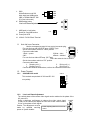
1.6 After setting the dip switches into “push to lock” mode,
point the camera at a white object and bring it into focus.
1.6.1
PTL
Point at the subject to fulfill the TV screen.
Use a light to illuminate the subject.
Press the set button, to optimize the picture color.
1.7 Manual mode white balance - set the Dip SW. WB1=0,
WB2=0, WB3=1
WB1
1.7.1
WB2
When the dip SW. setting is set to MWB, use the
up/down SW. to adjust.
1.7.2
Press the up/down key simultaneously back to
1
WB3
WB1
WB2
WB3