1
Auxillary audio source & manual
iPod control
The iTronic audio interface has the facility to play audio
from and external (auxiliary) audio device through the
factory audio system.
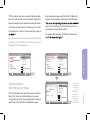
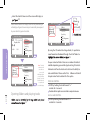
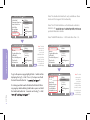
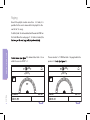
To select the auxiliary input, go to the CD List menu (see
3, page 8). From the CD List choose the “Menu / Aux
20.
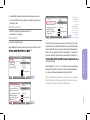
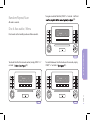
To manually control the iPod and exit lock mode, press
and old the Track Forward button for 2 seconds on
“Exit lock mode” from within the CD Track listing menu.
21.
The iPod will exit lock mode and allow manual user control.
To re-enter lock mode and gain full control from the vehicle,
press and hold the Track Forward button for 2 seconds on
the “Enter lock mode” track index.
CD List
23ºC
CD List
Track/List
CD Name
Track Seq.
Scan
Traffic Programme
Mute
CD 1 Track 1
Audio CD – Changer
CD List
Exit lock mode >>
Enter lock mode >>
Aux Input >>
BL Ver: 01.00.01
SW Ver: 02.02.21
Vehicle: Porsche
Browsing: Folder Su
23ºC
23.02.07
CD 1 Track 1
CD List
Track/List
CD Name
Track Seq.
Scan
Traffic Programme
Mute
23.02.07
Tip: Push and
hold Rotary
Selection
button on the
numeric keypad
from any screen
as a shortcut to
select the
Menu/Auxillary
audio input
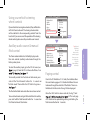
Paging control
OPERATING THE IPOD
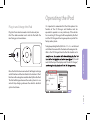
If your vehicle has steering wheel controls, they will function
with the iTronic audio unit. The steering wheel controls
will be identical to the corresponding controls from the
head unit. If you are unsure of the operation of the steering
wheel controls, please consult your vehicle user manual.
Audio CD – Changer
Playlist s/iPod
Artists
Albums
Genre
All Songs
Menu/Aux Audio Input
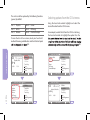
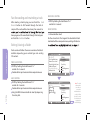
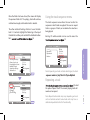
Due to the CD limitation of 99 tracks, the interface allows
the user to load up pages of 99 tracks which allows the user
to browse through the entire list of iPod tracks. There is no
limitation to the thousands of songs that can be paged.
Once the 99th track has been reached, the tag “[ Next
22. The next page
of 99 tracks can be uploaded by pressing and holding the
Track Forward button for 2 seconds.
PAGE 15
Using your vehicle’s steering
wheel controls