1
DISCONNECTING YOUR KEYBOARD
Your Slim Book features a case that protects your iPad even when it’s not
connected to your keyboard. When you’d like to use the case without the
keyboard, there are three ways you can disconnect your keyboard.
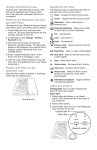
1. Press the Keyboard Hide/Show button.
Pressing this button will disengage the
Slim Book keyboard and allow you to use
your iPad’s on-screen keyboard. Press
the Keyboard Hide/Show button again
when you are ready to use the Slim Book’s
keyboard.
2. Turn off the Bluetooth connection from
your iPad.
3. Turn your Slim Book keyboard off.
PAIRING YOUR ZAGG Slim Book
Pairing your Slim Book with your iPad is easy. It should only need to be
paired once, using the following directions. If the connection between
your iPad and Slim Book is ever lost, repeat these steps.
1. O
n your iPad select: SETTINGS > BLUETOOTH > ON.
2. P
ress and hold the Bluetooth button for three seconds.
A blue LED under the Power key will flash until your
Slim Book and iPad are paired.
3. Y
our iPad will display “ZAGG Slim Book”
as an available device. Select this option to
complete pairing.
2