1
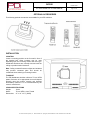
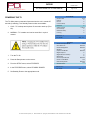
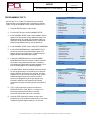
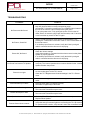
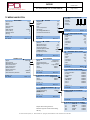
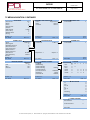
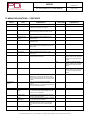
USER MANUAL 22” Healthcare LCD TV Model: PDI-CV2200 Better Solutions Are Within Reach® Communication Systems, Inc. 40 Greenwood Lane Springboro, Ohio 45066 PH: 937-743-6010 FX: 937-743-5664 http://www.pdiarm.com Document Number: PD196-171R2 Document Number: MODEL NUMBER: Better Solutions Are Within ReachTM CV2200 PD196-171R2 22” HEALTHCARE LCD TV USER MANUAL Page 2 of 24 Cables CAUTION RISK OF ELECTRIC SHOCK DO NOT OPEN! CAUTION: TO REDUCE THE RISK OF ELECTRIC SHOCK DO NOT REMOVE COVER (OR BACK) NO USER SERVICEABLE PARTS INSIDE REFER SERVICING TO QUALIFIED SERVICE PERSONNEL This lightning flash with arrowhead symbol within an equilateral triangle is intended to alert the user to the presence of uninsulated dangerous voltage within the product’s enclosure that may be of sufficient magnitude to constitute a risk of electric shock to persons. The exclamation point within an equilateral triangle is intended to alert the user to the presence of important operating and maintenance (servicing) instructions in the literature accompanying the product. WARNING: To reduce the risk of fire or electric shock, do not expose this apparatus to rain or moisture. WARNING: To prevent injury, this apparatus must be securely attached to the floor/wall in accordance with the installation instructions. WARNING: Do not install this equipment in a confined space such as a bookcase or similar unit. Connections to this device must be made with shielded cables with metallic RFI/EMI connector hoods to maintain compliance with FCC Rules and Regulations. Healthcare Grade Television The PDI Communications, Inc. series television is specifically designed for installation and use in a healthcare environment. The TV’s special design and safety features have been investigated by the Underwriters Laboratory and listed for use in Hospitals, Nursing Facilities, Dialysis Clinics, and similar healthcare services. SERVICING User Servicing If your product is not operating correctly or exhibits a marked change in performance and you are unable to restore normal operation by following the detailed procedure in its operating instructions, do not attempt to service it yourself as opening or removing covers may expose you to dangerous voltage or other hazards. Refer all servicing to qualified service personnel. Damage Requiring Service Unplug this product from the wall outlet and refer servicing to qualified service personnel under the following conditions: • When the power supply cord or plug is damaged. • If liquid has been spilled, or objects have fallen into the product. • If the product has been exposed to rain or water. • If the product does not operate normally by following the operating instructions. Adjust only those controls that are covered by the operating instructions as an improper adjustment of other controls may result in damage and will often require extensive work by a qualified technician to restore the product to its normal operation. • If the product has been dropped or damaged in any way. • When the product exhibits a distinct change in performance which indicates a need for service. Replacement Parts CAUTION: Do not block ventilation openings. Install in accordance with the manufacturer’s instructions. When replacement parts are required, be sure the service technician has used replacement parts specified by the manufacturer or have the same characteristics as the original part. Unauthorized substitutions may result in fire, electric shock, or other hazards. REGULATORY INFORMATION FCC Part 15 Safety Check This equipment has been tested and found to comply with the limits for a Class B digital device, pursuant to Part 15 of the FCC Rules. These limits are designed to provide reasonable protection against harmful interference in a residential installation. This equipment generates, uses and can radiate radio frequency energy and, if not installed and used in accordance with the instructions, may cause harmful interference to radio communications. However, there is no guarantee that interference will not occur in a particular installation. If this equipment does cause harmful interference to radio or television reception, which can be determined by turning the equipment off and on, the user is encouraged to try to correct the interference by one or more of the following measures: • Reorient or relocate the receiving antenna. • Increase the separation between the equipment and receiver. • Connect the equipment into an outlet on a circuit different from that to which the receiver is connected. • Consult the dealer or an experienced radio/TV technician for help. Upon completion of any service or repairs to this product, ask the service technician to perform safety checks to determine that the product is in safe operating conditions. Cleaning & Disinfecting • • • • Unplug the TV before cleaning. Use a soft damp cloth to clean. Do not use harsh chemicals such as solvents. Wipe off water droplets from the cabinet and screen as soon as possible, as they may leave spots. Modifications Any changes or modifications made to this device that are not expressly approved by PDI Communications, Inc may void the user’s authority to operate the equipment. PDi Communication Systems, Inc. 40 Greenwood Lane Springboro, Ohio 45066 USA PH 937-743-6010 FX 937-743-5664 Document Number: MODEL NUMBER: Better Solutions Are Within ReachTM CV2200 PD196-171R2 22” HEALTHCARE LCD TV USER MANUAL Page 3 of 24 IMPORTANT SAFETY INSTRUCTIONS 1. Read these instructions. 2. Keep these instructions. 3. Heed all warnings. 4. Follow all instructions. 5. Do not use this apparatus near water. 6. Clean only with dry cloth. 7. Do not block any ventilation opening. Install in accordance with the manufacturer’s instructions. 8. Do not install near any heat sources such as radiators, heat registers, stoves, or other apparatus (including amplifiers) that produce heat. 9. Do not defeat the safety purpose of the polarized or grounding-type plug. A polarized plug has two blades with one wider than the other. A grounding type plug has two blades and a third grounding prong. The wide blade or the third prong are provided for your safety. If the provided plug does not fit into your outlet, consult an electrician for replacement of the obsolete outlet. 10. Protect the power cord from being walked on or pinched particularly at plugs, convenience receptacles, and the point where they exit from the apparatus. 11. Only use attachments/accessories specified by the manufacturer. 12. Use only with the cart, stand, tripod, bracket, or table specified by the manufacturer, or sold with the apparatus. When a cart is used, use caution when moving the cart/apparatus combination to avoid injury from tip-over. 13. Unplug this apparatus during lightning storms or when unused for long periods of time. 14. Refer all servicing to qualified service personnel. Servicing is required when the apparatus has been damaged in any way, such as power-supply cord or plug is damaged, liquid has been spilled or objects have fallen into the apparatus, the apparatus has been exposed to rain or moisture, does not operate normally, or has been dropped. 15. This appliance should be mounted to a wall or ceiling only as recommended by the manufacturer. 16. Care should be taken so that objects do not fall and liquids are not spilled into the enclosure through openings. 17. If an outside antenna or cable system is connected to the video product, be sure the antenna or cable system is grounded so as to provide some protection against voltage surges and built-up static charges. Section 810 of the National Electrical Code, ANSI/NFPA 70 provides information with respect to proper grounding of the mast and supporting structure, grounding of the lead-in wire to an antenna discharge unit, size of grounding conductors, location of antenna-discharge unit, connection to grounding electrodes, and requirements for the grounding electrode. See Figure A. NOTE: This reminder is provided to call the CATV system installer’s attention to Article 820-40 of the NEC that provides guidelines for proper grounding and, in particular, specifies that the cable ground shall be connected to the grounding system of the building, as close to the point of cable entry as practical. PDi Communication Systems, Inc. 40 Greenwood Lane Springboro, Ohio 45066 USA PH 937-743-6010 FX 937-743-5664 Document Number: MODEL NUMBER: Better Solutions Are Within ReachTM CV2200 PD196-171R2 22” HEALTHCARE LCD TV USER MANUAL Page 4 of 24 TABLE OF CONTENTS Graphic Symbols .....................................................................................................................................................................................2 Warnings .................................................................................................................................................................................................2 Regulatory Information ...........................................................................................................................................................................2 Servicing ..................................................................................................................................................................................................2 Important Safety Instructions .................................................................................................................................................................3 Optional Accessories ...............................................................................................................................................................................5 Installation ..............................................................................................................................................................................................5 Pillow Speaker Connections ....................................................................................................................................................................6 TV Controls & Connections .....................................................................................................................................................................7 TV Controls ......................................................................................................................................................................................7 TV Connections ................................................................................................................................................................................8 Powering the TV ......................................................................................................................................................................................9 Programming the TV .............................................................................................................................................................................10 Pillow Speaker Sound Setup .................................................................................................................................................................11 Programming the TV’s FM Radio ..........................................................................................................................................................12 Troubleshooting ....................................................................................................................................................................................13 Cloning the TV – Saving Settings ...........................................................................................................................................................14 Cloning the TV – Restoring Settings ......................................................................................................................................................15 TV Menu Navigation .............................................................................................................................................................................16 TV Menu Navigation Continued ............................................................................................................................................................17 TV Menu Navigation Continued ............................................................................................................................................................18 TV Menu Explanations ..........................................................................................................................................................................19 TV Menu Explanations Continued .........................................................................................................................................................20 TV Menu Explanations Continued .........................................................................................................................................................21 TV Menu Explanations Continued.........................................................................................................................................................22 TV Menu Explanations Continued .........................................................................................................................................................23 Limited Warranty ..................................................................................................................................................................................24 PDi Communication Systems, Inc. 40 Greenwood Lane Springboro, Ohio 45066 USA PH 937-743-6010 FX 937-743-5664 Document Number: MODEL NUMBER: Better Solutions Are Within ReachTM CV2200 PD196-171R2 22” HEALTHCARE LCD TV USER MANUAL Page 5 of 24 OPTIONAL ACCESSORIES The following optional accessories are available for your PDI television. INSTALLATION LOCATION Locate a mounting position on the foot wall in front of the hospital bed. Other locations may be used depending upon the mounting means and room type. Healthcare televisions are normally mounted near the ceiling to provide needed clearance. Note: Ceiling mounted fluorescent lights and windows may produce unwanted glare and should be considered when selecting a mounting location. TV MOUNT The PDI Healthcare television utilizes a 75 mm VESA pattern. Selection of an appropriate mount will depend primarily upon the mounts, capacity and intended functionality. Install the TV as recommended by the mount’s manufacturer. CV2200 SPECIFICATIONS Weight: 10 lbs Mount: 75 mm VESA, 4 mm Thread Dimensions: 21” x 14” x 3 ½” (WHD) PDi Communication Systems, Inc. 40 Greenwood Lane Springboro, Ohio 45066 USA PH 937-743-6010 FX 937-743-5664 Document Number: MODEL NUMBER: Better Solutions Are Within ReachTM CV2200 PD196-171R2 22” HEALTHCARE LCD TV USER MANUAL Page 6 of 24 PILLOW SPEAKER CONNECTIONS PILLOW SPEAKER STYLES Control of the TV is possible using either a single-button Analog or multi-button Digital style pillow speaker (neither supplied with TV). TV PILLOW SPEAKER WIRING The PDI Healthcare television series utilizes the industry standard 3-wire interface via a ¼ inch stereo jack located on the back of the TV. Additionally, the TV employs a universal pillow speaker interface that can be configured to operate with many different model pillow speakers. Move the pillow speaker slide switch located next to the Pillow Jack to match the appropriate style pillow speaker. Refer to your nurse call system wiring instructions for the pillow speaker’s bed side connections. ANALOG DIGITAL PILLOW SPEAKER SELECTOR SWITCH SETTINGS CZ = Zenith CP = Phillips OFF = Disables Pillow Speaker CR = RCA PDi Communication Systems, Inc. 40 Greenwood Lane Springboro, Ohio 45066 USA PH 937-743-6010 FX 937-743-5664 Document Number: MODEL NUMBER: Better Solutions Are Within ReachTM CV2200 PD196-171R2 22” HEALTHCARE LCD TV USER MANUAL Page 7 of 24 TV CONTROLS & CONNECTIONS TV CONTROLS Standard TV controls are located on the TV’s lower left cabinet side. Basic control is provided. 1. TV/AV Switches the TV between various Enabled Sources. Press the button once to verify the current source. Press the button additional times to advance to the next active source. 2. CC Closed Caption (Sub-Title) control. Press the button once to verify the current Closed Caption mode. Press the button additional times to advance to the next Closed Caption Mode. 3. CH / Selects the next or previous channel. If a menu item is active, selects the next or previous menu item. 4. VOL / Increases or decreases the volume. If a menu item is active, adjusts the menu item’s settings. 5. POWER Turns TV On and Off. PDi Communication Systems, Inc. 40 Greenwood Lane Springboro, Ohio 45066 USA PH 937-743-6010 FX 937-743-5664 Document Number: MODEL NUMBER: Better Solutions Are Within ReachTM CV2200 PD196-171R2 22” HEALTHCARE LCD TV USER MANUAL Page 8 of 24 TV CONNECTIONS The PDI CV series televisions offer connection jacks for many different types of external devices such as DVD players, Game Boxes, and other similar devices. Connects are located along the side edge of the television. CLONE S-VIDEO COMPOSITE VIDEO Y/PB/PR AUDIO VGA AUDIO COMPONENT IN VGA HOUR METER HDMI ANT TV/FM EXT +5V MTI CCI PILLOW CR-OFF-CP-CZ USB port for Clone operation and updating the TV’s operational firmware. S-Video, L (Left channel sound), R (Right channel sound) inputs. Composite Video, L (Left channel sound), R (Right channel sound) inputs. Left and Right sound input jacks for Component IN. PC Audio Input jack. The TV’s internal speakers can be used for computer audio. Input for a Component signal, with Y, PB, & PR jacks. VGA Video input jack. The TV can be used as a computer monitor. Readout of hours the TV has been in use. HDMI signal jack. Input for the high quality HDMI signal. Connection for hospital Cable TV Coax cable. Maintenance port to supply +5V for TV diagnostics Multiple Television Interface jack. Use with external control boxes. NOTE: Do NOT connect to a hospital’s network as damage will result to the TV. Computer Control Interface jack. NOTE: Do NOT connect to a hospital’s network as damage will result to the TV. Pillow Speaker Jack. See PILLOW SPEAKER CONNECTIONS for details. Pillow Speaker compatibility switch. See PILLOW SPEAKER CONNECTIONS for details. PDi Communication Systems, Inc. 40 Greenwood Lane Springboro, Ohio 45066 USA PH 937-743-6010 FX 937-743-5664 Composite Video EXT +5V Document Number: MODEL NUMBER: Better Solutions Are Within ReachTM CV2200 PD196-171R2 22” HEALTHCARE LCD TV USER MANUAL Page 9 of 24 POWERING THE TV The TV offers power conservation features when the unit is turned Off and Idle (in standby). Two Standby Power modes are available: 1. LOW – TV is asleep and requires 15 seconds to wake up (Turn On). 2. NORMAL – TV is awake and can be turned On in a quick manner. 1. Turn the TV On. 2. Press the Setup button on the remote. 3. From the SETUP menu, select FEATURES. 4. In the FEATURES menu, select STANDBY POWER. SETUP MODE ▪ Service Level ▪ Picture ▪ Sound ▪ Channel Setup ▪ Features ▪ OSD Language ▪ Source Setup ▪ FM Radio Setup ▪ Cloning Position Exit: SETUP FEATURES ▪ Power On Caption Mode ▪ Auto Power On ▪ Power Management ▪ Bed A/B ▪ Caption Text Modes ▪ Digital Captions ▪ Digital Mode Time Setup ▪ Diagnostics ▪ Channel Up Power Off ▪ Power on ARC Mode ▪ Slot Standby Power ▪ Standby Power Position Exit: SETUP 5. Set Standby Power to the appropriate mode. PDi Communication Systems, Inc. 40 Greenwood Lane Springboro, Ohio 45066 USA PH 937-743-6010 FX 937-743-5664 Free English Next: Last Disabled Disabled A Disabled Disabled Last Disabled Low Next: Document Number: MODEL NUMBER: Better Solutions Are Within ReachTM CV2200 PD196-171R2 22” HEALTHCARE LCD TV USER MANUAL Page 10 of 24 PROGRAMMING THE TV Connect the TV to a Cable TV signal before proceeding. Programming is accomplished with a programming remote control. Verify the handheld remote control operates the TV. 1. Press the SETUP button on the remote. 2. From the SETUP menu, select CHANNEL SETUP. 3. In the CHANNEL SETUP menu, select SIGNAL. Set the signal to one appropriate to your healthcare facility. The possible choices are, Cable STD (Standard Cable TV); Cable IRC (Incrementally Related Carrier); Cable HRC (Harmonically Related Carrier); and Air (Antenna). 4. In the CHANNEL SETUP menu, select AUTO PROGRAM. 5. In the AUTO PROGRAM menu, select MODE. The TV can be set to search and locate different styles of TV signals; Analog Only, Digital Only, or both Analog and Digital channels. Select the style of signal. 6. In the AUTO PROGRAM menu, select CHANNEL SEQUENCE and select the manner in which channels are viewed. The possible selections are: Interleave A+D (Analog & Digital appear grouped together); All A then D (Analog appear firs, followed by Digital). 7. The ADDITIONAL DIGITAL SIGNAL selection allows for auto programming of a second block of channels using a different signal type. For example, first Auto Program the TV for CATV STD signals, then use the Additional Digital Signal set to AIR to provide a second auto programming of air type signals to be included in addition to the channels found during normal Auto Program searching into the same Service Level. 8. The TV offers 3 discrete groups of channels or SERVICE LEVELS. Free, Basic, or Premium can each be programmed and used as needed. Select the desired Service Level to program. SETUP MODE ▪ Service Level ▪ Picture ▪ Sound ▪ Channel Setup ▪ Features ▪ OSD Language ▪ Source Setup ▪ FM Radio Setup ▪ Cloning Free English Position Exit: SETUP ▪ ▪ ▪ ▪ ▪ ▪ ▪ ▪ ▪ Next: CHANNEL SETUP Signal Auto Program Add/Delete Channels Clear Service Level Copy Service Level Parental Control Power On Channel Channel Lock Channel Memory Override Cable STD Disabled Enabled Position Exit: SETUP AUTO PROGRAM ▪ Mode ▪ Channel Sequence ▪ Additional Digital Signal ▪ Free ▪ Basic ▪ Premium Next: Analog Only Interleave A+D None Programmed Blank Blank Position Exit: SETUP Next: CONFIRM AUTO PROGRAM ▪ Confirmation 9. Press the YES (Channel Up button) to begin Auto Programming or NO (Channel Down button) to exit. Auto Programming takes approximately 2 to 12 minutes. Exit: SETUP PDi Communication Systems, Inc. 40 Greenwood Lane Springboro, Ohio 45066 USA PH 937-743-6010 FX 937-743-5664 Yes No Document Number: MODEL NUMBER: Better Solutions Are Within ReachTM CV2200 PD196-171R2 22” HEALTHCARE LCD TV USER MANUAL Page 11 of 24 PILLOW SPEAKER SOUND SETUP Proper setup of the TV’s Sound is required for use with a wired Pillow Speaker. Setup involves disabling the TV’s internal speakers and then setting the audio level to the pillow speaker. 1. Press the setup button on the handheld programming remote control. ▪ ▪ ▪ ▪ ▪ ▪ ▪ SOUND Balance Minimum Volume Maximum Volume Power On Volume Internal Speaker Enable HDMI Audio Port Composite / S-Video Sound Mode Position Exit: SETUP 0 0 100 Last HDMI L+R Next: 2. From the SETUP MODE menu, select SOUND. 3. In the SOUND menu, select INTERNAL SPEAKER ENABLE. (Note: Pillow Speaker will always have sound coming from it.) 4. In the INTERNAL SPEAKER ENABLE menu, select the source you wish to enable/disable. For Television, select TV. 5. For Pillow Speakers with a thumb wheel volume control, in the SOUND menu, select MINIMUM VOLUME, and set the level to approximately 50% to provide a fixed level of sound for the pillow speaker to adjust. (Note: You may need to adjust this setting. Volumes may vary per speaker models.) ▪ ▪ ▪ ▪ ▪ ▪ ▪ ▪ SETUP MODE Service Level Picture Sound Channel Setup Features OSD Language Source Setup FM Radio Setup Position Exit: SETUP Free English Next: INTERNAL SPEAKER ENABLE NOTE: Pillow Speakers with dedicated Volume Up and Volume Down buttons do not require a Minimum Volume adjustment. ▪ TV ▪ Composite Video ▪ S-Video ▪ Component ▪ HDMI ▪ PC-ANALOG ▪ FM RADIO ▪ Slot 1 ▪ Slot 2 Position Exit: SETUP ▪ ▪ ▪ ▪ ▪ ▪ ▪ SOUND Balance Minimum Volume Maximum Volume Power On Volume Internal Speaker Enable HDMI Audio Port Composite / S-Video Sound Mode Position Exit: SETUP PDi Communication Systems, Inc. 40 Greenwood Lane Springboro, Ohio 45066 USA PH 937-743-6010 FX 937-743-5664 Speaker Enable Disable Disable Enable Disable Disable Enable Disable Disable Next: 0 0 100 Last HDMI L+R Next: Document Number: MODEL NUMBER: Better Solutions Are Within ReachTM CV2200 PD196-171R2 22” HEALTHCARE LCD TV USER MANUAL Page 12 of 24 PROGRAMMING THE TV’S FM RADIO Connect the TV to a Cable TV signal before proceeding. Verify the handheld remote control operates the TV. 1. Press the setup button on the remote. 2. From the SETUP MODE menu, select FM RADIO SETUP. (NOTE: If the FM Radio item is nonselectable, enable FM RADIO in the SOURCES menu first.) 3. In the FM RADIO SETUP menu, select AUTO PROGRAM. A confirmation screen will appear. 4. In the CONFIRM FM RADIO PROGRAM menu, press Channel Up on the remote to begin or Channel Down to abort. The TV will now search every available FM frequency and memorize frequencies that contain radio stations. NOTE: FM radio signals must be present on the coax input cable for the TV’s FM radio feature to work properly. ▪ ▪ ▪ ▪ ▪ ▪ ▪ ▪ ▪ SETUP MODE Service Level Picture Sound Channel Setup Features OSD Language Source Setup FM Radio Setup Cloning Free English Position Exit: SETUP Next: FM RADIO SETUP ▪ Auto Program ▪ Frequency ▪ Add/Delete 100.7 MHz Added Position Exit: SETUP Next: CONFIRM FM RADIO PROGRAM ▪ Confirmation Exit: SETUP PDi Communication Systems, Inc. 40 Greenwood Lane Springboro, Ohio 45066 USA PH 937-743-6010 FX 937-743-5664 Yes No Document Number: MODEL NUMBER: Better Solutions Are Within ReachTM CV2200 PD196-171R2 22” HEALTHCARE LCD TV USER MANUAL Page 13 of 24 TROUBLESHOOTING Problem CHECK • • No Picture and No Sound • • No Picture, Sound OK • Picture OK, No Sound • • • • No Sound from Internal TV Speaker Picture is too Light Ensure the TV is connected to a powered AC outlet. The TV’s front lamp will glow Red when correctly connected to power. Operate the TV directly by pressing the TV’s POWER button located on the side of the cabinet. The front lamp should glow green. Try to cycle power to the TV by pulling the power cord from the AC outlet, wait for 30 seconds, plug it back into the outlet, wait 15 seconds or more and then try to turn On the TV again. Verify TV is set to an active Video Source or set directly to TV by pressing the TV/AV button on the side of the TV or the TV/AV button on the remote control. If an Auxiliary Input Source is selected, verify the Video input signal cable is connected and the video source is playing. Verify the Sound has not been muted. Check the Volume settings. Verify pillow speaker is connected and the volume control on the pillow speaker is properly adjusted. If an Auxiliary Input Source is selected, verify the Audio input signal cable is connected and the video source is playing. • • Verify the sound has not been muted. Verify the TV’s internal speakers have not been disabled in the “Internal Speaker Enable” setup menu. • Check that external light sources, such as windows or overhead lights are not creating glare on the TV’s screen. Check the TV’s Brightness and Contrast settings in the TV’s Picture menu. • Picture is too Dark • Check the TV’s Brightness and Contrast settings in the TV’s Picture menu. Picture Breaks-Up or Jitters • • Verify the coax cable is connected correctly. The cable TV signal may be too weak. Picture has Ghost Images • • The cable TV signal may be too weak. The coax cable connection may be loose. Picture has Stripes or Dots • • The cable TV signal may be too weak. The coax cable connection may be loose. Pillow Speaker does not Control TV • • Check the TV’s Pillow Speaker Selector switch is correctly set. Replace Pillow Speaker. • • • Replace the remote’s batteries. Verify that strong fluorescent lights are not flooding the TV’s IR windows For patient remote controls, verify remote is set to the correct Bed Code. Remote Control does not work PDi Communication Systems, Inc. 40 Greenwood Lane Springboro, Ohio 45066 USA PH 937-743-6010 FX 937-743-5664 Document Number: MODEL NUMBER: Better Solutions Are Within ReachTM CV2200 PD196-171R2 22” HEALTHCARE LCD TV USER MANUAL Page 14 of 24 CLONING THE TV - SAVING SETTINGS The TV settings can be saved to a USB Flash Drive (user supplied) and then used to program another television. Please contact PDI should you require additional assistance. 1. Turn on the TV 2. Using the Programming Remote, press SETUP to open the SETUP MENU. 3. Press or to select CLONING. SETUP MODE ▪ ▪ ▪ ▪ ▪ ▪ ▪ ▪ ▪ Free Service Level Picture Sound Channel Setup Features OSD Language Source Setup FM Radio Setup Cloning English Position Exit: SETUP Next: 4. Press to open the CLONING MENU. 5. Insert a Blank USB thumb drive into the cloning port of the TV. CLONING Insert USB Flash Drive into TV Cloning Port. 6. Press Channel UP(Yes) to continue. Screen will go black and red LED light will flash. 7. LED light will stop flashing and turn green. TV will reboot and CLONING MAIN MENU will appear. 8. Pressto highlight the SAVE SETTINGS TO USB DISK. Press to select it and continue the cloning process. 9. Press or to highlight CV2200M in the SAVE SETTINGS TO USB menu. 10. Press to save the settings to the USB drive. The screen will go black and red LED light will flash. 11. LED light will stop flashing and turn green and TV will reboot. 12. CLONING MAIN MENU will reappear and will display the message “Successfully Saved.” 13. The Flash Drive can now be removed and used to program another television. Press Channel Up(Yes) to Continue. The TV requires 15 seconds to perform the Clone operation. Exit: SETUP CLONING MAIN MENU ▪ Download Firmware to TV ▪ Save Settings to USB Disk ▪ Restore Settings to TV Position Exit: SETUP SAVE SETTINGS TO USB Model CV2200M ▪ P19LCDC ▪ P19W ▪ P22LCDC_p ▪ P32LCDE ▪ P26LCDE ▪ P15X ▪ CV2200M ▪ CV2600M ▪ CV3200M ▪ CV3700M Position Exit: SETUP PDi Communication Systems, Inc. 40 Greenwood Lane Springboro, Ohio 45066 USA PH 937-743-6010 FX 937-743-5664 Next: Next: Document Number: MODEL NUMBER: Better Solutions Are Within ReachTM CV2200 PD196-171R2 22” HEALTHCARE LCD TV USER MANUAL Page 15 of 24 CLONING THE TV - RESTORING SETTINGS The TV settings can be saved to a USB Flash Drive (user supplied) and then used to program another television. Please contact PDI should you require additional assistance. 1. Turn on the TV 2. Using the Programming Remote, press SETUP to open the SETUP MENU. 3. Press or to select CLONING. SETUP MODE ▪ ▪ ▪ ▪ ▪ ▪ ▪ ▪ ▪ Free Service Level Picture Sound Channel Setup Features OSD Language Source Setup FM Radio Setup Cloning English Position Exit: SETUP Next: 4. Press to open the CLONING MENU. CLONING 5. Using the USB Flash Drive you saved the settings to in the “Cloning the TV – Save Settings”, insert the USB thumb drive into the cloning port of the TV. Insert USB Flash Drive into TV Cloning Port. 6. Press Channel UP(Yes) to continue. Screen will go black and red LED light will flash. The TV requires 15 seconds to perform the Clone operation. Press Channel Up(Yes) to Continue. 7. LED light will stop flashing and turn green. TV will reboot and CLONING MAIN MENU will appear. Exit: SETUP 8. Pressto highlight the RESTORE SETTINGS TO TV. Press to select it and continue the cloning process. 9. Press or to highlight CV2200M in the RESTORE SETTINGS TO TV menu. 10. Press to save the settings to the television. The screen will go black and red LED light will flash. 11. LED light will stop flashing and turn green and TV will reboot. 12. CLONING MAIN MENU will reappear and will display the message “Successfully Restored.” 13. The Flash Drive can now be removed and used to program another television. CLONING MAIN MENU ▪ Download Firmware to TV ▪ Save Settings to USB Disk ▪ Restore Settings to TV Position Exit: SETUP RESTORE SETTINGS TO USB Model CV2200M ▪ P19LCDC ▪ P19W ▪ P22LCDC_p ▪ P32LCDE ▪ P26LCDE ▪ P15X ▪ CV2200M ▪ CV2600M ▪ CV3200M ▪ CV3700M Position Exit: SETUP PDi Communication Systems, Inc. 40 Greenwood Lane Springboro, Ohio 45066 USA PH 937-743-6010 FX 937-743-5664 Next: Next: Document Number: MODEL NUMBER: Better Solutions Are Within ReachTM CV2200 PD196-171R2 22” HEALTHCARE LCD TV USER MANUAL Page 16 of 24 COLOR TEMPERATURE TV MENU NAVIGATION ▪ Service Level ▪ Picture ▪ Sound ▪ Channel Setup ▪ Features ▪ OSD Language ▪ Source Setup ▪ FM Radio Setup ▪ Cloning SETUP MODE PICTURE Free English Position Exit: SETUP Next: ▪ Brightness ▪ Contrast ▪ Color ▪ Tint ▪ Color Temperature ▪ Sharpness ▪ PC Analog/HDMI Picture ▪ Component Input Picture Position Exit: SETUP SOUND ▪ Balance ▪ Minimum Volume ▪ Maximum Volume ▪ Power On Volume ▪ Internal Speaker Enable ▪ HDMI Audio Port ▪Composite / S-Video Position Exit: SETUP CHANNEL SETUP ▪ Signal ▪ Auto Program ▪ Add/Delete Channels ▪ Clear Service Level ▪ Copy Service Level ▪ Parental Control ▪ Power On Channel ▪ Channel Lock ▪ Channel Memory Override Position Exit: SETUP Cable STD Disabled Enabled Next: 50 50 50 Next: 0 50 100 Last HDMI L+R Next: AUTO PROGRAM Analog Only ▪ Mode Interleave A + ▪ Channel Sequence None ▪Additional Digital Signal D Programmed ▪ Free Blank ▪ Basic Blank ▪ Premium Position Exit: SETUP Next: ADD/DELETE CHANNEL SERVICE LEVEL Programmed ▪ Free Blank ▪ Basic Blank ▪ Premium Position Exit: SETUP ▪ Standard ▪ Reddish ▪ Greenish ▪ Bluish ▪ Features Position Exit: SETUP R G B Next: PC ANALOG/HDMI PICTURE 6500 ▪ Temperature 50 ▪ Clock 50 ▪ Phase 16.9 ▪ ARC 50 ▪ H-Position 50 ▪ V-Position ▪ Auto Position Exit: SETUP Next: COMPONENT INPUT PICTURE 6500 ▪ Temperature 50 ▪ Clock 50 ▪ Phase 16.9 ▪ ARC 50 ▪ H-Position 50 ▪ V-Position ▪ Auto Position Exit: SETUP Next: INTERNAL SPEAKER ENABLE Speaker ▪ TV Disabled ▪ Composite Video Disabled ▪ S-Video Disabled ▪ Component Disabled ▪ HDMI Disabled ▪ PC-ANALOG Disabled ▪ FM RADIO Disabled ▪ Slot 1 Disabled ▪ Slot 2 Next: ADD/DELETE CHANNELS 2 ▪ Analog Channel Deleted ▪ Add/Delete Analog ▪Channel Enable/Disable Digital Channel Position Exit: SETUP Next: Position Exit: SETUP CONFIRM AUTO PROGRAM ▪ Confirmation Exit: SETUP Sample channel listing shown for illustrative purposes. Actual channel listing will vary. Next: Yes No ENABLE/DISABLE DIGITAL CHANNELS 7-1 WHIO HD Enabled 7-2 WHIO WX Enabled 16-1 16HD Enabled 16-2 16Again Enabled 16-3 16Life Enabled PDi Communication Systems, Inc. 40 Greenwood Lane Springboro, Ohio 45066 USA PH 937-743-6010 FX 937-743-5664 Document Number: MODEL NUMBER: Better Solutions Are Within ReachTM CV2200 PD196-171R2 22” HEALTHCARE LCD TV USER MANUAL Page 17 of 24 Position Exit: SETUP Next: TV MENU NAVIGATION- CONTINUED ▪ Service Level ▪ Picture ▪ Sound ▪ Channel Setup ▪ Features ▪ OSD Language ▪ Source Setup ▪ FM Radio Setup ▪ Cloning Position Exit: SETUP SETUP MODE Free English Next: FEATURES ▪ Power On Caption ▪Mode Auto Power On ▪ Inactive Power Off ▪(H:mm) Bed A/B ▪ Caption Text Modes ▪ Digital Captions ▪ Digital Mode Time Setup ▪ Diagnostics ▪ Channel Up Power Off ▪ Channel to other Sources ▪ Power on ARC Mode ▪ Standby Power ▪ Wireless Audio Position Exit: SETUP Last Disabled Disabled A Disabled Disabled Enabled Last Disabled Disabled ▪ Power on Source Position Exit: SETUP Position Exit: SETUP Default Default Default Default Default Default Default Next: DIGITAL MODE TIME STAMP Time Zone Eastern Daylight Savings On Next: SOURCE SETUP Enabled/No APO ▪ TV Disabled ▪ Composite Video Disabled ▪ S-Video Disabled ▪ HDMI ▪ PC ANALOG ▪ FM RADIO DIGITAL CAPTIONS ▪ Mode ▪ Font ▪ Size ▪ FG Color ▪ BG Color ▪ FG Opacity ▪ BG Opacity Disabled Disabled TV Next: Position Exit: SETUP DIAGNOSTICS ▪ Main Firmware VSN ▪ IO Firmware VSN ▪ Mpeg4 ▪ProIdiom ▪ Field Hours On ▪ Field Powered Hours Next: M1.14.2 K4.40 Unsupport ed Unsupport ed 7 33 Exit: SETUP FM RADIO SETUP ▪ Auto Program ▪ Frequency ▪ Add/Delete 100.7 MHz Added Position Exit: SETUP Next: CONFIRM FM RADIO PROGRAM ▪ Confirmation Exit: SETUP PDi Communication Systems, Inc. 40 Greenwood Lane Springboro, Ohio 45066 USA PH 937-743-6010 FX 937-743-5664 Yes No Document Number: MODEL NUMBER: Better Solutions Are Within ReachTM CV2200 PD196-171R2 22” HEALTHCARE LCD TV USER MANUAL Page 18 of 24 TV MENU NAVIGATION- CONTINUED SETUP MODE ▪ Service Level ▪ Picture ▪ Sound ▪ Channel Setup ▪ Features ▪ OSD Language ▪ Source Setup ▪ FM Radio Setup ▪ Cloning Position Exit: SETUP Free English Next: CHANNEL SETUP ▪ Signal ▪ Auto Program ▪ Add/Delete Channels ▪ Clear Service Level ▪ Copy Service Level ▪ Parental Control ▪ Power On Channel ▪ Channel Lock ▪ Channel Memory Override Position Exit: SETUP Cable STD Disabled Enabled Next: POWER ON CHANNEL ▪ Free ▪ Basic ▪ Premium Position Exit: SETUP Channel 12 Last Last Next: ▪ Free ▪ Basic ▪ Premium CLEAR SERVICE LEVEL Programmed Blank Blank Position Exit: SETUP Next: COPY SERVICE LEVEL To Basic ▪ From: Free Adjust From: Exit: SETUP CONFIRM CLEAR ▪ Confirmation Yes No Exit: SETUP CONFIRM COPY ▪ Confirmation Adjust to Next: Yes No Exit: SETUP PARENTAL CONTROL ▪ TV Rating ▪ MPAA Rating ▪ Advanced Rating Disabled ▪ Advanced Rating ▪Option Change Password Unblocked ▪ Aux. Block Sources Always ▪ Block Hour Disabled ▪ Parental Lock ▪ TV-Y ▪TV-Y7 ▪ TV-G ▪ TV-PG ▪ TV-14 ▪ TV-MA Position Exit: SETUP Position Exit: SETUP Next: TV RATING ALL FV L U U U U U U U U U U ▪G ▪ PG ▪ PG-13 ▪R ▪ NC-17 ▪X ▪ No Rating S V D U U U U U U U U Next: MPAA RATING Position Exit: SETUP U U U U U U U Next: CHANGE PASSWORD Enter Password ---- Confirm Password ---- Exit: SETUP PDi Communication Systems, Inc. 40 Greenwood Lane Springboro, Ohio 45066 USA PH 937-743-6010 FX 937-743-5664 Document Number: MODEL NUMBER: Better Solutions Are Within ReachTM CV2200 PD196-171R2 22” HEALTHCARE LCD TV USER MANUAL Page 19 of 24 TV MENU EXPLANATIONS Menu Item Explanation Sub-Item Explanation Setup Service Level 3 programmable Service Levels (banks of channels) plus a Disable service level. Picture Adjusts picture appearance. Sound Adjusts sound parameters. Brightness Adjust the brightness of the dark areas in the picture. 50% is the default value. Contrast Adjust the brightness of the light areas in the picture. 50% is the default value. Color Adjust the strength of the color in the picture. 50% is the default value. Tint Adjust the tint of the picture. 50% is the default value. Color Temperature Opens a sub-menu that provides adjustment to the color balance of the picture. Sharpness Adjust the amount of detail present in the picture. 50% is the default value. PC Analog/HDMI Picture Opens a sub-menu that provides adjustment to the picture when the TV is used in computer mode. Temperature: Color warmth of picture. Clock: Adjust the horizontal screen size. Phase: Removes horizontal noise. ARC: Selects the screen size ratios. H-Position: Move Picture left or right. V-Position: Moves Picture up or down. Auto: Automatically adjust picture. Component Input Picture Opens a sub-menu that provides adjustment to the picture when viewing a component signal. Temperature: Color warmth of picture. Clock: Adjust the horizontal screen size. Phase: Removes horizontal noise. ARC: Selects the screen size ratios. H-Position: Move Picture left or right. V-Position: Moves Picture up or down. ‘ Auto: Automatically adjust picture. Balance Moves sound between the Left and Right Speakers. Minimum Volume Sets a minimum sound level. The TV’s sound level cannot be adjusted below the minimum volume setting. The default value is 0. Maximum Volume Sets a maximum sound level. The TV’s sound level cannot be adjusted above the maximum volume setting. The default value is 100. Power On Volume Sets an initial sound level when the TV is first turned on. The default value is LAST. Internal Speaker Enable Opens a sub-menu that provide Disabling/Enabling the TV’s internal speakers. Items are shown in the default setting. TV Enabled Composite Video Enabled S-VIDEO Enabled Component Enabled HDMI Enabled PC-Analog Enabled FM Radio Enabled Slot1 Disabled Slot2 Disabled HDMI Audio Port Audio Ports HDMI, PC-ANALOG, and COMPONENT can be selected as an HDMI Audio port. Composite/S-Video Sound Mode Sets sound for Stereo (L+R), Left (L+L), or Right (R+R). PDi Communication Systems, Inc. 40 Greenwood Lane Springboro, Ohio 45066 USA PH 937-743-6010 FX 937-743-5664 Document Number: MODEL NUMBER: Better Solutions Are Within ReachTM CV2200 PD196-171R2 22” HEALTHCARE LCD TV USER MANUAL Page 20 of 24 TV MENU EXPLAINATIONS – CONTINUED Menu Item Explanation Sub-Item Explanation Programs different channels and sources into each of the 3 service levels Channel Setup Signal Sets the TV to tune 1 of 4 different signal styles: Air, Cable STD, Cable IRC, Cable HRC Auto Program TV automatically scans for active channels and memorizes them into the selected service level. Mode Scan for “Analog Only”, “Digital Only”, or “Ana- log and Digital” channels. Channel Sequence Set the sequence in which the TV displays channels. Interleave A+D, Analog and Digital appear grouped together. All A then D, Analog appear first, followed by Digital. Additional Digital Signal Provides a second auto search for channels using a different signal type. None Disabled Air Antenna Tuning Cable STD Standard Cable Cable IRC Incremental Related Cable Cable HRC Harmonic Relate Cable Free One of three different service levels (channel banks) used to hold different groupings of channels. Confirm Auto Program Begins the Auto Program process. Auto Program requires 2 to 12 minutes to complete. Basic One of three different service levels (channel banks) used to hold different groupings of channels. Confirm Auto Program Begins the Auto Program process. Auto Program requires 2 to 12 minutes to complete. Premium One of three different service levels (channel banks) used to hold different groupings of channels. Confirm Auto Program Begins the Auto Program process. Auto Program requires 2 to 12 minutes to complete. Analog Channel Selects the channel to be edited. Add/Delete Analog Channel Sets the indicated Analog channel to either “Deleted” or “Added”. Enable/Disable Digital Channel Displays a list of auto programmed Digital Channels. Each channel can be “Enabled” or “Disabled” for viewing. Add/Delete Channels Add or Delete Channels from a Service Level. Free Selects the Free service level edit menu. Basic Selects the Basic service level edit menu. Premium Selects the Premium service level edit menu. Erase the programmed channels from a service level. “Blank” indicates an empty service level. Clear Service Level Free Selects the Free Service level to Clear. Confirm Clear Confirmation Menu before clearing service level. Basic Selects the Basic Service level to Clear. Confirm Clear Confirmation Menu before clearing service level. Premium Selects the Premium Service level to Clear. Confirm Clear Confirmation Menu before clearing service level. Confirm Copy Confirmation Menu to before copying service levels. Copy an existing service level to a destination service level. Copy Service Level From: Sets the service level to be copied. To: Sets the service level to be programmed. PDi Communication Systems, Inc. 40 Greenwood Lane Springboro, Ohio 45066 USA PH 937-743-6010 FX 937-743-5664 Document Number: MODEL NUMBER: Better Solutions Are Within ReachTM CV2200 PD196-171R2 22” HEALTHCARE LCD TV USER MANUAL Page 21 of 24 TV MENU EXPLANATIONS – CONTINUED Menu Item Parental Control Explanation Sub-Item Explanation Control Access of TV and Movie content. TV Rating Displays a list of parental TV viewing levels and allows for Blocking or Unblocking of TV content. MPAA Rating Displays a list of parental Movie viewing levels and allows for Blocking or Unblocking of Movie content. Advanced Rating Digital TV content Rating levels listing menu. Advanced Rating Option Enable or Disable the Advanced Rating menu for digital TV content. Change Password Displays a menu and allows creation of a new parental password. Aux. Block Sources Enable or Disable the Aux. Block Source item to restrict program content inputted through the TV’s auxiliary inputs. Block Hours Sets the number of hours the parental lock is enabled. Parental Lock Enable or Disable the settings in the Pa- rental Control menus. TV displays a preset TV channel upon initial powering for each service level. Power On Channel Channel Lock Enable or Disable the Channel Lock feature. W hen Enabled the TV is locked to the last channel viewed. Prevents the TV from being tuned to any other channel or source. Disabled allows the TV to be tuned to other channels. Channel Memory Override Enable means the TV will tune to all possible channels. Disable means the TV can only be tuned to channels in the currently selected service level. Free TV powers on to this set channel number. Entering “Last” causes the TV to power on to the last channel viewed. Basic TV powers on to this set channel number. Entering “Last” causes the TV to power on to the last channel viewed. Premium TV powers on to this set channel number. Entering “Last” causes the TV to power on to the last channel viewed. Features Power on Caption Mode Sets the Caption mode TV when the powers On. Off = TV powers on with captions disabled. Last = TV powers on in last caption setting. Auto Power On TV remains in On condition and cannot be turned Off except by interrupting AC power. Power Management TV turns Off after a preset time of inactivity. Adjustable by 10 minute increments or Disable. Bed A / B TV Bed A or Bed B selectable IR codes for independent control of a single TV in a 2 television room. Patient remote is set to corresponding Bed code. Caption Text Mode Teletext function, Normally Disabled for US. PDi Communication Systems, Inc. 40 Greenwood Lane Springboro, Ohio 45066 USA PH 937-743-6010 FX 937-743-5664 Document Number: MODEL NUMBER: Better Solutions Are Within ReachTM CV2200 PD196-171R2 22” HEALTHCARE LCD TV USER MANUAL Page 22 of 24 TV MENU EXPLAINATIONS – CONTINUED Menu Item Explanation Sub-Item Explanation Features Digital Captions Customize the look of captions when tuned to a digital channel. Digital Mode Time Setup Timing information provided by Digital channels can be set to the specific Time Zone and also Daylight Savings. Diagnostics A display menu that provides a read- out of the TV’s internal operations. Channel Up Power Off When Enabled the TV shuts off when it reaches the highest channel. Channel to Other Sources When Enabled the External sources connected to the TV appear in the TV’s channel listing. If Disabled the External sources do not appear in the TV’s channel listing. Power on ARC Mode The TV can be set to turn On with a specific picture Aspect Ratio: Last, 4:3, 14:9, 16:9, and 16:9 Panorama. Slot Standby Power Enable or Disable Slot power to run externally connected options. Standby Power TV’s standby power can be set for Low power consumption or Normal. OSD Language The menu system On Screen Display language settings are English, Spanish, and French Sources The individual auxiliary input connectors on the back of the TV can be turned On or Off. The source can also be set to Auto Power Off (APO) after 5 minutes of a no signal condition. Mode Default or Custom. Custom enables additional menu items. Font Default, Style 0 thru Style 7 Size Default, Normal, Large, Small FG Color Foreground color: Default, W hite, Black, Red, Green, Blue, Yellow, Magenta, Cyan BG Color Background Color: Default, W hite, Black, Red, Green, Blue, Yellow, Magenta, Cyan FG Opacity Default, Solid, Translucent, Transparent, Flashing BG Opacity Default, Solid, Translucent, Transparent, Flashing Time Zone Sets the current Time zone to +0 (Newfound- land), Eastern, Central, Mountain, Pacific, Alaska, Hawaii. Daylight Saving Turns Daylight Saving On or Off. Field ON Hours Readout of the number of hours the TV has been turned On. Field Power Hours Readout of the number of hours the TV has been plugged into a powered outlet. IO Firmware VSN IO firmware version resident inside the TV. Main Firmware VSN Main firmware version resident inside the TV. TV Disabled, Enabled/APO, Enabled/No APO Composite Video Disabled, Enabled/APO, Enabled/No APO S-VIDEO Disabled, Enabled/APO, Enabled/No APO Component Disabled, Enabled/APO, Enabled/No APO HDMI Disabled, Enabled/APO, Enabled/No APO PC-ANALOG Disabled, Enabled/APO, Enabled/No APO FM RADIO Slot 1 Disabled, Enabled/APO, Enabled/No APO Disabled, Enabled Slot 2 Disabled, Enabled Power On Source Last, (Any Enabled Source) PDi Communication Systems, Inc. 40 Greenwood Lane Springboro, Ohio 45066 USA PH 937-743-6010 FX 937-743-5664 Document Number: MODEL NUMBER: Better Solutions Are Within ReachTM CV2200 PD196-171R2 22” HEALTHCARE LCD TV USER MANUAL Page 23 of 24 TV MENU EXPLAINATIONS – CONTINUED Menu Item Explanation Sub-Item Explanation Setup FM Radio Cloning FM Radio Setup menu Auto Program Automatic search for FM radio stations present on the connected coax cable. Frequency User selectable Frequency Add/Delete Add or Delete a Frequency Saving the TV’s settings to a USB Flash Cloning Main Drive to be used in programming Menu another television Utilizes items saved to the USB Flash Drive to program another television Download Firmware Updates TV firmware downloaded from to TV pdiarm.com Save Settings to USB Disk Saves TV settings to a USB Flash Drive to be used in programming another television Restore Settings to TV Uploads TV settings from saved to USB Flash Drive in “Save Settings to USB Disk” into another television PDi Communication Systems, Inc. 40 Greenwood Lane Springboro, Ohio 45066 USA PH 937-743-6010 FX 937-743-5664 Document Number: MODEL NUMBER: Better Solutions Are Within ReachTM CV2200 PD196-171R2 22” HEALTHCARE LCD TV USER MANUAL Page 24 of 24 Limited Warranty PDI Communication Systems Inc., (“PDI”) warrants, to the original purchaser only, that the CV2200 will be free from defects in materials and workmanship, under normal use, for 2 years from the date of original purchase. This warranty does not cover any other equipment that may have been included with PDI’s shipment of this product. After receipt of written notice of a defect or malfunction occurring during the warranty period, PDI will repair or replace goods returned to its Springboro, Ohio location, at its discretion, free of charge to the original purchaser, the whole or any component part of any product manufactured by PDI and found by PDI to be defective. As a condition to obtaining warranty service, written notification must be received by PDI within at least ten (10) days after defect is first observed. Repair of said product requires it to be shipped to the PDI factory in Springboro, Ohio. All shipments shall be F.O.B. Springboro, Ohio, and all shipping and freight charges to PDI’s factory shall be paid by the customer. This warranty shall not apply to any PDI products subjected to improper use, negligence or accident; nor to tampering, alterations, or repairs by others, without PDI’s specific prior written authorization. For information regarding authorized servicing and all other information pertaining to this warranty, please contact PDI COMMUNICATION SYSTEMS at 40 Greenwood Lane, Springboro, Ohio 45066 or phone 937-743-6010. This warranty gives specific legal rights and you may also have other rights which vary from state to state. PDI’s liability under this warranty is limited to repair or replacement of defective products and parts as provided above. PDI shall not be liable for incidental or consequential damages.* The warranty contained herein is in lieu of all other expressed or implied warranties, including any implied warranty of merchantability or fitness for any particular purpose. PDI neither assumes nor authorizes any person to assume, on its behalf, any other obligation or liability. *Some states do not allow the exclusion of limitation of incidental or consequential damages or a disclaimer of warranties implied by law, so the above limitation or exclusion may not apply. The information and technical data in this manual is believed accurate, but is not warranted and is subject to change without notice or obligation. ”PDI” and “Better Solutions Are Within Reach” are registered trademarks of PDI Communication Systems, Inc. Copyright © 2012 by PDI Communication Systems, Inc. All rights reserved PDi Communication Systems, Inc. 40 Greenwood Lane Springboro, Ohio 45066 USA PH 937-743-6010 FX 937-743-5664