1
14
Changing the Water Filter
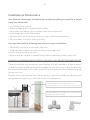
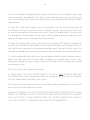
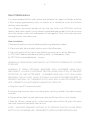
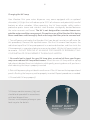
1. Lift top black cover back to front to remove. Turn off water supply then turn filter in
a half turn counterclockwise and pull up. Insert new filter and turn clockwise to fully
engage back into unit.
2. Turn water supply back on and dispense at least three (3) gallons of cold water.
This procedure will drain old water and flush new filter. If you see unflushed carbon
fines these may appear as black specks in the water and are not harmful, but may
not present well so consider additional flushing after inserting the new filter. It is also
suggested to sanitize both the hot and cold tanks similar to the new install procedure
every other filter change (12 months) as needed.
Turn counterclockwise left,
then lift to remove.
Insert new filter,
then turn clockwise
right to install
Replacement filter part
# 37MC235