1
2.2.5 CAM DISPLAY: when it is set at ON, the camera screen will be opened.
2.2.6 RETURN: to return to MAIN MENU.
2.3
CAMERA SETUP
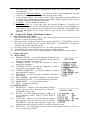
2.3.1 SLOW SHUTTER: frame accumulation with two
options Manual/Automatic. When camera screen is
opened under automatic state, ASS displays on screen.
2.3.2 BACK LIGHT: backlight compensation ON/OFF.
2.3.3 ICR SHOT: low shooting,ON/AUTO
2.3.4 IRIS: setup of automatic iris AUTO/MANU.
2.3.5 D-ZOOM: setup of digital zooming ON/OFF.
2.3.6 FOCUS: setup of automatic focusing AUTO/ MANU.
2.3.7 WB SET: setup of white balance. ATW / INDOOR /
OUTDOOR / ONEPUSH / AUTO / MANU
2.3.8 MENU OF CAM: blank
2.3.9 RETURN: return to MAIN MENU.
2.4 CONTROL SETUP
2.4.1 AUTO FLIP: 180° automatic flip of dome camera
ON/OFF.
2.4.2 ALARM: blank.
2.4.3 PRESET PIC: if image is followed when calling
preset point or making tour. FREEZE – when switching
scene to freeze image and to recover otherwise; MOVE
– when switching scene no image frozen.
2.4.4 HOME OPTION: enter the submenu of automatic home function.
2.4.4.1 AUTO HOME: when it is set at ON, home
function is available, namely, the dome camera will
return HOME if user has no action in a period of
time. The dome camera shall not return HOME if it
is on tour state. If no HOME is needed when the
dome camera is stopped, set the option at OFF.
2.4.4.2 HOME POS: HOME means return home. For
example to set one scene as HOME, call the scene first and set it as preset point, then
call out the menu to enter into this submenu, change figures after HOME POS into 5.
If automatic HOME function is needed, do not forget to set AUTO HOME at ON.
The preset points of HOME POS are from 1 to 63 and 65 to 128.
2.4.4.3 DWELL TIME: to set the time of automatic HOME, which means the camera shall
return HOME if it is not controlled in a period of time which can be from 1 to 99
minutes.
2.4.4.4 RETURN: return to the menu one level higher.
2.4.5 RETURN: return to MAIN MENU.
2.5 CAMERA MASK SET
2.5.1 MASK PRIVACY: blank.
2.5.2 MASK SHADE: blank.
2.5.3 MASK REGION: blank.
2.5.4 RETURN: return to Main Menu.
2.6 PROGRAM Options
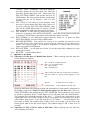
2.6.1 AUTO PAN START POS: To set start position of auto scan between two points. To
move the dome camera by joystick after entering and to return by CLOSE button.
2.6.2 AUTO PAN END POS: To set end position of auto scan between two points. To
move the holder by joystick after entering and to return by CLOSE button.
2.6.3 RUN AUTO PAN: Auto scan function between two points. First of all, you must set
the start position and the end position of auto scan. If the start position is just the end
position, it means 360° scan. The speed of auto scan has six grades: FAST / NORMAL
4