1
CONNECTING THE DVI FM1500
OPTICAL EXTENDER WITH RECORDABLE EDID
How to Connect the DVI FM1500 Optical Extender with Recordable EDID
STOP: Before continuing, connect one of included 5V DC power
supplies to the Receiver unit.
If EDID programming is required, then skip to the EDID
Programming Procedure on the next page.
1. Connect the Sender unit to the DVI source.
2. Connect the Receiver unit to the DVI display.
3. Connect the Sender unit and Receiver unit together using an SC-terminated
multi-mode (or single-mode) fiber optic cable.
IMPORTANT: In most cases the Sender module will not require a
power supply as long as the DVI source provides sufficient power
on pin 14 of the DVI connector. If you are unsure that the source
will supply enough power to the Sender unit, it is recommended that
the included power supplies be connected to both the Sender and
Receiver unit when powering the DVI FM1500 Optical Extender.
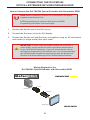
Wiring Diagram for the
DVI FM1500 Optical Extender with Recordable EDID
FIBER OPTIC CABLE
®
Sender
DVI Source
Receiver
DVI Display
GEF-DVI-FM1500
8