1
COFDM-PAL
1 CH
User manual
© Copyright, Televés S.A.
User manual
COFDM-PAL 1CH
INDEX
1.
Technical specifications . . . . . . . . . . . . . . . . . . . . . . . . . . . . . . . . . . . . . . . . . . . . . . . . . . . . . . . . . . . . . . . . . . . . . . . . . .
5
2.
Reference description . . . . . . . . . . . . . . . . . . . . . . . . . . . . . . . . . . . . . . . . . . . . . . . . . . . . . . . . . . . . . . . . . . . . . . . . . . . .
6
3.
Mounting . . . . . . . . . . . . . . . . . . . . . . . . . . . . . . . . . . . . . . . . . . . . . . . . . . . . . . . . . . . . . . . . . . . . . . . . . . . . . . . . . . . . . .
7
3.1 Wall mounting
7
..............................................................................
3.2 19” rack mounting
4.
5.
Element description
...........................................................................
8
.............................................................................
9
4.1. COFDM-PAL . . . . . . . . . . . . . . . . . . . . . . . . . . . . . . . . . . . . . . . . . . . . . . . . . . . . . . . . . . . . . . . . . . . . . . . . . . . . . . .
9
4.2. Power Supply Unit . . . . . . . . . . . . . . . . . . . . . . . . . . . . . . . . . . . . . . . . . . . . . . . . . . . . . . . . . . . . . . . . . . . . . . . . . . .
10
4.3. Launch amplifier . . . . . . . . . . . . . . . . . . . . . . . . . . . . . . . . . . . . . . . . . . . . . . . . . . . . . . . . . . . . . . . . . . . . . . . . . . . .
11
4.4. PCT 4.0 programmer . . . . . . . . . . . . . . . . . . . . . . . . . . . . . . . . . . . . . . . . . . . . . . . . . . . . . . . . . . . . . . . . . . . . . . . . .
12
How to use the product . . . . . . . . . . . . . . . . . . . . . . . . . . . . . . . . . . . . . . . . . . . . . . . . . . . . . . . . . . . . . . . . . . . . . . . . . . .
13
5.1. Main menu . . . . . . . . . . . . . . . . . . . . . . . . . . . . . . . . . . . . . . . . . . . . . . . . . . . . . . . . . . . . . . . . . . . . . . . . . . . . . . . . .
13
5.2. Extended menu . . . . . . . . . . . . . . . . . . . . . . . . . . . . . . . . . . . . . . . . . . . . . . . . . . . . . . . . . . . . . . . . . . . . . . . . . . . . .
17
5.3. Parameters saving . . . . . . . . . . . . . . . . . . . . . . . . . . . . . . . . . . . . . . . . . . . . . . . . . . . . . . . . . . . . . . . . . . . . . . . . . . .
20
6.
Typical applications
.............................................................................
21
7.
Norm for rack mounting . . . . . . . . . . . . . . . . . . . . . . . . . . . . . . . . . . . . . . . . . . . . . . . . . . . . . . . . . . . . . . . . . . . . . . . . . .
22
8.
Norm for gabinet mounting . . . . . . . . . . . . . . . . . . . . . . . . . . . . . . . . . . . . . . . . . . . . . . . . . . . . . . . . . . . . . . . . . . . . . . . .
24
A.
Channel tables
27
.................................................................................
3
User manual
COFDM-PAL 1CH
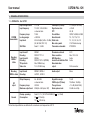
1.- TECHNICAL SPECIFICATIONS
1.1.- COFDM-PAL Ref. 557701
Input through losses:
Input frequency:
COFDM
demodulator
Decoding
MPEG-2
-Video
Decoding
MPEG-2-Audio
RF
output
General
SAW filter:
< 1.2 dB
174-230 / 474-858 MHz
or channel table
1 MHz
± 500 KHz
49 to 89 dBµV (-60 to -20 dBm)
(8K, 64 QAM, FEC 2/3)
Select. 7 - 8 MHz
VSWR input (75 ohm):
Signal/noise ratio:
FFT:
Constellation:
Guard interval:
Viterbi rate:
Max. rate symbol:
Transmission standard:
> 12 dB (46 - 862 MHz)
> 20 dB
2K, 8K
QPSK, 16 QAM, 64 QAM
1/4, 1/8, 1/16, 1/32
1/2, 2/3, 3/4, 5/6, 7/8
31.67 Msímbolos/seg
ETS300744
Input format 1:
Decoding:
Input format 2:
Decoding:
TS input rate:
Video rate:
MPEG-1
ISO/IEC 11172-2
MPEG-2
ISO/IEC 13818-2 (MP@ML)
Max. 90 Mbits/seg
1.5 to 15 Mbits/seg
Chrominance format:
Video resolution:
WSS Signaling:
Inserción de subtítulos PAL:
Base band video
output:
4:2:0
Max. 720 x 576
Active
Active
Input format:
Decoding:
MPEG-1, MPEG-2
LAYER 1, LAYER 2
Audio output:
Mono
Output frequency:
46 - 862 MHz
or channel table
250 KHz
80 dBµV ±5 dB (selec. SW)
Regulation margin:
VSWR output (75 ohm):
Through losses:
Band spurious level:
15 dB
10 dB min. 14 dB tip.
< 1.5 dB (46-862 MHz)
55 dBc min. 60 tip.
Frequency steps:
Locking margin:
Input level:
Frequency steps:
Maximum output level:
Preamp. powering:
Consumption:
Select. 0 / 12 / (24 NOT AVAILABLE) V
5V : 670 mA tip
15V : 420 mA tip.
The technical specifications are defined with a maximum room temperature of 40º C.
5
/ (< 50 mA)
RJ45 connector
User manual
COFDM-PAL 1CH
1 . 2.- Technical specifications Amplifier Ref. 5075
Amplifier
Frequency range:
Gain:
Regulation margin:
Output level (60 dB):
47 ... 862 MHz
45 ± 2 dB
20 dB
105 dBµV (42 CH CENELEC)
Connector:
Powering:
Consumption at 15 V:
Test socket:
“F”
15 V
800 mA
-30 dB
Maximum current
provided:
24V
18V
15V
5V
1 . 3.- Technical specifications Power Supply Ref. 5029
Power
supply
Mains voltage:
Output voltages:
230 ± 15 % V~
5, 15, 18, 24V
(0,55 A)
(0,8 A)
(4,2 A)(1)
(6,6 A)
(1) If you use 24V and/or 18V, you need to take the power consumed by these from the 15V power.
2.- REFERENCE DESCRIPTION
Ref. 557701
.... COFDM-PAL
(174 - 230 / 474 - 858 MHz)
Ref. 7234 .... Universal programmer
Ref. 5075
.... Amplifier
(47 - 862 MHz)
Ref. 5071 .... Wall support 10 mod + PSU.
Ref. 5029
.... Power Supply Unit (230 V~ ± 15 % - 50/60 Hz)
(24 V
- 0,55 A)
(18 V
- 0,8 A)
(15 V
- 4,2 A)(1)
(5 V
- 6,6 A)
Ref. 5239 .... Wall support T40/T50 12 mod + PSU.
Ref. 8250 .... Subrack 19’
Ref. 5301 .... 19” subrack
Ref. 5072 .... Universal cabinet
Ref. 5069 .... Cabinet of 14 modules + power supply unit
Ref. 4061 .... 75 ohm adapter load “F” DC block
Ref. 4058 .... 75 ohm adapter load “F”
Ref. 5073 .... Blank plate
Ref. 5334 .... Ventilation unit
Ref. 5301
Ref. 5072
Ref. 8250
6
User manual
COFDM-PAL 1CH
3 .- MOUNTING
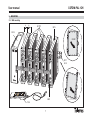
3.1.- Wall mounting
a
a
557701
5075
5029
CLICK!
COFDM-PAL
COFDM-PAL
DVB Sub
DVB Sub
COFDM-PAL
DVB Sub
COFDM-PAL
DVB Sub
PRGM
PRGM
PRGM
5071
5239
PWR
PWR
PWR
PWR
PWR
PWR
PWR
PRGM
TEST
(-30dB)
1
234025 00
234025 00
234025 00
234025 00
2
PC
105366
T4
.0
A
UN
IVE
B
RS
C
AL
4061
7234
7
User manual
COFDM-PAL 1CH
3.2.- 19” rack mounting
CLICK!
COFDM-PAL
COFDM-PAL
DVB Sub
DVB Sub
COFDM-PAL
DVB Sub
COFDM-PAL
DVB Sub
PRGM
PRGM
PWR
PWR
PWR
PWR
PWR
PWR
PWR
PRGM
PRGM
TEST
(-30dB)
5301
234025 00
234025 00
234025 00
234025 00
5073
8
User manual
COFDM-PAL 1CH
4. - ELEMENT DESCRIPTION
4.1.- COFDM-PAL
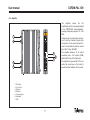
1.- BIII / UHF input + DC
2.- BIII / UHF output
3.- RF input
4.- RF output
5.- Programmer / PC connector
6.- Mains input
7.- LED
COFDM-PAL
DVB Sub
1
2
PRGM
5
PWR
6
7
COFDM-PAL
Indicate the programmed input channel
3
4
Product reference
Indicate the programmed output channel
The COFDM transmodulator turns a TV or
radio channel (chosen by the user) from the
existing channels in a terrestrial digital television multiplex (COFDM modulation and an
approximate bandwidth of 7/8 MHz) into a
VHF/UHF channel (PAL modulation and a
bandwidth of 7/8 MHz).
To do this, the unit carries out the COFDM
demodulation of the input channel (multiplex), obtaining an MPEG-2 TS signal
(MPEG-2 transport stream), to carry out the
subsequent modulation, according to the
standard, of the audio and video signals of
the selected program in any channel or frequency between 46 and 862 MHz.
The COFDM-PAL transmodulator disposes
of a BIII and UHF input and output in the
upper F connectors with the aim of enabling
the input signal to pass through to various
modules.
9
Ch
It also has an RF input and output connector
so as to be able to mix the output channel
for their subsequent amplification.
User manual
COFDM-PAL 1CH
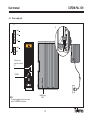
4.2.- Power supply unit
(1)
(1)
+ 18V
+ 5V
+ 24V
GND
N/C
PWR
PWR
Connectors to
power the modules
(1)
LED ON
NOTE:
The power supply unit can power a maximum of 5 COFDM-PAL modules.
MAINS input
230V~
10
PWR
PWR
PRGM
+ 15V
User manual
COFDM-PAL 1CH
4.3.- Amplifier
The
amplifier
carries
out
the
amplification of the channels generated
in the COFDM-PAL transmodulators,
covering a frequency range of 47 - 862
MHz.
1
2
It disposes of two input signal connectors to mix the channels coming from
two systems. If only one of the inputs is
used, it is advisable to load the unused
input with 75 ohm, Ref 4061.
TEST
(-30dB)
PWR
5
7
3
4
234632
1.- RF output
2.- Test socket
3.- RF Input
4.- RF Input
5.- Powering input
6.- Attenuator
7.- LED
11
6
The amplifier disposes of an output
connector and a Test socket (-30dB)
located at the top of the front panel.
The amplifier is powered with 15V via a
cable, the same type as that used to
power the other modules of this system.
User manual
COFDM-PAL 1CH
4.4. -Programmer PCT 4.0
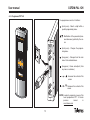
The programmer consists of 4 buttons:
: (short press) - Selects a digit within a
specific programming menu.
PCT 4.0
: Modification of the parameter (increases/decreases) pointed by the cursor.
UNIVER
SAL
CO
FDM
A
B
COFDM-PAL
DVB Sub
-PA
L
: (short press) - Changes the programming menu.
C
: (long press) - Changes from the main
menu to the extended menu.
Ch
105366
PWR
PRGM
: (long press) - Saves and adjusts (from
any menu or submenu).
234025 00
12
+
+
: Increases the contrast of the
screen.
+
+
: Decreases the contrast of the
screen.
NOTE: In order to program by means of the
hand programmer PCT 3.0 check
previous
manual
in
www.televes.com
User manual
COFDM-PAL 1CH
5. - HOW TO USE THE PRODUCT
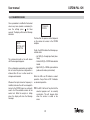
5.1.- MAIN MENU
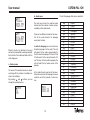
When the programmer connector is inserted
in the “PROG” socket of the front pannel the
first information displayed is the programmer version.
PCT 4.0
firmware
-----------Version 4.03
OUTPUT
Frequency:
471.25 MHz
Level: 00
The output frequency range is 47-862 MHz.
The output level control ranges from 00 to
99.
OUTPUT
Channel:21
(471.25 MHz)
Level: 99
To switch between frequency mode and
channel mode see 5.2. EXTENDED MENU.
b.- Input menu
Then the unit version and build number are
displayed:
Unit
Firmware
version:
V:3.04
a.- Output menu
The first main menu shows the output frequency/channel (depending on the freq.
mode) and the output level.
To change the frequency you must press
the
button until is located over the selected digit. By using
and
you can
modify the value of the digit. The following
decimal values are permitted for the output
frequency:
=> .00 MHz
=> .25 MHz
=> .50 MHz
=> .75 MHz
To modify the output channel and the output
level you must press
until the cursor is
situated over the desired parameter, the
value can be modified by pressing
and
.
13
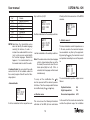
This menu displays the following input parameters: input frequency or input channel
(depending on the selected mode), bandwith
selection (7-8 MHz) and preamplifier power
supply (0, 12 or 24V).
Note: 24V not available
To modify a parameter you must press
until the desired parameter flashes on and
off. Then you can change the value using
and .
User manual
INPUT
Frequency:
474MHz 8MHz
Preamp: 12v
INPUT
-Ch: 21 8MHz
(474.00 MHz)
Preamp: 12v
Should a shortcut is detected in the input
connector (preamplifier powering enabled),
the front led of the module will blink until this
state disappears.
c.- Service menu
The name of the selected service is displayed along with the number of available services in the multiplex:
By pressing
and
buttons you can
change the selected service.
SERVICE
1/5
TVE 1
COFDM-PAL 1CH
d.- Audio menu
The list of languages that can be selected is:
The next menu shows the selected audio
channel (and the number of audio services
available) and the audio mode.
There are two different modes for the selection of the audio channel: for language
search and for index.
In audio for language you can choose two
favourite languages for the audio. The unit
will search for the audio correspondent to
the first selected language. If it doesn’t find
it it will search for the second favourite. If it
can’t find any of the favourite languages the
unit will select the first audio service of the
program.
In this mode the unit searches for the selected audio even when this language is broadcasted in one of the channels of a dual service.
AUDIO
Audio1: fin
Audio2: den
14
‘eng’
‘fra’
‘den’
‘nor’
‘spa’
‘ger’
‘swe’
‘fin’
‘ita’
‘dut’
‘por’
‘pol’
‘rus’
‘mdr’
‘hun’
‘jpn’
‘lit’
‘est’
‘ara’
‘scc’
‘cro’
‘ukr’
‘slo’
‘bel’
‘tur’
‘chi’
‘cze’
‘rum’
‘gre’
‘lav’
English
French
Danish
Norwegian
Spanish
German
Swedish
Finnish
Italian
Dutch
Portuguese
Polish
Russian
Chinese
Hungarian
Japanese
Lithuanian
Estonian
Arabic
Serbian (Latin 1)
Croatian
Ukrainian
Slovakian
Belarusian
Turkish
Chinese
Czech
Rumanian
Greek
Latvian
User manual
‘kor’
‘srp’
‘bul’
‘heb’
‘che’
‘mol’
‘slv’
‘tlh’
COFDM-PAL 1CH
Korean
Serbian (Cyrillic 1)
Bulgarian
Hebrew
Chechen
Moldavian
Slovenian
Klingon
NOTE: Sometimes the transmitted service
does not identify the audio language
correctly (for instance, it sends '---'
instead of an audio identifier such as
'eng'), so the receiver cannot identify
the selected language. Should this
happens, it is recommended to use
the manual mode to select the audio.
In Indexed Audio, the user selects the audio
service from the list of available audios for
the current program. We will have the following options:
- Indexed Audio:
AUDIO
Audio: 01/02
Audio mode:
R+L
It will be modulated on the respective auxi-
liary audio line (L+R)/2.
AUDIO
Audio: 01/02
Audio mode:
Right
R will be modulated on the auxiliary audio line.
AUDIO
Audio: 01/02
Audio mode:
Left
L will be modulated on the auxiliary audio line.
Note: If the audio service is dual (one language
on the L channel and another one on the
R channel) the user must select the suitable option (Right or Left). If R+L is
selected, both languages will be heard
simultaneously.
To carry out the modification the
key
must be pressed until the desired parameter flashes. Then the correspondent field can
be modified using the
and
keys.
e.- Monitor menu
This menu shows the following information:
estimation of the BER (bit error rate before
15
Viterbi) and the firmware version of the MPEG
decoder.
MONITOR >>
CBER: 2.4E-3
V.MPEG:
3.02
f.- Monitor menu 2
This menu indicates current temperature on a
1-10 scale, as well as the maximum temperature recorded at any time by the equipment.
By pressing the
key, the maximum is reset
and updated according to current temperature.
MONITOR
Now: 04
Max: 06
reset
The recommended operation ranges are as
follows:
Optimal function:
0-6
High temperature:
7-8
Excessive temperature: 9-10
In the event that the maximum recorded lies
outside the optimum range, the installation
User manual
COFDM-PAL 1CH
should be altered to bring down temperature.
Should the COFDM-PAL modules be in a Ref
5069 cabinet installed and the working temperature be over the optimal level, the installation of a ventilation unit Ref 5334 is strongly
recommended. To check whether this change has been successful, you can reset the
maximum and check temperature value after
a certain time.
16
User manual
COFDM-PAL 1CH
5.2.- EXTENDED MENU
By pressing the
key for more than three
seconds, you can access a series of options
that are less frequently used and that are
called extended menus.
a. Subtitles menu
The unit allows both DVB and teletext subtitling.
Two favourite languages can be selected for
the subtitles, so that if the first language is
not available it will choose the second one.
It is also possible to disable the subtitles.
The second favourite language can only be
selected when the first language has already
been enabled.
The selected language has preference over
the subtitling type.
SUBTITLES
Subt1: fin
Subt2: --Ttx subt:aut
If the service does not show the subtitles
automatically, you are requested to introduce the teletext page number where the subtitles are available.
The following options are possible for subtitling selection:
- Subt. OFF All subtitles disabled.
- Ttx Subt aut Only Ttx subtitlig, either auto
or user selected ttx page.
- DVB subt. DVB subtitling only
- DVB + Ttx DVB and TTX subtitling
(priority for DVB).
If the Ttx Subt option is enabled the user
can choose between “aut” mode (the unit
searches for the page of the teletext automatically) or selecting a page of the teletext
for the subtitles (usually page 888). This
page will only be displayed if the unit
doesn’t find the teletext subtitles for the
selected languages.
The list of available languages for subtitling
is the same as the audio list (see pages 14,
15).
b. Audio mode menu
In this menu the user can select the way the
unit handles the audio service. Two options
are possible: for language or for index.
- Language: two favourite languages can
be selected for the audio in the audio
menu. In this mode the unit automatically searches for the selected audio.
17
AUDIO MODE
Language
- Index: the audio is selected from the
available audios of the service. This
option can be used if the audio information is not properly broadcasted.
AUDIO MODE
Index
c.- Modulador menu 1
This menu shows the following parameters
of the output modulation: video modulation
depth (VMD), video to audio carrier ratio and
subcarrier ratio frequency in MHz.
MODULATOR>>
VMD: 72.0%
PictS 1: -12
Sound:5.5MHz
User manual
Video modulation depth: the possible
values for the video modulation depht are:
1. 68.5%
5. 79.0%
2. 72.0%
6. 80.0%
3. 75.5%
7. 81%
4. 77.0%
8. 82.5%
Video to audio carrier ratio: for the
carriers ratio there are 8 possible values between -11 and -18 dB.
Audio subcarrier frequency: this enables
us to comply with PAL B-G-H-I-D standards. For audio subcarrier frequency the
possible values that are selected 4.5, 5.5,
6.0 and 6.5 MHz.
To carry out a modification the
key must
be pressed until the selected parameter flashes. Then the correspondent parameter can
be modified by pressing the
and
keys.
d.- Modulator menu 2
This menu shows the following parameters:
audio level and video format.
COFDM-PAL 1CH
MODULATOR
S.Lev: -2
Letterbox
Audio level: the value displayed indicates
the necessary audio input level to get a
deviation of ±50KHz considering an input
signal of 1KHz. This means that -15 dBm
will generate a greater audio level than 7
dBm.
Audio input level (dBm)
7
5
3
1
0
-1
-2
-3
-4
-5
-7
-9
-13
-15
18
Video format: allows the selection of the
video mode for programs in 16:9 format.
Three possible modes are available:
- Pan & Scan: wide screen is scanned
and panned left and right to give a full
screen picture
- Letterbox: picture with black bars on
top and bottom of picture.
- Full Screen: the picture adapts to the
whole screen but its contents are
deformed.
To carry out a modification the
key must
be pressed until the desired parameter flashes. Then the parameter can be modified
just pressing the
and
keys.
e.- COFDM parameters menu
The parameters of the COFDM transmission
are displayed in this menu:
- FFT size (number of carriers): 8K-2K.
- Constellation (type of modulation):
QPSK - 16 QAM - 64QAM.
- Guard interval: 1/4, 1/8, 1/16 o 1/32
- Viterbi rate (coderate): 1/2, 2/3, 3/4, 5/6
o 7/8.
User manual
COFDM
8K - 64QAM
Guard: 1/32
CodeRate:3/4
COFDM-PAL 1CH
Table 3: M/N, Chile.
Table 4: France.
Table 5: Australia.
Table 6: Southafrica, K1 (8 MHz), I (Ireland,
8MHz).
Table 7: Former URSS and OIRT.
CONFIG
CDCAddr: 001
Mode:
Frecuency
CONFIG
CDCAddr: 001
Chan. table:
CCIR N.Z.Ind
The following channel tables are available:
Table 1: CCIR, New Zealand and Indonesia.
Italian channels.
Table 2: China, Taiwan and CCIR hyperband.
The last extended menu allows the selection of
the menus language (English/Spanish/
German).
LANGUAGE
f.- Configuration menu
Through this menu the address of the unit
can be selected (so that it could be controlled by the Headend Controller CDC, not
available in this reference).
From this menu you can switch between frequency and channel table mode.
h.- Language selection menu
To carry out a modification the
key must
be pressed until the desired parameter flashes. Then the correspondent parameter can
be modified by pressing
and .
g. Scan transponder menu
This menu allows the user to repeat the
exploration of the input signal, for example,
if the names of the services haven’t been
found. To force a new exploration just press
or .
SCAN TRANSP
Press or
to scan
again
This menu only appears when the unit is
hooked.
19
English
By pressing
or
different languages.
you switch between
Note: It is necessary for the unit to be locked onto COFDM so that the following menus can be selected:
- Audio menu
- Audio for language/index (audio
mode)
- Video format (letterbox, fullscreen...)
- Subtitles menu
User manual
COFDM-PAL 1CH
5.3.- PARAMETERS SAVING
Once a parameter is modified to the desired
value in any menu (normal or extended), to
save the settings press
for three
seconds. The display will show the following
indication:
Saving
settings and
restarting
...
The command should not be with drawn
until the message disappears.
If the configuration paremeters are modified
but not saved the previous configuration is
retrieved after 30 sec. in other words the
changes are discarded.
Whenever the input channel or frequency is
modified, and once the unit has managed to
lock onto the COFDM signal, an automatic
search of all the available services will be
carried out. While the analysis is taking
place, the display will show the following
message:
Processing
Channels
.
The time that this process will last depends
on the number of services in the COFDM
multiplex.
Finally, the LEDS indicate the following operational status:
- Left LED (A) = Enough input level (orientative).
- Central LED (B) = COFDM demodulator
locked.
- Right LED (C) = MPEG synchronization
(audio and/or video synchronized).
When the LEDs are ON indicate a correct
operation. If any of them is OFF it indicates
an abnormal operation.
TIP: The LED C will turn off any time that the
selected program can’t be correctly
synchronize. This will happen either
when the service is coded or has
errors.
20
User manual
COFDM-PAL 1CH
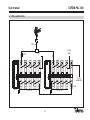
6.- TYPICAL APPLICATION
0/12V
DVB Sub
DVB Sub
75 ohm
4061
7428
0/12V
DVB Sub
DVB Sub
DVB Sub
DVB Sub
DVB Sub
DVB Sub
DVB Sub
To the
distribution
5075
5029
5 x 557701
5029
21
4 x 557701
User manual
COFDM-PAL 1CH
7.- NORMS FOR RACK MOUNTING (max. 35 COFDM-PAL - 7 subracks with 5 units in height - 8.7”)
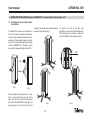
7.1.- Installation of the rack with ventilation facilities.
To facilitate the renewal and circulation of
the air in the rack and reduce the temperature of the units thereby improving their characteristics, it is advisable to place 2 ventilation units of 25W, particularly when the rack
with the COFDM-PAL is located in warm
place, with a temperature higher than 40°C.
the Rack. The air will enter again through the
lower part of the device, fig 3.
To mount the units in the rack with
ventilation, you must mount blank plates ref.
5073 between the modules to allow the
correct ventilation of the equipment, fig. 4.
b
DVB Sub
DVB Sub
DVB Sub
5073
Front
Subracks
fig. 1
fig. 2
These ventilators will be placed on a tray,
that is screwed onto the top part of the
Rack, fig. 1 and 2, so that they can extract
the air from the COFDM-PAL and expel it via
the gap (approx. 3-5 cm) at the top part of
fig. 3
22
fig. 4
User manual
COFDM-PAL 1CH
7.2.- Installation of the rack without ventilation facilities.
It is very important for this process to work
correctly, therefore the following must be
observed:
To install the units in racks without installation facilities, and when the rack is located
in a place with a temperature of around
40°C, it is advisable to place the rack completely open, in other words, do not use the
side doors. This is to facilitate the ventilation
of the units. The use of the blank plates ref.
5073 is optional, fig. 6.
- Do not open the side doors, as this would
cause the ventilators to extract air from
the outside rather than from the inside of
the rack.
- Do not place objects close to the rack
that may block the entry and exit points
of the air.
- If the rack is not complete, the subracks
must be placed from the top downwards
without leaving any gaps in between, fig 5.
DVB Sub
DVB Sub
DVB Sub
fig. 6
fig. 5
23
User manual
COFDM-PAL 1CH
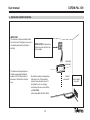
8.- NORMS FOR CABINET MOUNTING
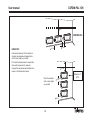
IMPORTANT
The scheme of recommended ventilation is the one in the figure in any case
of cabinet placement (horizontal or
vertical).
EXTRACTOR for forced ventilation must be onto the highest module.
Horizontal
placement
The maximum temperature permitted surrounding the highest
cabinet is 40ºC in both ways of
placement, horizontal or vertical
way.
Should the maximum temperature
indicator in any of the modules
(check "measurements menu 2")
be higher than 6, we strongly
recommend the use of ventilation
unit Ref. 5334.
(Only compatible with Ref. 5069)
24
Vertical
placement
Inferior grid in
any wall.
User manual
COFDM-PAL 1CH
1m
HORIZONTAL
0,2 m
0,2 m
IMPORTANT
Horizontal placement of the cabinets is
strongly recommended, hanging them
with as less height as possible.
If the horizontal placement is impossible,
then vertical placement is allowed.
Respect the recommended minimum distances in the attached schemes.
0,8 m
Place the cabinets
with as less height
as possible
Maximum T:
40ºC.
0,2 m
0,2 m
25
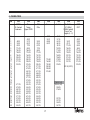
A.- CHANNEL TABLE
CH
0
1
2
3
4
5
6
7
8
9
10
11
12
13
14
15
16
17
18
19
20
21
22
23
24
25
26
27
28
29
30
Tab1
CCIRR
N. Zealand
Indonesia
48.25
55.25
62.25
175.25
182.25
189.25
196.25
203.25
210.25
217.25
224.25
471.25
479.25
487.25
495.25
503.25
511.25
519.25
527.25
535.25
543.25
Tab2
China
Taiwan
Hyper-CCIRR
49.75
57.75
65.75
77.25
85.25
168.25
176.25
184.25
192.25
200.25
208.25
216.25
471.25
479.25
487.25
495.25
503.25
511.25
519.25
527.25
535.25
543.25
551.25
559.25
607.25
615.25
623.25
631.25
639.25
647.25
Tab3
M/N
Chile
55.25
61.25
67.25
77.25
83.25
175.25
181.25
187.25
193.25
199.25
205.25
211.25
471.25
477.25
483.25
489.25
495.25
501.25
507.25
513.25
519.25
525.25
531.25
537.25
543.25
549.25
555.25
561.25
567.25
Tab4
France
Tab5
Australia
47.75
55.75
60.50
63.75
46.25
57.25
64.25
86.25
95.25
102.25
175.25
182.25
189.25
196.25
210.25
217.25
224.25
176.00
184.00
192.00
200.00
208.00
216.00
53.75
61.75
175.25
183.25
191.25
199.25
207.25
215.25
223.25
231.25
247.43 (247.5)
138.25 (5 A)
203.25 (9 A)
209.25
216.29
521.25
527.25
534.25
541.25
27
Tab6
South Africa
K1 (8Mhz)
I (8Mhz Ireland)
French Terr.
Angola (4….9)
Tab7
USSR
OIRT
49.75
59.25
77.25
85.25
93.25
175.25
183.25
191.25
199.25
207.25
215.25
223.25
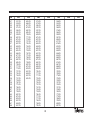
CH
Tab1
Tab2
Tab3
31
32
33
34
35
36
37
38
39
40
41
42
43
44
45
46
47
48
49
50
51
52
53
54
55
56
57
58
59
60
61
62
63
64
65
66
67
68
551.25
559.25
567.25
575.25
583.25
591.25
599.25
607.25
615.25
623.25
631.25
639.25
647.25
655.25
663.25
671.25
679.25
687.25
695.25
703.25
711.25
719.25
727.25
735.25
743.25
751.25
759.25
767.25
775.25
783.25
791.25
799.25
807.25
815.25
823.25
831.25
839.25
847.25
655.25
663.25
671.25
679.25
687.25
695.25
703.25
711.25
719.25
727.25
735.25
743.25
751.25
759.25
767.25
775.25
783.25
791.25
799.25
807.25
815.25
823.25
831.25
839.25
847.25
855.25
573.25
579.25
585.25
591.25
597.25
603.25
609.25
615.25
621.25
627.25
633.25
639.25
645.25
651.25
657.25
663.25
669.25
675.25
681.25
687.25
693.25
699.25
705.25
711.25
717.25
723.25
729.25
735.25
741.25
747.25
753.25
759.25
765.25
771.25
777.25
783.25
789.25
795.25
Tab4
Tab5
548.25
555.25
562.25
569.25
576.25
583.25
590.25
597.25
604.25
611.25
618.25
625.25
632.25
639.25
646.25
653.25
660.25
667.25
674.25
681.25
688.25
695.25
702.25
709.25
716.25
723.25
730.25
737.25
744.25
751.25
758.25
765.25
772.25
779.25
786.25
793.25
800.25
807.25
28
Tab6
Tab7
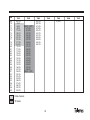
CH
Tab1
69
70
71
72
73
74
75
76
77
78
79
80
81
82
83
84
85
86
87
88
89
90
91
92
93
94
95
96
97
98
99
855.25
53.75
62.25
82.25
175.25
183.75
192.25
201.25
210.25
217.25
224.25
105.25
112.25
119.25
126.25
133.25
140.25
147.25
154.25
161.25
168.25
231.25
238.25
245.25
252.25
259.25
266.25
273.25
280.25
287.25
294.25
Tab2
303.25 (S21)
311.25
319.25
327.25
335.25
343.25
351.25
359.25
367.25
375.25
383.25
391.25
399.25
407.25
415.25
423.25
431.25
439.25
447.25
455.25
463.25 (S41)
Tab3
Tab4
801.25
807.25
813.25
819.25
825.25
831.25
837.25
843.25
849.25
855.25
861.25
Tab5
814.25
Italian channels
“S” bands
29
Tab6
Tab7
Guarantee
Televés S.A. offers a two year guarantee, beginning from the date
of purchase for countries in the EU. For countries that are not part
of the EU, the legal guarantee that is in force at the time of purchase is applied. Keep the purchase invoice to determine this
date.
During the guarantee period, Televés S.A. complies with the guarantee by repairing or substituting the faulty equipment.
The harm produced by improper usage, wear and tear, manipulation by a third party, catastrophes or any other cause beyond the
control of Televés S.A. is not included in the guarantee.
31
Red Comercial Nacional
A CORUÑA C.P. 15011
Gregorio Hernández 8.
Tfnos.: 981 27 47 31 /981 27 22 10
Fax: 981 27 16 11
[email protected]
ALMERÍA C.P. 04008
Campogrís 9.
Tfno.: 950 23 14 43
Fax: 950 23 14 43
[email protected]
BADAJOZ C.P. 06010
C/Jacobo Rodríguez,
Pereira, nº11-Oficina
Tfno.: 924 20 74 83
Móvil: 670 70 21 93
Fax: 924 20 01 15
[email protected]
BARCELONA C.P. 08940
C/ Sant Ferrán, 27
Cornellá - Barcelona
Tfnos.: 93 377 08 62 /93 474 29 50
Fax: 93 474 50 06
[email protected]
BILBAO C.P. 48150
Iberre kalea, mód. 16, pabellón 15-B
Sangroniz-Sondika
Tfnos.: 94 471 12 02 /94 471 24 78
Fax: 94 471 14 93
[email protected]
BURGOS C.P. 09188
C/Campanero, 3,
San Adrián de Juarros
Tfno.: 947 56 04 58
Móvil: 670 73 75 86
[email protected]
GIJÓN C.P. 33210
C/Japón, 14
Tfnos.: 985 15 25 50 /985 15 29 67
Fax : 985 14 63 89
[email protected]
LAS PALMAS C.P. 35006
Gral. Mas de Gaminde 26
Tfnos.: 928 23 11 22 /928 23 12 42
Fax: 928 23 13 66
[email protected]
LOGROÑO C.P. 26004
San Prudencio 19. bajo
Tfno.: 941 23 35 24
Fax: 941 25 50 78
[email protected]
MADRID C.P. 28005
Paseo de los Pontones 11
Tfnos.: 91 474 52 21 /91 474 52 22
Fax: 91 474 54 21
[email protected]
MÁLAGA C.P. 29006
C/ La Boheme 55
Pol. Ind. Alameda 2
[email protected]
MURCIA C.P. 30010
Polígono Conver - C/ Rio Pliego 22
Tfnos.: 968 26 31 44 /968 26 31 77
Fax: 968 25 25 76
[email protected]
P. MALLORCA C.P. 07007
Ferrer de Pallares 45. bajo D.
Tfno.: 971 24 70 02
Fax: 971 24 53 42
[email protected]
PAMPLONA C.P. 31007
Avda. Sancho el Fuerte 5
Tfno.: 948 27 35 10
Fax: 948 17 41 49
[email protected]
SEVILLA C.P. 41008
Pol. Ind. Store - C/ A-6. Nave 5
Tfnos.: 95 443 64 50 /95 443 58 00
Fax: 95 443 96 93
[email protected]
A CORUÑA
BILBAO
TENERIFE C.P. 38108
Avda. El Paso, 25 Los Majuelos- La Laguna
Tfnos.: 922 31 13 14 /922 31 13 16
Fax: 922 31 13 33
[email protected]
OURENSE
ZAMORA N
Miembro de número del
ER 224/1/94
NAVARRA
HUESCA
SORIA
BARCELONA
ZARAGOZA
SEGOVIA
SALAMANCA
GUADALAJARA
ÁVILA
OPORTO
LISBOA
CASTELLÓN
TOLEDO
CUENCA
CIUDAD REAL
VALENCIA
VIGO C.P. 36204
Escultor Gregorio Fernández, 5
Tfnos.: 986 42 33 87 /986 42 40 44
Fax: 986 42 37 94
[email protected]
ZARAGOZA C.P. 50002
C/ Monasterio de Alahón 1-3
Tfno.: 976 41 12 73
Fax: 976 59 86 86
[email protected]
CÓRDOBA
PALMA DE
MALLORCA
ALBACETE
BADAJOZ
VALENCIA C.P. 46022
Plaza Jordi San Jordi s/n
Tfnos.: 96 337 12 01 /96 337 12 72
Fax: 96 337 06 98
[email protected]
TARRAGONA
TERUEL
MADRID
CÁCERES
GIRONA
LA RIOJA
PALENCIA
ZAMORA
ALICANTE
JAÉN
BALEARES
MURCIA
GRANADA
HUELVA
SEVILLA
ALMERÍA
MÁLAGA
CÁDIZ
CANARIAS
SUCURSALES
TENERIFE
DELEGACIONES
CEUTA
LAS PALMAS
MELILLA
FÁBRICAS
Red Comercial Internacional
MAIA - OPORTO
Via . Dr Francisco Sa Carneiro. Lote 17.
ZONA Ind. MAIA 1. Sector-X MAIA.
C.P. 4470 BARCA
Telefono/Fax: 00 351 22 9478900
GSM: 00 351 968581614
[email protected]
Empresa
Registrada
BURGOS
LEÓN
VIGO
GUIPÚZCOA
ÁLAVA
ASTURIAS
TELEVES ELECTRONICA PORTUGUESA
Rúa B. de Conxo, 17
15706 SANTIAGO DE COMPOSTELA
Tel. 981 52 22 00 Fax 981 52 22 62
[email protected] www.televes.com
CANTABRIA
GIJÓN
LUGO
SANTIAGO
TELEVES ITALIA S.r.l.
S.op.Viale Liguria 24
20068 Peschiera Borromeo (MI) Italia
Tel.: (+39)-0251650604 (RA)
Fax: (+39)-0255307363
[email protected]
LISBOA
C.P. 1000 Rua Augusto Gil 21-A.
Tel.: 351 21 7932537
Fax: 351 21 7932418
[email protected]
TELEVES MIDDLE EAST FZE
P.O. Box 17199
JEBEL ALI FREE ZONE DUBAI,
UNITED ARAB EMIRATES
Tel.: 9714 88 343 44
Fax: 9714 88 346 44
[email protected]
TELEVES FRANCE S.A.R.L.
1 Rue Louis de Broglie
Parc d'Activités de l'Esplanade
77400 St Thibault des Vignes FRANCE
Tél.: +33 (0)1 60 35 92 10
Fax: +33 (0)1 60 35 90 40
[email protected]
TELEVES UNITED KINGDOM LTD
Unit 11 Hill Street, Industrial State
CWMBRAN, GWENT NP44 7PG.
(United Kingdom)
Tel.: 44 01 633 87 58 21
Fax: 44 01 633 86 63 11
[email protected]