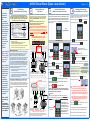
1
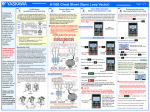
A1000 Cheat Sheet (Closed Loop Operation)
Step
The following
procedure is a
supplement to
other
documentation
supplied with this
equipment and will
guide the user in
properly wiring the
A1000, motor and
encoder. It will also
show the user how
to configure the
A1000 in closed
loop mode
operation using a
PG-X3 card for a
dedicated
applications.
1
A1000 Model
Identification and Mounting
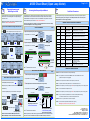
To make sure you received the correct model, it is
essential to verify the A1000 nameplate with your order
and make sure the A1000 has the correct rating so it can
be used with your motor. Please check the nameplate
information as shown in the example below.
Drive Spec Number
Drive Model
Number
Input Power
Rating
Normal /
Heavy Duty
Amps
Output
Power
Rating
Software
Version
Weight
Serial
Number
UL File
Number
·
·
·
Step
2
When installing the
system, be sure to
follow good wiring
practices and all
applicable codes.
Ensure that the
mounting of
components is
secure and that
the environment,
such as extreme
dampness, poor
ventilation, etc. will
not cause system
degradation.
Please read this
cheat sheet and
other
documentation
provided with the
A1000 thoroughly
before attempting
any installation.
The clearances to be maintained around the enclosure
for adequate ventilation.
·
The environmental specifications such as avoiding
excessive dampness, extreme temperatures, chemical
exposure, corrosive areas, etc. to avoid damage to the
equipment and to maintain safety.
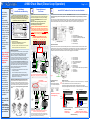
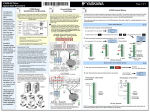
In this step the PG-X3 encoder feedback card is installed. WITH POWER OFF install the PG-X3 card as shown below. Make sure
to follow good wiring practices and all applicable codes. Ensure that the feedback card is grounded properly as shown in
fig. 3 item H.
This option card can be inserted into either the CN5-B or CN5-C connectors located on the drive’s control board. If only one option
card is connected to the drive, use the CN5-C connector. If two option cards are connected, use both CN5-B and CN5-C.
See the A1000 User Manual, Document No. SIEP C710606 21A, Section 3.5, for directions on removing the front cover.
DANGER; LETHAL VOLTAGES ARE PRESENT- Before
cover is fastened and all wiring connections are secure.
After the power has been turned OFF, wait at least five
minutes until the charge indicator extinguishes
completely before touching any wiring, circuit boards or
components.
WARNING DO NOT CONNECT ANY OF THE
FOLLOWING TERMINALS TO EARTH GROUND
B1
-
B2
+1
+2
A
B
C
D
E
F
G
+3
PG-X3 Option Card
Option Card Installation
In the case of systems with more than one A1000, follow
the above procedure for each A1000 and motor.
·
Install PG-X3 Feedback Card and wire encoder feedback
! applying power to the A1000, ensure that the terminal
Check that the available power will meet the input
power requirements.
Ensure that the output power from the A1000 is
compatible with the motor requirements.
The mounting of the A1000 is extremely important regarding
environment and accessibility. Depending on your system,
there are various models available and the mounting
dimensions (footprint) may be different. Because the
mounting procedure is fairly extensive, it is beyond the scope
of this document; the user is referred to the A1000 User
Manual (Document No. SIEP C710606 21A) received with
the A1000, Section 2.2 Mechanical Installation. Match the
model that you received and follow the procedure described
in the manual to ensure a safe and functional installation. In
cases where the system has more than one A1000, refer to
the proper clearances required for adequate ventilation.
Please pay particular attention to:
3
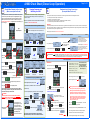
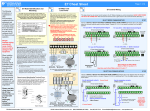
Fig.1 & 2 below show the electrical connections for the
input power and motor terminals for various A1000 models.
Select the proper diagram for the model you are installing
(see Step 1). WITH POWER OFF make the appropriate
connections.
Make sure to follow good wiring practices and all
applicable codes. Ensure that the equipment is
grounded properly as shown in fig. 1
(W/T3)
(T/L3)
(R/L1)
(U/T1)
(V/T2)
(S/L2)
A
B
C
D
E
F
G
H
I
J
K
L
To change
direction of
motor rotation
swap any two
of the three
motor leads
(See Step 2)
Connect to
chassis ground
Input
Protection
(Fuse or Circuit
Breaker)
L1 L2 L3
Connect
frame to
ground
Use L1, L2 for
Use L1, L2, L3 for
3Ø Induction
1Ø Input Power * 3Ø Input Power
motor
Fig. 1 Input Power and Output Motor Electrical Connections for
Models: 2_0004 - 2_0056, 4_0002 - 4_0044 and 5_0003 - 50011
Ground Lead
BUS TERMINALS:
DO NOT CONNECT TO GROUND
Improper removal of the A1000 terminal cover as well as
front cover can cause extensive damage to the A1000. To
avoid damage to these items, please pay particular attention
to the A1000 User Manual, Document No. SIEP C710606
21A, Section 3.5, Removing and Attaching the Terminal
Cover.
Encoder Power Supply
(Max. 200mA)
Select Encoder Power Supply
(IP + IG TB2) with Jumper CN3.
Encoder Connection
!
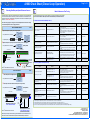
A single channel encoder can only be used in V/f + PG control mode (A1-02 = 1). It is required
to use a quadrature encoder in Flux Vector control mode (A1-02 = 3).
Connect Encoder (PG) signals to TB1 terminals of the PG-X3 card as shown below.
Connect power supply from the PG-X3 card (TB1 – Terminals IP and IG) to the Encoder (PG).
PG-X3 Terminals
TB2
Default
(R/L1)
(S/L2)
(V/T2)
(T/L3)
To change direction of motor
rotation swap any two of the
three motor leads
(See Step 2)
Connect to
chassis
ground
Input
Protection
(Fuse or Circuit
Breaker)
(W/T3)
(U/T1)
IP IG
IMPORTANT: Verify Encoder
Power Supply Rating
L1 L2 L3
SG a+ a- b+ b-
Use L1, L2 for
Use L1, L2, L3 for
3Ø Induction
1Ø Input Power * 3Ø Input Power
motor
Fig. 2 Input Power and Output Motor Electrical Connections for
Models: 2_0110 & Larger and 4_0058 & Larger
* Make sure the A1000 has been properly sized for single phase input
power. For best performance, the drive input supply voltage must be at
least equal to or greater than the motor rated voltage.
IP IG
z+ z+
-
SG a+ a- b+ b-
z+ z+
TB1
A+ A- B+ B- Z+ Z-
PG
Connect
frame to
ground
PG-X3 Terminals
TB2
TB1
Encoder
Power
+
Open Chassis
– Connector CN5-C
– Connector CN5-B
– Connector CN5-A
– Drive grounding terminal (FE)
– Insert connector CN5 here
– Option card
– Mounting screw
– Lead line Ground
– Use wire cutters to create an opening for cable lines
– Front cover
– Digital Operator
– Terminal cover
Fig. 3
NOT USED
Removing and Attaching the Terminal Cover
NEMA 1
– Terminal block TB1
– Ground terminal (installation hole)
– Jumper for PG power supply voltage (CN3)
– Terminal block TB2
– Model number
– Installation hole
– Connector (CN5)
Insert the PG-X3 card (connector CN5) into the matching CN5 connector on the A1000 control card. Next use the screws to fasten
the card into place. Connect one of the ground lead lines to the ground terminal with one of the screws. Two separate ground lead
lines have been included with the option card. Use the longer one when the option card is plugged into connector CN5-C on the
A1000 control card side and use the shorter one if the PG-X3 card is plugged into connector CN5-B.
DC Bus terminals
location varies by
model.
Mounting the A1000
Danger: Improper
wiring can and
will cause bodily
harm as well as
damage to the
equipment.
Step
Connect Motor and
Line Power
Page 1 of 3
SD FE
+
Encoder
Signals
SD FE
Encoder Signals
PG
Single Channel Feedback (A Only)
Set F1-37 = 0 (default)
Suitable only for
V/f with Feedback.
A+ A- B+ B- Z+ Z-
Encoder
Power
Quadrature / Dual Channel Feedback (A & B)
Set F1-37 = 1
(Required for FLUX Vector Operation)
Suitable for V/f or Flux Vector with Feedback.
PG-X3 Encoder Wiring