1
BOARD MOUNTING
The E240 can be adhered to plastic, glass, or any other dielectric panel with its peel-back
adhesive strip. You do not have to use the supplied panel if you would rather stick it on your own
panel. Here’s how to mount it:
1
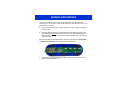
Place the plastic panel face down on a table; tape down the edges of the panel to the table
so it cannot move.
2
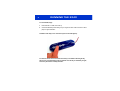
Remove the peel-back paper from the E240 PCB and adhere the E240 to the back of the
panel. Flex the E240 slightly while pressing down lightly on it to help eliminate trapped air.
Take care to flex the board only slightly to prevent the delicate SMT parts on the board from
cracking and failing.
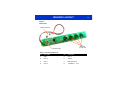
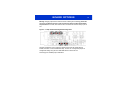
Tip: Line up the PCB with the alignment marks on the back of the slider panel. The PCB must
be positioned as shown below so that the keys line up with the graphics.
3
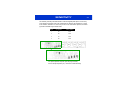
Un-tape the board from the table, and mount the four rubber feet as shown above to make
the E240 mechanically stable in use.
1