1
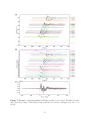
To start the GUI, run
ttpick.py 20110915.19310408.bhz.pkl -t -10 10 -s1
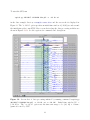
in the data example directory <example-event-dir> and the screen shot is displayed in
Figure 12. The ”-t -10 10” option specifies an initial time window of (-10,10) seconds around
the initial time pick to run ICCS. More screen shots along the data processing workflow are
shown in Figures 13-16. See the captions for commands and descriptions.
Figure 12: Screen shot of data processing initiated by running command "ttpick.py
20110915.19310408.bhz.pkl -t -10 10 -s1 -x -30 30". Initial time window Wa =
(−10, 10) s. The ”-x -30 30” option sets the time axis range to be (-30, 30) s. Seismograms are sorted by CCC.
23