1
II. Test printer
1. Check printer status to see whether it is normal or not, and check its mechanics
for smooth and any damage.
2. Print a test sheet on nozzle check to see if gaps appear on lines in the printout.
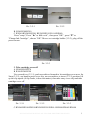
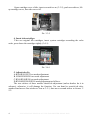
Pic. 2-1
Pic. 2-2, 2-3
3. If printer is alright, please print a picture to see the result.
Note: This system will not cause any damage on your printer.
II. Installation Procedures
1. Make the system ready
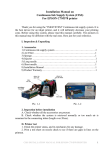
Put this system on the left side of printer, tidy up ink flow tubes (3-1-1), pull the
air balance plug out (3-1-2) and replace it with an air filter with the bigger side downwards (3-1-3).This is repeated for each air balance plug. Keep the air balance plugs for
future use.
Pic. 3-1-1
Pic. 3-1-2
Pic. 3-1-3
2. Move out cartridge holder:
A. R260/R265/R270
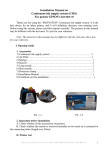
Press "cartridge change" button (3-2-1), move cartridge holder out to cartridge
change position, plug off power source (3-2-2).
2
INSTALLATION MANUAL ON CISS FOR PRINTER EPSON R270