1
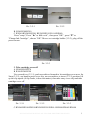
Open cartridge cover a little, insert screwdriver as (3-3-5), push screwdriver, lift
up cartridge cover, then take cover off.
Pic. 3-3-5
4. Insert ink cartridges
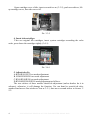
Take out original ink cartridges, insert system cartridges according the color
order, press down the cartridges tightly (3-4-1).
Pic. 3-4-1
5. Adjust tube fix
A.R260/R265/R270 no needs adjustment
B. R280/R285/R290 no needs adjustment
C.R360/R380/R390 no needs adjustment
D.RX560/RX580/RX590 needs adjustment as follows:
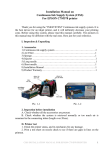
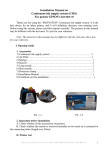
The two stickers of these models should do adjustment (unless dealers do it in
advance), otherwise, it will damage the function. Use one hand to scratch ink tube,
another hand mover first sticker to 2cm as 3-5-1, then move second sticker to 8cm as 35-2.
4
INSTALLATION MANUAL ON CISS FOR PRINTER EPSON R270