1
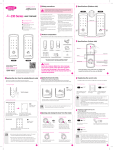
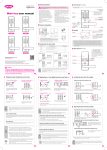
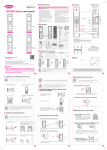
To Set/Release Double Security
Mute Mode Function
This function is any of the three numbers to authenticate after enter
registered secret code for exposure secret code to the other person
It is designed to be totally silent during operation so as not to disturb the neighbor
To set
1. Touch [Numeric Pad]
2. Press [#]
3. Enter Secret Code
4. Press [*]
_
Control the volume switch after open the battery cover
_ [0] = Mute(warning sound is keeping)
"bi"
[4] button : Realse
[6] button : Ste up
"bibi"
Press [Register]
button after open the
battery cover
Press [Register] button to
set up double security system
Press "6" button
[1] = Mids, [2] = High
"bi"
To Release Double Security from Outside
In case you accidentally double locking set on, it can be released
double locking mode from outside.
To release
1. Touch[Numeric Pad]
"bi"
[4] button : Realse
[6] button : Ste up
"bibi"
Press [Register]
button after open the
battery cover
Press [4] button
2. Enter Secret Code
3. Press [#]
"bi"
4. Enter secret code again
External Forced Locking Set/Release
5. Press [ ]
It makes strengthen security in case of long-term outing.
It will be alarming if operate the device indoor side.
Press [Register] button to
release double security system
The factory is not set up this function, please use after set up
External Forced
Locking Set
To Set Auto/Maual Locking
External Forced
Locking Release
The door is locked automatically or manually when the door closed
To Set/Release Double Locking
The [Manual/Auto] switch position
ishould be at [Manuall] or [Auto]
Double locking function is the door can not open from outside.
Maual Auto
- Auto Locking : Automatically locking the door within 3 seconds
after the door closed
Press [0] after touched
numeric pad in the locking
state.
Release
Double
Locking
Double
Locking Set
- Manual Locking : Press [Open/Close] button after closed the door
in manual mode
("bi~")
("biriri")
Turn [Manual Knob] to open
or press [open/close] button
Press [Doublelock]
button 3 seconds while the
door is closing
To Set/Release Volume
It can be control the beep volume when the door lock or unlock
It will release automatically if
using registered digital key or
smart tag and secret code from
outside
Warning/Emergency Sound Release
Remove out battery after opening the battery cover or touched
smart tag or enter secret code with press [*]
※The factory mode is original set(Release)
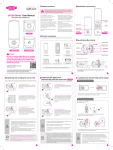
To Replace Battery
When replace the beep melody comes on
It will notice to replace the battery when those batteries getting
low voltage.
How to replace the battery
After the first beep is sounded, please replace all the batteries to
new batteries within 7 days.
- It will stop the system, if not change the batteries after the beep sounded
CAUSION
The battery life span may differ according to manufacturer,date of
manufacture, using environment
(AA, Alkaline 1.5V 4pcs, Lifes pan :10 ~12 months if 10 times to
use per day )
Please check the batteries every 6 months to see if the
batteries are leaking, in this case , the product will be damaged
It can not change secret code, digital key, smart card after
battery replacement beep is sounded until replace new battery.
To Use Emergency Power(Battery)
When it is time to replace the battery, and continue without replacing
the battery, the battery is discharged and the door lock not functioning
normally.
How to use emergency power
Purchasing square battery(6F22 / 9V),
- Using alkaline battery only
Human Body Detection Function Set/Release
To
Set
1. Press [Register]button
"bi"
"bi"
Press [Register] button
after open battery cover
2. Press [8]
"bi"
Press [Register] button
to end
Press [5] button
1. Press [Register] button
To
Release
3. Press [Register] button
Press [8] button
"bi"
Press [Register] button
to end
KDL-230S
Repare with fee
Free Repair
Same defect repeats 4times
Free Repair
Repare with fee
Replacement
Replacement
(will apply depreciation rate)
Can not repair by Manufacturer
No failure product
Consumer's
mistake and Consumer's error and carelessness
on purpose
Repair with fee
Wrong installation and other
No failure product
Consumer's error
and carelessness
Others
Consumer's error
and carelessness
Notice in danger state by alarm for 3 minutes due to remove out the
lock device by forced or breakage by abnormal way in door locked.
Re-install product by
door deflection or wrong
installation
Wrong battery inserted
Failure and damage
caused by natural
disasters such as fire,
flood, salt.
High Temperature Warning System
Requests check
whether over product
without apparent failure
symptoms
Product failure ordamage
due to the use of the
product other than
original purpose.
Due to water infiltration,
moisture condensation,
chemical injection, and in
case of a circuit failure
inside the product
Intrusion/Breakage Alarm Function
- If this system detect high temperatures, then it will activate an
alarm, and release door locking function to evacuate peoples
quickly(This function is basic system, therefore there is no setting or
releasing the function). It will activate at 60℃, it can vary depending on
the installation environment.
It will open the door within 5 seconds and alarm for 5 minutes
when it detect the high temperature(It will normal operation
when the temperature down normally).
Division
While contacting the external emergency
power terminal with a 9V(6F22) square
battry, enter the secret code or contact
smart card
Replacement
Within a year after purchase
Destroyed product
due to lost secret code
Product Specifications
KDL-230S
Within a month after purchase
General
Compensation
Consumer's Erro and Carelessness Detailes
"bi"
"bi"
Press [Register] button
after open battery cover
3. Press [Register] button
2.Press [5]
Fees
Within warranty Over warranty
Description
* The door can be opened/closed by only human hands due to capacitive touch type
Specification
Remarks
Power : DC6V
Operating Temperature
: -20 ~ 60℃
Sensor Activate : at 60℃
Front Ass'y
Back Ass'y
Strike
AL Alloy Diecasting
Smart Tag
4pcs
Battery
1.5V AA LR6 Alkaline 4pcs
About Product Warranty
Our warranty valadity is a year from product purchasing date.
We will charge you even warranty period if in case of repair with
charge( Service Call Charge + Royalties + Components Cost).
When you apply for a service, you should present the product warranty,
installation information listed.
If you don't have product warranty, you can replace purchase receipt,
card slips, cash receipt(Simplified receipt disapproval)
If it can not prove the date of purchasing, then it will be recognized by
date of manufacture + Expiration date(6 months)
Distance of Sensor : 2cm
Up to 50pcs Register
Battery life span is for 10 months
based on 10 times to use a day.
※The battery valadity can vary depending on batterymanufacturer, production date, using
environment andfrequency.
UNICOR HIGHTECH CO., LTD
62 EunCheong Street, Namdong-Gu, Incheon, Korea (zip : 405-817)
http://www.unicor.co.kr