1
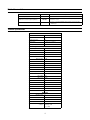
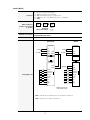
Communication type: RS485
Display (out): Terminal type: RJ11
Protocol: EZ95
Communication type: RS485
Terminal type: Screw
Wire size: 0, 14-2, 52 / AWG 26 - 14
Terminals (out):
Protocol: EZ95
Max. number of drops: 32
Max. distance: 4000 ft (1200 m)
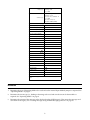
Input Module
Bus power required (5 VDC)
Max. operating voltage: 5.05 V
Min. operating voltage: 4.95 V
Max. current: 15 mA
Input power required (24 VDC)
Max. operating voltage: 36 VDC
Min. operating voltage: 18 VDC
Max. current: 90 mA
Min. current: 5 mA
Inputs per module:
8
Discrete fixed: 8
Discrete momentary: 8
BCD: 8
Binary: 7
Counter: 3 (min.)
Protection:
Polyswitch, 300 mA
Terminals:
Type: Screw
Wire size: 0, 14-2, 52 / AWG 26 - 14
Input impedance:
3600 ohms
Max. input voltage:
36 VDC
Min. input voltage:
18 VDC
Max. current draw:
3.5 mA (36 V)
Min. current draw:
4.1 mA (18 V)
1Only one power supply, 18 – 36 VDC or 24 VAC, can be used to power this
product.
Installation
1.
Determine the type of Operating Mode to be used and set the internal Input Module jumpers as required. See
“Operating Modes” on page 9.
2.
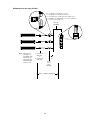
Determine the circuit type (i.e., Sinking or Sourcing) to be used and wire the circuit for the modules as
required. See “Operating Modes” on page 9.
3.
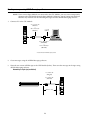
Determine the content of the messages to be displayed on the ALPHA sign(s). Then create the messages and
store them on the sign(s). See “Creating messages using ALPHA Messaging software” on page 23.
3