1
3 Interface design
The general layout corresponds to that of a standard Windows application with dropdown menus and a toolbar in automatic mode. In the sketches below, only four icons
are shown on the toolbar, but in fact there would be one for each menu option.
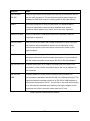
Menu items are described in the following table, and the subsequent section
provides some additional detail on the layout.
3.1 Menu items
Menu
Item
Description
Notes
File
New
Clears screen for new input.
Not available while test is running
Open
Dialog allows user to select an
existing test from the
database.
Not available while test is running
Save
Saves current test to the
database
Not available while test is running.
Instructions are validated before
saving, and if errors are found, the
save operation fails.
Import
Allows the user to read test
details from an external XML
file
Not available while test is running
Export
Allows the user to save the
current test as an external
XML file
Not available while test is running
Delete
Deletes current test from the
database and clears screen
If test has not previously been stored,
Delete has the same effect as Open
Exit
Closes the application
Not available while test is running.
User is prompted to save current test
if changes have been made
Validate
Check current sequence of
instructions against validation
rules
Only available if changes have been
made
Run
Runs the current test
Not available while test is running.
If changes have been made, the
instructions are validated before
running. If errors are found, the run
operation fails.
Stop
Interrupts the current run
Only available while test is running.
Brings the drive to a graceful stop
and disables.
Test
Log
Directory Allows the user to select a
directory for storing logfiles
105
Not available while test is running