1
7
Multiple State Lights
!
STEP 1
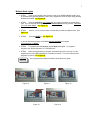
If you are not already in the program mode on the CS2000 Master Unit#1, do so
by simultaneously pressing buttons 1 and 7 on the keypad until all of the LEDs begin blinking.
Release the buttons. See Figure 10.
!
STEP 2
Press the Color Key twice rapidly that you want to program as a multiple state
light. If you do not hear two beeps, the CS2000 has accepted your key presses. Otherwise
you must repeat Step 2. See Figure 11.
!
!
STEP 3
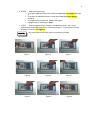
Press 2, 3, or 4, for the number of states that you want the LEDs to have. See
Figure 12.
!
STEP 4
Press the BUZZ key. See Figure 13.
ENTER
If you do not hear two beeps, the CS2000 has not accepted the program
You must return to Step 2.
!
STEP 5
To program other Color Keys, repeat Steps 2 through 4. To program a
sequence see “Doctor Sequence or Tech Sequence”.
!
STEP 6
When all programming is complete, simultaneously press 1 through 7 on the
keypad until all of the LEDs stop blinking. Release the buttons. You have now stored the
programs in memory. See Figure 14.
Any unprogrammed LEDs will default to slow blink/on/off lights.
Figure 10
Figure 11
Figure 13
Figure 12
Figure 14