
1
µC/USB Device User's Manual
the class demo application. In general, the class application initializes the class, creates a class
instance, and adds the instance to the full-speed and high-speed configurations. Refer to the
chapter(s) of the USB class(es) you purchased for more details about the USB class demos.
usbd_cfg.h
is a configuration file used to setup µC/USB-Device stack parameters such as the
maximum number of configurations, interfaces, or class-related parameters.
usbd_dev_cfg.c
and usbd_dev_cfg.h are configuration files used to set device parameters such
as vendor ID, product ID, and device release number. They are also necessary to configure the
USB device controller driver parameters, such as base address, dedicated memory base address
and size, controller’s speed, and endpoint capabilities.
Modify Device Configuration
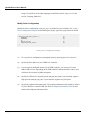
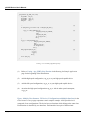
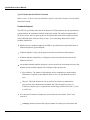
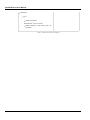
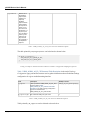
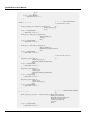
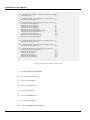
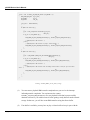
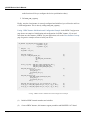
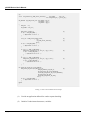
Modify the device configuration file (usbd_cfg.c) as needed for your application. See Listing Device Configuration Template in the Building the Sample Application page below for details.
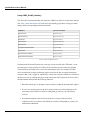
USBD_DEV_CFG USBD_DevCfg_Template = {
0xFFFE,
0x1234,
0x0100,
"OEM MANUFACTURER",
"OEM PRODUCT",
"1234567890ABCDEF",
USBD_LANG_ID_ENGLISH_US
};
(1)
(2)
(3)
(4)
Listing - Device Configuration Template
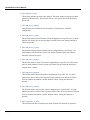
(1)
Give your device configuration a meaningful name by replacing the word “Template”.
(2)
Assign the Vendor ID, Product ID and Device Release Number. For development
purposes you can use the default values, but once you decide to release your product,
you must contact the USB Implementers Forum (USB-IF) at www.usb.org in order to get
valid IDs. USB-IF is a non-profit organization that among other activities, maintains all
USB Vendor ID and Product ID numbers.
(3)
Specify human readable Vendor ID, Product ID, and Device Release Number strings.
(4)
A USB device can store strings in multiple languages. Specify the language used in your
Copyright 2015 Micrium Inc.
25
















































































































































![Les blocs d`informations de la page d`accueil [v3]](http://vs1.manualzilla.com/store/data/006375479_1-e4094da53d9560c3a0eecb76542e7f0c-150x150.png)