1
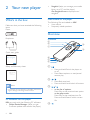
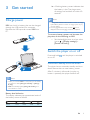
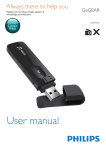
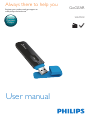
• Remove the cap to use the USB
connector for power charging and data
transfer
e Volume buttons
• Press: Increase/decrease the volume
• Press and hold: Increase/decrease the
volume quickly
f RESET
• Press the hole by using the tip of a
ball pen when the screen does not
respond to the pressing of keys
g
• 3.5-mm headphone connector
h MIC
• Microphone for voice recording
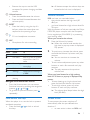
Home screen
Menu
Mode
Music
FM radio
To
play music
tune in to the FM radio;
record from the FM
radio
Recordings create or listen to
recordings
Folder view view files in folders
Settings
customize the settings
of MIX
Now
show current play screen
playing
»» All buttons except the volume keys are
locked and a lock icon is displayed.
Volume reminder
MIX can have you reminded when:
• the volume reaches the high level (80
dBA); or
• you have listened at a high volume level for
20 hours.
With the feature of volume reminder, the Philips
MP3/MP4 player complies with the European
Union regulations (EN 60950-1) in protecting
your hearing safety.
When you increase the volume,
1
2
•
Press the Volume Up button.
»» When the volume level reaches the
high level, a pop-up screen is displayed.
Play pauses.
To continue to increase the volume, press
and hold the Volume Up button until play
resumes.
»» You can continue to increase the
volume.
To exit volume adjustment, press any other
buttons or wait a few seconds until play
resumes.
»» The play resumes at the previous
volume level.
Navigate from the Home screen
• From the Home screen, you can access
functional menus by pressing the navigation
buttons
/ and .
• To go back to previous screens, press
repeatedly.
When you have listened at a high volume
level for 20 hours, a pop-up is displayed. Play
pauses.
• To keep listening at a high volume level,
press and hold the Volume Up button.
• To exit high volume, press any other
buttons or wait until play resumes.
»» The volume level drops below the high
level (80 dBA).
Lock/unlock the keys
Screen on/off
When the player is on, use the lock to prevent
accidental operation.
• Press and hold
/ to lock or unlock
the keys.
To save power, the screen switches off
automatically after the pre-defined time
duration if
• no new action is taken on MIX; and
EN
7