1
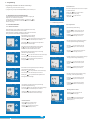
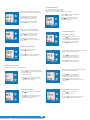
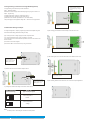
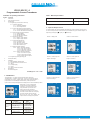
3.1.5.4 Elbow value of Input
ON O/P1 O/P2
COM
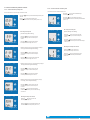
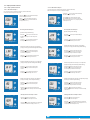
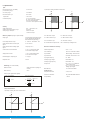
Enter New / Change Start value of Input, second digit entered,
prompting for third digit. (*Denotes that digit will be flashing).
INPUT
This screen appears only when Elbow function is enabled.
This screen allows the user to set the Elbow value of the Input.
The Elbow value of Input can be set beetween1.5% to 98.5% of Set End value of Input.
ON O/P1 O/P2
Pressing the “
Down” key will scroll the value of the
third digit from 0 through to 9, the value will wrap from 9
round to 0 depending on set value of End vale of Input.
A
*
COM
INPUT
Pressing “
Up” key will confirm the present value as
Elbow value of the Input and advance to the Output
parameter selection(section 3.1.6).
A
Ziegler PRO -I
Pressing the “
Down” key will enter the “New/Change
Elbow value of the Input edit” mode.
Pressing the “
Up” key will advance the operation to
the next digit and set the third digit, in this case to “5”.
Ziegler PRO -I
ON O/P1 O/P2
COM
Enter New / Change Start value of Input, third digit entered,
prompting for fourth digit. (* denotes that digit will be flashing).
INPUT
ON O/P1 O/P2
*
Pressing the “
Down” key will scroll the value of the
fourth digit from 0 through to 9, the value will wrap from
9 round to 0 depending on set value of End vale of Input.
A
Ziegler PRO -I
Pressing the “
Up” key will advance the operation to
the “New / Changed Start value of Input” and set the fourth digit,
in this case to “0”.
COM
(*Denotes that digit will be flashing).
INPUT
Pressing the “
Down” key will scroll the value of the
second digit from 0 through to 7, the value will wrap from 7
round to 0 depending on set value of End value of Input.
A
*
Ziegler PRO -I
ON O/P1 O/P2
COM
Pressing the “
Up” key will advance the operation to
the next digit and set the first digit, in this case to “4”.
New/changed Start value of Input confirmed.
Pressing the “
Down” key will re-enter to the
“New / Change Start value of Input edit” mode.
INPUT
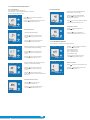
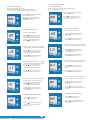
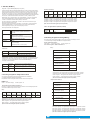
New / Change Elbow value of the Input
A
ON O/P1 O/P2
COM
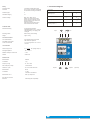
Enter New / Change Elbow value of the Input, second digit entered, prompting for
third digit. (*Denotes that digit will be flashing).
INPUT
Pressing the “
Up” key will confirm New Start value of Input
and advance to the Elbow function selection (section 3.1.5.3).
Pressing the “
Down” key will scroll the value of the
third digit from 0 through to 9, the value will wrap from 9
round to 0 depending on set value of End value of Input.
A
*
Ziegler PRO -I
Ziegler PRO -I
Pressing the “
Up” key will advance the operation to
the next digit and set the third digit, in this case to “1”.
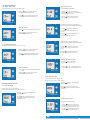
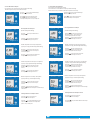
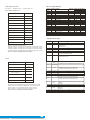
3.1.5.3 Elbow Function selection
This screen allows the user to enable or disable Elbow function of input.
ON O/P1 O/P2
COM
INPUT
Pressing the “
Down” key will enter the “Selection of Elbow
function of Input edit” mode and scroll the value between yes and no.
YES : Elbow function is enabled.
ON O/P1 O/P2
*
Pressing “
Up” key will accept the displayed condition and
advance to the Elbow value of Input selection(section 3.1.5.4)
or Output parameter selection(section 3.1.6).
Elbow Function of Input confirmation
Pressing “
Down” key will re-enter into Elbow function of
Input Edit mode.
INPUT
Pressing “
Up” key will confirm the displayed condition and
advance to the Elbow value of Input selection(section 3.1.5.4)
or Output parameter selection(section 3.1.6).
Ziegler PRO -I
6
|
16
www.ziegler-instruments.com
Pressing the “
Down” key will scroll the value of the
fourth digit from 0 through to 9, the value will wrap from
9 round to 0 depending on set value of End value of Input..
A
Ziegler PRO -I
Ziegler PRO -I
COM
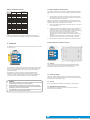
Enter New / Change Elbow value of the Input, third digit entered, prompting
for fourth digit. (* denotes that digit will be flashing).
INPUT
NO : Elbow function is disabled.
ON O/P1 O/P2
COM
ON O/P1 O/P2
COM
Pressing the “
Up” key will advance the operation to
the “New / Changed Elbow value of the Input” and set the fourth digit,
in this case to “0”.
New/changed Elbow value of the Input confirmed.
Pressing the “
Down” key will re-enter to the
“New / Change Elbow value of the Input”.
INPUT
A
*
Ziegler PRO -I
Pressing the “
Up” key will confirm New Elbow value of the Input
and advance to the Output parameter selection(section 3.1.6).