1
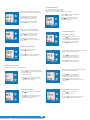
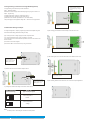
3.1.4. Output Type Selection
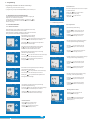
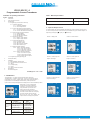
3.1.4.1 Output 1 Type selection
ON O/P1 O/P2
COM
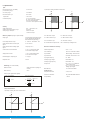
This screen allows the user to set the output 1 type as Voltage or Current.
(*Denotes that digit will be flashing).
INPUT
ON O/P1 O/P2
COM
Pressing the “
Down” key will enter the “output 1 type
edit” mode and scroll between voltage and current.
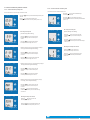
New / Change End value of Input
Pressing the “
Down” key will scroll the value of the
second digit from 0(2) through to1(7), the value will wrap from 1(7)
round to 0(2) for 1A(5A) CT secondary.
A
*
Pressing “
Up” key will confirm the present type for Output 1
and advance to the Output 2 type selection(section 3.1.4.2).
Ziegler PRO -I
O/P 1
Pressing the “
Up” key will advance the operation to
the next digit and set the second digit, in this case to “5”.
Ziegler PRO -I
ON O/P1 O/P2
ON O/P1 O/P2
COM
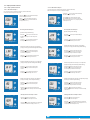
Output 1 Type confirmation
Pressing “
COM
INPUT
Pressing the “
Down” key will scroll the value of the
second digit from 0 through to 9, the value will wrap from
9 round to 0.
A
*
Down” key will re-enter into Output 1 type Edit mode.
Pressing the “
Up” key will set the type and advance to
the Output 2 type selection(section 3.1.4.2).
O/P 1
Enter New / Change End value of Input, second digit entered,
prompting for third digit. (*Denotes that digit will be flashing).
Ziegler PRO -I
Pressing the “
Up” key will advance the operation to the
next digit and set the third digit, in this case to “0”.
Ziegler PRO -I
ON O/P1 O/P2
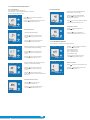
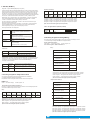
3.1.4.2 Output 2 Type Selection
*
COM
Enter New /Change End value of Input, third digit entered,
prompting for fourth digit. (*Denotes that digit will be flashing).
INPUT
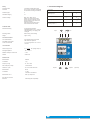
This screen allows the user to set the output 2 type as Voltage or Current.
ON O/P1 O/P2
COM
Pressing the “
Down” key will scroll the value of the
fourth digit from 0 through to 9, the value will wrap from 9
round to 0.
A
Pressing the “
Down” key will enter the “output 2 type
edit” mode and scroll between voltage and current.
Ziegler PRO -I
Pressing the “
Up” key will advance the operation to
the next digit and set the fourth digit, in this case to “0”.
Pressing “
Up” key accepts the present type for Output 2
and advance to the Input Parameter selection(section 3.1.5).
O/P 2
ON O/P1 O/P2
Ziegler PRO -I
COM
New/changed End value of Input confirmed.
Pressing the “
Down” key will re-enter to the
“New / Change End value of Input edit” mode.
INPUT
A
ON O/P1 O/P2
COM
Pressing the “
Up” key will confirm New End value of Input
and advance to the Start value of Input selection(section 3.1.5.2).
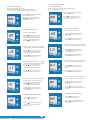
Output 2 Type confirmation
Pressing “
Down” key will re-enter into Output 2 type Edit mode.
Ziegler PRO -I
Pressing the “
Up” key will set the type and advance to
the Input Parameter selection(section 3.1.5).
O/P 2
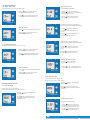
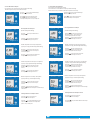
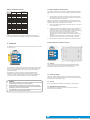
3.1.5.2 Start value of Input
Ziegler PRO -I
This screen allows the user to set the Start value of Input.
Start value of Input can be set up to 80% of End value of Input.
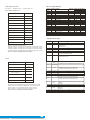
3.1.5. Input parameter selection
ON O/P1 O/P2
3.1.5.1 End value of Input
INPUT
This screen allows the user to set the End value of Input.
End value of Input can be set from 40% to 150% of set CT secondary value.
ON O/P1 O/P2
COM
COM
Pressing “
Up” key will confirm the present value as
Start value of Input and advance to the Elbow function selection
(section 3.1.5.3)
A
Pressing the “
Down” key will enter the “New/Change
End value of Input edit” mode.
Pressing the “
Down” key will enter the “New/Change
Start value of Input edit” mode.
Ziegler PRO -I
INPUT
A
Pressing “
Up” key will confirm the present value as
End value of Input and advance to the Start value of Input
selection(section 3.1.5.2).
ON O/P1 O/P2
COM
New / Change Start value of Input
(*Denotes that digit will be flashing).
INPUT
Ziegler PRO -I
**
A
Ziegler PRO -I
Pressing the “
Down” key will scroll the value of the
second digit from 0 through to 7, the value will wrap from 7
round to 0 depending on set value of End vale of Input.
Pressing the “
Up” key will advance the operation to
the next digit and set the second digit, in this case to “0”.
www.ziegler-instruments.com
5
|
16