1
Panel Programming
Panel Programming
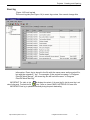
To determine the list of the panels, connected to your PC, you have to:
•
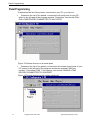
Determine the list of the panels, connected to all serial ports of your PC,
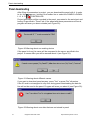
select in the left part of the program window "Controllers" and choose PANELS->FIND DEVICES CONNECTED TO ALL PORTS.
Figure 15 Search devices on all serial ports
•
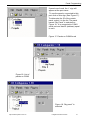
Determine the list of the panels, connected to the certain serial ports of your
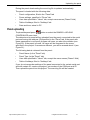
PC, select in the left part of the program window the desired COM port
number, "Controllers-COM 1" for instance, and choose PANELS->FIND
DEVICES CONNECTED TO COM PORT.
Figure 16 Search devices on the certain serial port
14
Integrated Technical Vision
http://www.itvsystems.com.ua