1
•
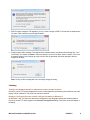
When the machine has finished receiving the file, run it in order to add the SS8 stones to the design
already containing the stones from the previous run.
Depending on the number of bling types used in the design and number of available feeders, you may
need to send bling more than once. You will be prompted if you exit before all bling has been sent to
machine.
Design management
Batch recording of designs
DesignWorkflow again allows you to batch record multiple designs via the Group Record function.
Due date field in Design Request form
Hiding the Due Date field from the DW design request form caused a crash when creating a new design
request or viewing an existing design request. The problem has been resolved.
Miscellaneous
Icon association on Vista and Win7
Icon association is now correctly displayed on Vista and Win7 systems when viewing medium, large and extra
large icons in Windows Explorer.
Desktop icons
Previously, desktop shortcuts sometimes have no icon association when software is installed over an earlier
build. This problem has been resolved.
Wilcom Workspace in Graphics mode
Wilcom Workspace is now available for selection via the Options dialog in Graphics mode.
Wilcom DecoStudio e2.0Q SP2 Update
6/08/2012
18