1
Making your own FPGA Design
The actual contents of the User FPGA on the HERON-FPGA4 are generated by the user.
While making this development requires some knowledge of Digital Design techniques, it is
made quite simple by the development environment that you use.
We recommend the Foundation ISE series software available from Xilinx, because that is
what we use at HUNT ENGINEERING, and any examples and libraries we provide are
tested in that environment. However there are other tools available from third parties that
can also be used. The use of VHDL sources for our Hardware Interface Layer and
examples means that virtually any FPGA design tool could be used. Any development tool
will eventually use the Xilinx Place and Route tool, where the user constraints file that we
supply will ensure that the design is correctly routed for the module. There are application
notes on the HUNT ENGINEERING CD that describe how other tools might be used.
The best way to learn how to use your development tools is to follow any tutorials provided
with them, or to take up a training course run by their vendors.
ALL NEW PROJECTS SHOULD START FROM ONE OF THE PROVIDED
EXAMPLES – that way all of the correct settings are made, and files included. Your design
should take place entirely within the User-Ap level, except in the case of needing to change
the I/O formats of the Digital I/Os in which case it is necessary to minimally edit the
top.vhd file – see a later section in this manual for details.
It is assumed that you are able to use your tools and follow the simplest of Digital Design
techniques. HUNT ENGINEERING cannot support you in these things, but are happy to
field questions specific to the hardware such as “how could I trigger my A/D from a DSP
timer?” or “How can I use the FIFO interface component to do….?”.
User_Ap Interface
This section describes the Interface between the User_Ap central module (or entity in
VHDL Jargon) and the external Interface hardware. This is the part where you connect
your FPGA design to the resources of the module.
In other words:
1.
The Clocks system
2.
How your application can communicate with the external world : Digital I/Os, HSB
interface, and FIFOs.
You need to understand this interface in order to properly connect your processing logic.
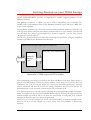
The complete FPGA project consists of a Top level in which many sub-modules (entities)
are placed (instantiated) and interconnected. One of these modules is User_AP: your
module.
The top-level and the other modules make the system work, but you do not have to
understand or modify them in any way.
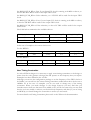
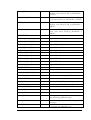
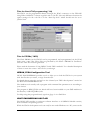
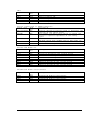
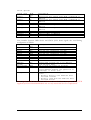
Let us see all of the Inputs/Outputs (Ports) of your User_Ap module:
Note that the names used for these ports are effectively “reserved” even if the user does not
connect to that signal. This means the user must be careful not to re-use the same name for
23
HUNT ENGINEERING HERON-FPGA4V USER MANUAL