1
D/C coupled
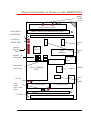
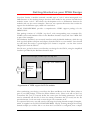
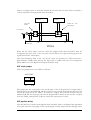
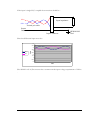
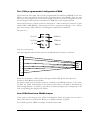
Optionally a D/C coupled input can be specified at build time.
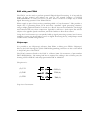
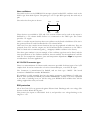
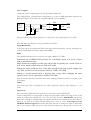
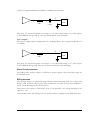
The standard D/C coupled input configuration is to have a 200R impedance between the
differential inputs. This results in a signal bandwidth of 0 to 500Mhz.
P+ 10R
I/P n+
I/P nGND
270R
1.0K
P10K
Ain+
Ain-
10R
10K
The ground pin of the input connector is connected to the ground plane of the PCB.
With this input configuration the performance should be :Input Bandwidth
In this case the A/D component defines the high and low frequency cut offs, resulting in an
analogue bandwidth of between 0Hz and 500MHz.
SNR
The AD9433 data sheet shows a worst case typical SNR of 57.7dB’s .
Production test of HERON-IO2s measure for a maximum spread of 8 levels of noise
with an unconnected input.
More detailed investigation of this noise shows that it typically has a mean square of
0.45 levels, which is equivalent to a SNR of 65.69dB
Adding the usual “inside the box” cable stubs provided with your system changes this
very little, to 0.46 levels (mean square) which is a SNR of 65.69dB
Adding a co-axial external cable to this has quite a large effect, changing the mean
square to be 4.3 levels, equivalent to a SNR of 55.89dB.
This shows the care that should be taken when making production cables to connect to the
A/D inputs.
Offset
The worst case offset is defined by the A/D component and the input biasing as +- 16
levels.
Input level
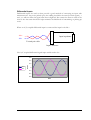
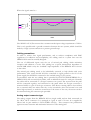
The Converter chip defines the input level as 2V peak to peak (differential).
In this configuration it is important to keep the signal inputs within the range of the A/D,
which is between 0v (GND) and +5V. For the A/D converter AD9433-125, this means
that when using D/C coupled inputs the signals should have a common mode DC offset of
about 4v. i.e each of the inputs should swing from +4.5V to +3.5V with respect to the
HERON-IO2 Gnd signal.This means that there must be a connection made to the GND
pin on the analogue input connector. Care should be taken when doing this to prevent any
51
HUNT ENGINEERING HERON-IO2 USER MANUAL