1
HP4402.book : chapter3.fm
18 Tue Apr 22 15:20:23 1997
Menu Reference
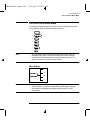
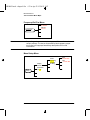
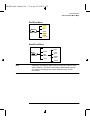
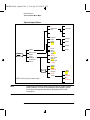
Front Panel Menu Reference "System/Inputs" Menu
■
Filter Off On
Press this softkey to toggle the filter value on or off. The
default is “On”. The filter value is set using Filter .
■
■
Filter
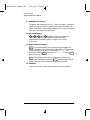
Press this softkey to enter the filter length. The filter is used
to reduce noise, obtain the desired resolution and to reduce
jitter in the measurement results. Use the
and
hardkeys to change the value. The default value is “AUTO”.
Filter Off On is automatically set to “On” when a value is
entered using Filter . Refer to “Setting Averaging”, on
page 2-26 for further information.
Duty Cycle Off On
■
Press this softkey to toggle the duty cycle value on or off. The
default is “Off”. The duty cycle value is set using
Duty Cycle .
Duty Cycle
■
Press this softkey to set the duty cycle for the pulse power
measurement feature of the power meter. A value in the range
of 0.001% to 100% can be entered. The default value is 1.000%.
Use the
,
,
and
hardkeys to change the
value. To confirm your choice press % . Duty Cycle Off On
is automatically set to “On” when a value is entered using
Duty Cycle . Refer to “Measuring Pulsed Signals”, on
page 2-28 for further information.
Offset Off On
■
Press this softkey to toggle the channel offset value on or off.
The default is “Off”. The offset value is set using Offset .
Offset
■
3-18
Press this softkey to enter a channel offset in the range of
-100 dB to +100 dB. The default value is 0 dB. Use the
,
,
and
hardkeys to change the value. To confirm
your choice press dB . This offset can be used to compensate
for a loss or gain. The offset is applied to the measured power
before the result is displayed. Offset Off On is
automatically set to “On” when a value is entered using
Offset . Refer to “Setting Channel Offsets”, on page 2-24 for
further information.
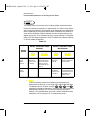
Range (HP E-series power sensors only)
Press this softkey to set the range in which you require the
power meter to make the power measurement or set the power
HP EPM-441A User’s Guide