1
6. C h a n n e l M a n a g e m e n t :
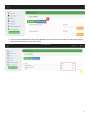
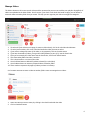
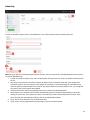
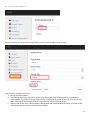
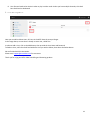
Select the Channel as is shown in the image above in order to make changes to your Channel.
From the above image we see we can:
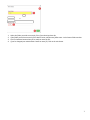
A. Change the Channel Name
B. Select the Default Playlist. The Default Playlist is the Playlist that Loops infinitely while the Scheduler is in
Looping Mode. If you want to change Playlists while in Looping Mode, you MUST turn the MiTV off, then on
again, switching the MiTV Stopped button to MiTV Started, by clicking on the button.
C. Channel State allows you to switch between Looping Mode and Scheduled Mode. As above, you need to stop
and start the Channel in order to switch between modes.
13