1
HP SURESTORE
USER MANUAL
2
Getting Started
HP SureStore does not need to be installed on your computer. The software runs
directly from your HP PMD.
1. Navigate to your PMD by clicking My Computer in Windows XP or Computer in
Windows Vista
2. Double-click the HP SureStore application icon.
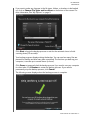
3. The first time you use HP SureStore, you need to agree to the End User License
Agreement (EULA) by clicking the Accept button.
4. Each time you start HP SureStore, it automatically checks for a software update.
To turn off this feature, see “Turning Off Automatic Updates” on page 10.
GETTING STARTED – 2