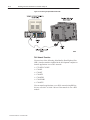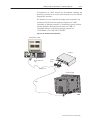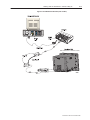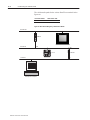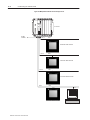
1
Allen-Bradley PanelView e Transfer Utility (Cat. No. 2711E–ND7) User Manual Important User Information Because of the variety of uses for the products described in this publication, those responsible for the application and use of this control equipment must satisfy themselves that all necessary steps have been taken to assure that each application and use meets all performance and safety requirements, including any applicable laws, regulations, codes and standards. The illustrations, charts, sample programs and layout examples shown in this guide are intended solely for purposes of example. Since there are many variables and requirements associated with any particular installation, Allen-Bradley does not assume responsibility or liability (to include intellectual property liability) for actual use based upon the examples shown in this publication. Allen-Bradley publication SGI-1.1, Safety Guidelines for the Application, Installation, and Maintenance of Solid-State Control (available from your local Allen-Bradley office), describes some important differences between solid-state equipment and electromechanical devices that should be taken into consideration when applying products such as those described in this publication. Reproduction of the contents of this copyrighted publication, in whole or in part, without written permission of Allen-Bradley Company, Inc., is prohibited. Throughout this manual we use notes to make you aware of safety considerations: ! ATTENTION: Identifies information about practices or circumstances that can lead to personal injury or death, property damage or economic loss. Attention statements help you to: • • • identify a hazard avoid the hazard recognize the consequences Important: Identifies information that is critical for successful application and understanding of the product. PanelBuilder, PanelView, Data Highway Plus, DH+, SLC, and SLC 500 are trademarks, and Logix, PLC, PLC-2, and PLC-3 are registered trademarks of Allen-Bradley, Inc. IBM, PC, AT, XT, PS/2, and PC DOS are registered trademarks of International Business Corporation. Microsoft Windows and Windows NT are trademarks, and Microsoft, MS, and MS-DOS are registered trademarks of Microsoft Corporation. Ethernet is a registered trademark of Digital Equipment Corporation, Intel, and Xerox Corporation. RSLinx, WINtelligent LINX, and INTERCHANGE are trademarks of Rockwell Software Inc. All other brand and product names are trademarks or registered trademarks of their respective companies and are hereby acknowledged. Publication 2711E-6.16 – November 1998 Preface Before You Begin . . . . . . . . . . . . . . . . . . . . . . . . . . . . . . . . . . . . . Purpose of This Manual . . . . . . . . . . . . . . . . . . . . . . . . . . . . . . . . Contents of This Manual . . . . . . . . . . . . . . . . . . . . . . . . . . . . . . Related Publications . . . . . . . . . . . . . . . . . . . . . . . . . . . . . . . . Technical Support Services . . . . . . . . . . . . . . . . . . . . . . . . . . . . . . Allen-Bradley Support . . . . . . . . . . . . . . . . . . . . . . . . . . . . . . . . . Local Product Support . . . . . . . . . . . . . . . . . . . . . . . . . . . . . . . Conventions Used in This Manual . . . . . . . . . . . . . . . . . . . . . . . . . Introducing the PanelView e Transfer Utility 32 Working with the PanelView e Transfer Utility 32 P–1 P–1 P–1 P–2 P–3 P–3 P–3 P–3 Chapter 1 About the PanelView e File Transfer Utility 32 . . . . . . . . . . . . . . . . Types of Applications . . . . . . . . . . . . . . . . . . . . . . . . . . . . . . . . . . Types of Transfers . . . . . . . . . . . . . . . . . . . . . . . . . . . . . . . . . . . . Methods of Downloading and Uploading Applications and Alarm History Files . . . . . . . . . . . . . . . . . . . . . . . . . . . . . . . . . . . . . . File Transfer Tips . . . . . . . . . . . . . . . . . . . . . . . . . . . . . . . . . . . . . General . . . . . . . . . . . . . . . . . . . . . . . . . . . . . . . . . . . . . . . . . For PanelView 1000e, 1200e, or 1400e Terminals Transfers . . . . PanelView e Transfer Utility 32 and RSLinx . . . . . . . . . . . . . . . . 1–1 1–3 1–3 1–3 1–4 1–4 1–5 1–6 Chapter 2 System Requirements . . . . . . . . . . . . . . . . . . . . . . . . . . . . . . . . . PanelBuilder Applications . . . . . . . . . . . . . . . . . . . . . . . . . . . . . PanelView Terminals . . . . . . . . . . . . . . . . . . . . . . . . . . . . . . . . Equipment Required for Transferring Applications . . . . . . . . . . . . . Serial Upload/Download . . . . . . . . . . . . . . . . . . . . . . . . . . . . . . DH+ Network Transfers . . . . . . . . . . . . . . . . . . . . . . . . . . . . . . ControlNet Network Transfers . . . . . . . . . . . . . . . . . . . . . . . . . . Remote I/O Pass-Through Transfers . . . . . . . . . . . . . . . . . . . . . General Installation Information . . . . . . . . . . . . . . . . . . . . . . . . . . . Installing FTU32 from CD-ROM on Windows NT or Windows 95 . . . Installing the FTU from CD-ROM on Windows 95 or Windows 3.x . . Installing the FTU32 from Floppy Disks on Windows NT or Windows 95 . . . . . . . . . . . . . . . . . . . . . . . . . . . . . . . . . . . . . . Installing the FTU from Floppy Disks on Windows 95 or Windows 3.x Starting the PanelView e Transfer Utility 32 Version 5 (FTU32) . . . . Exiting the PanelView e Transfer Utility 32 . . . . . . . . . . . . . . . . . . . 2–1 2–2 2–2 2–3 2–3 2–4 2–8 2–12 2–16 2–17 2–20 2–23 2–24 2–26 2–27 Publication 2711E-6.16 – November 1998 toc–ii Table of Contents Uploading1000e/1200e/1400e Application Files and Alarm History Files Chapter 3 Downloading 1000e/1200e/1400e Application Files Chapter 4 Configuring Communications Settings for 1000e/1200e/1400e Application Transfers Chapter 5 Uploading PanelView 1000e/1200e/1400e Application Files . . . . . . Uploading the PanelView 1000e/1200e/1400e Alarm History File . . . Alarm History Information . . . . . . . . . . . . . . . . . . . . . . . . . . . . . Uploading the Alarm History Files . . . . . . . . . . . . . . . . . . . . . . . Downloading PanelView 1000e/1200e/1400e Application Files . . . . Selecting Communication Hardware and Driver Packages . . . . . . . Configuring Communications . . . . . . . . . . . . . . . . . . . . . . . . . . . . Selecting the Transfer Method . . . . . . . . . . . . . . . . . . . . . . . . . . . Configuring the Transfer Parameters . . . . . . . . . . . . . . . . . . . . . . . Obtain Transfer Parameters from an Application File . . . . . . . . . . Configure Transfer Parameters Manually . . . . . . . . . . . . . . . . . . Serial Transfer Method — Driver Configuration . . . . . . . . . . . . Network Transfer Method — Network and Driver Configuration Remote I/O Pass-Through — Network, Driver, and Pass-Through Setup Configuration . . . . . . . . . . . . . . . . . . . . . . . . . . . . Saving the Communication Settings . . . . . . . . . . . . . . . . . . . . . . . Troubleshooting for the PanelView e Transfer Utility Chapter 6 Constructing the Transfer Path Appendix A Communication Errors . . . . . . . . . . . . . . . . . . . . . . . . . . . . . . . . . *.pvd File Errors . . . . . . . . . . . . . . . . . . . . . . . . . . . . . . . . . . . . . . Compatibility Errors . . . . . . . . . . . . . . . . . . . . . . . . . . . . . . . . . . . Driver Errors . . . . . . . . . . . . . . . . . . . . . . . . . . . . . . . . . . . . . . . . DH+ Addressing . . . . . . . . . . . . . . . . . . . . . . . . . . . . . . . . . . . . . DH+ Networks Bridged by a 1785-KA . . . . . . . . . . . . . . . . . . . . . . Multiple DH+ Networks Connected by a Pyramid Integrator (PI) . . . . Index Publication 2711E-6.16 – November 1998 3–1 3–8 3–8 3–10 4–1 5–1 5–2 5–3 5–3 5–3 5–5 5–6 5–8 5–11 5–14 6–2 6–3 6–4 6–8 A–1 A–1 A–3 Welcome to the Allen-Bradley PanelView e Transfer Utility 32. With this software, you can transfer PanelBuilder applications to and from an IBM-compatible personal computer and PanelView 1000e, 1200e, and 1400e operator terminals. You can transfer applications created in PanelBuilder 1400e Configuration Software for Windows. Before You Begin Before you begin you should be familiar with: • Microsoft Windows NT 4.0 or Microsoft Windows 95 operating system Purpose of This Manual The PanelView e Transfer Utility User Manual describes the methods of transferring application and alarm history files between the computer and the PanelView terminal. The computer must have the PanelView e Transfer Utility 32 (Version 5) installed. This user manual also provides step-by-step instructions for each method. Contents of This Manual Chapter Title Contents Preface An overview of this manual and a list of related publications. 1 Introducing the PanelView e Transfer Utility 32 Introduces the PanelView e Transfer Utility 32 and the methods of transferring PanelBuilder applications. 2 Working with the PanelView e Transfer Utility 32 Step-by-step instructions for installing the PanelView e Transfer Utility 32 and starting it for the first time. Also includes instructions for exiting from the utility. 3 Uploading 1000e/1200e/1400e Application Files and Alarm History Files Explains how to upload application files and alarm history files using serial transfer, network transfer for DH+ and ControlNet, and Remote I/O Pass-Through transfers. 4 Downloading 1000e/1200e/1400e Application Files Explains how to download application files using the various transfer methods. Publication 2711E-6.16 – November 1998 P–2 Preface Chapter Title Contents 5 Configuring Communications Settings for 1000e/1200e/1400e Application Transfers Explains how to set the common communication parameters for uploading and downloading files. 6 Troubleshooting for the PanelView e Transfer Utility 32 Explains how to diagnose and solve problems you might encounter when using the PanelView e Transfer Utility 32. Related Publications The following publications contain additional information about the PanelBuilder application as well as about PanelView terminals operation. Contact your local Allen-Bradley office or distributor for copies of any of these publications. For See Publication Number Comprehensive instructions for working with the PanelBuilder 1400e Configuration Software application. PanelBuilder 1400e Configuration Software for Windows User Manual 2711E-6.14 In-depth information about the objects that you can create for application screens. PanelBuilder 1400e Configuration Software for Windows Reference Manual 2711E-6.15 Information about installing, configuring, maintaining, and troubleshooting PanelView 1000e, 1200e, and 1400e operator terminals. Also includes specifications for the terminals. PanelView 1000e, 1200e, and 1400e Operator Terminals User Manual 2711E-6.17 A complete list of current Allen-Bradley documentation, including ordering instructions. Also indicates whether the documents are available on CD-ROM or in multiple languages. Allen-Bradley Publication Index SD499 A glossary of industrial automation terms and abbreviations. Allen-Bradley Industrial Automation Glossary AG-7.1 Publication 2711E-6.16 – November 1998 Preface Technical Support Services P–3 If you have questions about the PanelView e Transfer Utility 32, consult the online help and user documentation first. If you can’t find the answer, take advantage of our Technical Support Fax Back system, available 24 hours a day, 7 days a week at 1-440-646-6701. Or, browse our technical document library on the World Wide Web at http://www.ab.com/mem/technotes/kbhome.html Alternatively, contact: Allen-Bradley Technical Support 1 Allen Bradley Drive Mayfield Heights, Ohio 44124-6118 or call 1-440-646-6800 or fax 1-440-646-7801 for technical support between 8 AM and 5 PM (EST), Monday to Friday. Allen-Bradley Support Allen-Bradley provides support services worldwide, with over 75 Sales/Support Offices, 512 authorized Distributors, and 260 authorized Systems Integrators located throughout the United States alone, plus Allen-Bradley representatives in every major country in the world. Local Product Support Contact your local Allen-Bradley representative for: • sales and order support • product technical training • warranty support • support service agreements Conventions Used in This Manual " The following conventions are used throughout this manual: • bulleted lists such as this one provide information, not procedural steps • numbered lists provide sequential steps or hierarchical information • italic type is used for emphasis • text in this font indicates words or phrases you should type We also use this arrow to call attention to helpful information. Publication 2711E-6.16 – November 1998 Introducing the PanelView e Transfer Utility 32 This chapter introduces you to the PanelView e Transfer Utility 32, including: • what the Transfer Utility is used for • the methods of transferring application files • tips for transferring files About the PanelView e File Transfer Utility 32 Use the PanelView e Transfer Utility 32 to transfer PanelBuilder application files between a computer and the PanelView terminal. You can transfer application files created in PanelBuilder 1400e for Windows. You can also use this utility to upload alarm history information from a PanelView 1000e/1200e/1400e terminal to the computer that the Transfer Utility runs on. Only Version 2 and later alarm history files can be uploaded. To start the PanelView e Transfer Utility 32, double-click the following icon in Windows NT or Windows 95. After you start the application, the following splash screen is displayed momentarily. Publication 2711E-6.16 – November 1998 1–2 Introducing the PanelView e Transfer Utility 32 When the splash screen disappears, the following main download/upload dialog box is displayed. The PanelView e Transfer Utility 32 can also be accessed from the PanelBuilder 1400e software. In the main PanelBuilder 1400e dialog box, choose Download or Upload from the File menu. The Transfer Utility’s main download/upload dialog box is displayed automatically. " Publication 2711E-6.16 – November 1998 Note: PanelBuilder software does not need to be installed in order to do file transfers. You need only PanelView e Transfer Utility 32 and a PanelView application file saved in a .pvd format. Introducing the PanelView e Transfer Utility 32 1–3 Types of Applications You can transfer terminal application files, whose names end in .pvd, using the PanelView e Transfer Utility 32. The *.pvd files are created in PanelBuilder 1400e for Windows. Files are initially created and edited as *.pvc. You then must save the file as a *.pvd to download it. These are PanelView enhanced 1200 (Series F and later) and 1000e/1200e/1400e terminal files. Types of Transfers The PanelView e Transfer Utility 32 does the following types of transfers: • downloading an application file—Transferring an application file from the development computer to a PanelView terminal so the application can be run. PanelView enhanced 1200 (Series F and later) and PanelView 1000e/1200e/1400e applications can be downloaded. • uploading an application file—Transferring an application file from the PanelView terminal to the development computer that the PanelView e Transfer Utility 32 is on so the application can be edited or archived. PanelView enhanced 1200 (Series F and later) and PanelView 1000e/1200e/1400e applications can be uploaded. • uploading alarm history files—Transferring the Alarm History File from the PanelView terminal to the development computer so the files can be analyzed or archived. Only PanelView enhanced 1200 (Series F and later) and 1000e/1200e/1400e V02.00.00 and later Alarm History files can be uploaded. Methods of Downloading and Uploading Applications and Alarm History Files There are three methods for downloading and uploading applications and alarm history files: • Serial (RS-232) Upload/Download—With the Upload/Download cable (A-B Catalog Number 2711-NC1 for PanelView 1200e/1400e terminals; A-B Catalog Numbers 2706-NC13, 2711-NC13, or 2711-NC14 for PanelView 1000e terminals), you can upload or download applications or upload Alarm History files directly by connecting the serial ports on the computer and PanelView terminal. This is a serial file transfer. • Network Upload/Download—You can upload applications or Alarm History files once you have connected the PanelView terminal and computer to the DH+ or ControlNet network. You can download applications between the computer running the Transfer Utility and the PanelView terminal over the DH+ or ControlNet network without taking the terminal out of Run mode. Since the serial port is not used for network transfers, you can print from the PanelView terminal without changing the serial cabling of the terminal. Publication 2711E-6.16 – November 1998 1–4 Introducing the PanelView e Transfer Utility 32 To do network downloads, you can use RSLinx drivers. RSLinx is included on floppy disks with your PanelBuilder 1400e software package (A-B Catalog Number 2711E-ND1) or Transfer Utility software package (A-B Catalog Number 2711E-ND7); you must install RSLinx separately. For RSLinx installation procedures, see the RSLinx user documentation provided. For a complete list of hardware and driver requirements, refer to the table in Chapter 5. " Note: For information about the ControlNet Communication Interface Card requirements for uploading and downloading over ControlNet, refer to the PanelView 1000e, 1200e, and 1400e Operator Terminals User Manual (Publication Number 2711E-6.17). • Remote I/O Pass-Through—Using Remote I/O Pass-Through, you can upload application files and Alarm History files over Remote I/O and then over DH+, ControlNet, or Ethernet. You can download a Remote I/O application between the PanelView terminal and computer without taking the terminal out of Run mode or changing the terminal’s serial cabling. Since the serial port is not used for Remote I/O Pass-Through transfers, you can print from the PanelView terminal without changing the serial cabling of the terminal. To do Remote I/O Pass-Through downloads, you can use RSLinx drivers. RSLinx is included with your Transfer Utility software package; however, you must install RSLinx separately. Refer to the table in Chapter 5 for a complete list of hardware and driver requirements. File Transfer Tips Read this section when preparing to perform an application file transfer. General • For application file transfers over ControlNet or DH+, be sure the PanelView terminal address is correct, or for file transfers over Remote I/O Pass-Through, be sure the terminal address and control byte are correct; otherwise, the transfer could corrupt data used by another device on the network, such as the PLC. • For application file transfers (serial or network), the communication parameters of the PanelView e Transfer Utility 32 driver must match those being used by the PanelView terminal. • Do not interrupt a download by cycling power during the operation. Publication 2711E-6.16 – November 1998 Introducing the PanelView e Transfer Utility 32 1–5 • Do not try to download application files from two development computers to the same location at the same time. Results are unpredictable. • During the download, the PanelView terminal ignores all operator inputs and PLC outputs. The current application screen is removed and the Transfer screen and progress bar are displayed. • The rack assignments (for Remote I/O applications) or terminal network address (for DH+ and ControlNet) remain as they were set for the previous current application until the download is complete. For PanelView 1000e, 1200e, or 1400e Terminals Transfers • Before you download to PanelView 1000e, 1200e, or 1400e terminals, check the size of the application file (the .pvd file) to ensure it will fit in the terminal’s memory or on the PCMCIA memory card. For more information, refer to Chapter 3, Working with Applications in the PanelBuilder 1400e Configuration Software for Windows User Manual (Publication Number 2711E-819). • When you upload an application from the PanelView 1000e, 1200e, or 1400e terminals using the PanelView e Transfer Utility 32, the initial tag values of the application are uploaded, not the application’s current values. • When you upload an application from the PanelView 1000e, 1200e, or 1400e terminals to edit it in PanelBuilder, any of the following items that were originally in the downloaded application are not uploaded: • unused nodes • unused scan classes • unused tags • unused tag folders • unused graphic images • tag descriptions • variable names • comments in expressions • unused scheduled files • When the PanelView e Transfer Utility 32 uploads an application file, it creates a *.pvd file. PanelBuilder can open the *.pvd file to create a *.pvc file. When *.pvd files are opened in PanelBuilder, the *.pvd files are always regenerated as *.pvc files with a private tag database. Publication 2711E-6.16 – November 1998 1–6 Introducing the PanelView e Transfer Utility 32 PanelView e Transfer Utility 32 and RSLinx The Transfer Utility supports RSLinx network drivers. RSLinx Lite, Version 2.0 or later, is included with your PanelBuilder 1400e software package (A-B Catalog Number 2711E-ND1) or Transfer Utility software package (A-B Catalog Number 2711E-ND7). The PanelView e Transfer Utility 32 supports a subset of the RSLinx drivers which are used by DH+ or ControlNet. You can use these drivers to transfer files over DH+, ControlNet, Remote I/O Pass-Through, or serial connection networks. For more information, refer to the RSLinx user documentation. If you use RSLinx drivers, install them before setting up communications for application file transfers. The PanelView e Transfer Utility 32 displays the RSLinx drivers as driver options, but you can use them only if they are installed. Make sure the driver you select is configured correctly for the communication device and settings. You can open the RSLinx configuration utility from the Transfer Utility to configure the selected driver. Publication 2711E-6.16 – November 1998 Working with the PanelView e Transfer Utility 32 This chapter provides instructions for setting up and using the PanelView e Transfer Utility 32, including: • minimum hardware and software requirements • installing and starting the PanelView e Transfer Utility 32 • exiting from the PanelView e Transfer Utility 32 The PanelView e Transfer Utility 32 has context-sensitive online help that you can access at any time, by pressing the Help button, F1 on your keyboard, or by clicking the Help menu item. You can also click the icon in the utility’s toolbar. Auto-Help automatically displays help information as you work with the utility from one application window to another. For version information and information about obtaining technical support, click the icon in the utility’s toolbar. System Requirements You need the following hardware and software to install the PanelView e Transfer Utility 32. Table 2.A Hardware and Software Requirements System Requirements Hardware A personal computer with a 66-MHz, 486-DX or higher microprocessor, with a recommended minimum of 16-MB RAM (for Windows 95 operating system) or 32-MB RAM (for Windows NT operating system) CD-ROM drive (recommended) A hard disk with 10 MB of free space and 15 MB for RSLinx Lite An 8-MB swap file A 3.5-inch high-density (1.44-MB) disk drive An RS-232 serial port for uploading or downloading applications, or other communication cards listed later in this chapter A standard VGA (640 by 480) display adapter configured for at least 16 colors A mouse or pointing device supported by Windows oft a Software ic osoft Windows indo s NT Version sion 44.0, oor Windows indo s 955 Microsoft Publication 2711E-6.16 – November 1998 2–2 Working with the PanelView e Transfer Utility 32 PanelBuilder Applications For details about PanelBuilder applications, see Types of Applications in Chapter 1 of this manual. PanelView Terminals To transfer files using the PanelView e Transfer Utility 32, you must have one or more of the following PanelView terminals. Table 2.B lists the terminal products and their catalog numbers. Table 2.B PanelView Terminal Products and Catalog Numbers Catalog Number Product Description 2711E-T10C6 1000e Touch Screen Terminal Color display, clip mount, NEMA 4X 2711E-K10C6 1000e Keypad Terminal Color display, clip mount, NEMA 4X 2711E-T10C7 1000e Touch Screen Terminal ControlNet 1.25 enhanced 2711E-T10C6 terminal 2711E-K10C7 1000e Keypad Terminal ControlNet 1.25 enhanced 2711E-K10C6 terminal 2711E-T10C15 1000e Touch Screen Terminal ControlNet 1.5 enhanced 2711E-T10C6 terminal 2711E-K10C15 1000e Keypad Terminal ControlNet 1.5 enhanced 2711E-K10C6 terminal 2711E-T12C6 1200e Touch Screen Terminal Color display, clip mount, NEMA 12 2711E-T12C4 1200e Touch Screen Terminal Color display, stud mount, NEMA 4X (indoor use only) 2711E-K12C6 1200e Keypad Terminal Color display, stud mount, NEMA 4X (indoor use only) 2711E-K12C6L2 1200e Keypad Stainless Steel Terminal Color display, stud mount, stainless steel bezel, NEMA 4X (indoor use only) 2711E-T14C6 1400e Touch Screen Terminal Color display, stud mount, NEMA 4X (indoor use only) 2711E-K14C6 1400e Keypad Terminal Color display, stud mount, NEMA 4X (indoor use only) 2711E-T14C7 1400e Touch Screen Terminal ControlNet 1.25 enhanced 2711E-T14C6 terminal 2711E-K14C7 1400e Keypad Terminal ControlNet 1.25 enhanced 2711E-K14C6 terminal 2711E-T14C15 1400e Touch Screen Terminal ControlNet 1.5 enhanced 2711E-T14C6 terminal Publication 2711E-6.16 – November 1998 Working with the PanelView e Transfer Utility 32 2–3 Catalog Number Product Description 2711E-K14C15 1400e Keypad Terminal ControlNet 1.5 enhanced 2711E-K14C6 terminal 2711-NC1 Upload/Download Cable For 1200e/1400e terminals. Includes a 9-pin or 25-pin RS-232 serial cable (Upload/Download cable) to transfer files between terminal and development computer. The cable is 10 ft (3.1 m) long. 2711-NC13 Upload/Download Cable For 1000e terminals. Includes a 9-pin RS-232 serial cable (Upload/Download cable) to transfer files between terminal and development computer. The cable is 16.4 ft (5 m) long. 2711-NC14 Upload/Download Cable For 1000e terminals. Includes a 9-pin RS-232 serial cable (Upload/Download cable) to transfer files between terminal and development computer. The cable is 32.7 ft (10 m) long. 2706-NC13 Upload/Download Cable For 1000e terminals. Includes a 9-pin RS-232 serial cable (Upload/Download cable) to transfer files between terminal and development computer. The cable is 10 ft (3 m) long. Equipment Required for Transferring Applications This section describes the equipment required to perform the following application transfers: • serial transfer • DH+ network transfer • ControlNet network transfer • Remote I/O Pass-Through transfer Serial Upload/Download To transfer applications serially, you need an RS-232 Serial (Upload/Download) cable (A-B Catalog Numbers 2706-NC13, 2711-NC13, 2711-NC14 for PanelView 1000e terminals; 2711-NC1 for PanelView 1200e/1400e terminals) for connecting the computer to the PanelView terminal. The Transfer Utility can transfer applications serially without using the RSLinx drivers. Publication 2711E-6.16 – November 1998 2–4 Working with the PanelView e Transfer Utility 32 Figure 2.1 Connecting the Upload/Download Cable DH+ Network Transfers You need one of the following Allen-Bradley Data Highway Plus (DH+) interface modules installed in the development computer to transfer applications over a DH+ network: • 1770-KF2/1785-KE • 1784-KL • 1784-KT • 1784-KT2 • 1784-KTK1 • 1784-PCMK • 1784-KTX You can transfer applications over a DH+ network using RSLinx drivers, or Serial 1 or Serial 2 drivers if the transfer is over a KF2 module. Publication 2711E-6.16 – November 1998 Working with the PanelView e Transfer Utility 32 2–5 To download over a DH+ network, the development computer and PanelView terminal can be on the same network or on two different bridged DH+ networks. File transfers over one ControlLogix bridge can be supported. You can transfer files from the development computer over a DH+, ControlNet, or Ethernet network to a ControlLogix gateway module, and then bridged to the PanelView terminal over a DH+ or ControlNet network. ControlLogix gateway modules are: 1756 DH/RIO, 1756 CNB, and 1756 ENET. Figure 2.2 DH+ Network Download (with KF2) Development Computer 1770-KF2 RS-232 Serial Port 9-pin RS-232 25-pin RS-232C Link PanelView 1400e DH+ Publication 2711E-6.16 – November 1998 2–6 Working with the PanelView e Transfer Utility 32 Figure 2.3 DH+ Network Download (with 1784-KT card) Publication 2711E-6.16 – November 1998 Working with the PanelView e Transfer Utility 32 2–7 Figure 2.4 DH+ Network Download (with Logix55xx) Channel A Publication 2711E-6.16 – November 1998 2–8 Working with the PanelView e Transfer Utility 32 ControlNet Network Transfers The 1200e terminals are not compatible with ControlNet. You need the following Allen-Bradley ControlNet Interface modules installed in the development computer to transfer applications over ControlNet: • 1784-KTCX (Series B or later) • 1784-KTC • 1770-KFC You can transfer applications over a ControlNet network using RSLinx drivers, or Serial 1 or Serial 2 drivers if the transfer is over a KFC module. To download over a ControlNet network, the PanelView terminal must be active on the same network as the development computer. File transfers over one ControlLogix bridge can be supported. You can transfer files from the development computer over a DH+, ControlNet, or Ethernet network to a ControlLogix gateway module, and then bridged to the PanelView terminal over a DH+ or ControlNet network. ControlLogix gateway modules are: 1756 DH/RIO, 1756 CNB, and 1756 ENET. Publication 2711E-6.16 – November 1998 Working with the PanelView e Transfer Utility 32 2–9 Figure 2.5 ControlNet Network Download (with 1770-KFC) (with 1784-KTCX15 or 1784-KTCS card) Publication 2711E-6.16 – November 1998 2–10 Working with the PanelView e Transfer Utility 32 Figure 2.6 ControlNet Network Download (with 1784-KTC or KTCX card) (with 1784-KTCX15 or 1784-KTCS card) Publication 2711E-6.16 – November 1998 Working with the PanelView e Transfer Utility 32 2–11 Figure 2.7 ControlNet Network Download (with Logix55xx) Publication 2711E-6.16 – November 1998 2–12 Working with the PanelView e Transfer Utility 32 Remote I/O Pass-Through Transfers The Remote I/O Pass-Through feature enables you to download a PanelBuilder Remote I/O application file from your computer over the Data Highway Plus (DH+), ControlNet, or Ethernet networks and then over the Remote I/O network, to a PanelView terminal. You can do this without connecting the serial cable to the terminal and without going from terminal to terminal with a PC. You need the same equipment for Remote I/O Pass-Through transfers over either DH+, ControlNet, or Ethernet as listed previously for the DH+ and ControlNet networks. In addition, you need one of the following: • for a DH+ transfer, a PLC-5 or SLC-5/04 processor is required (for PLC/SLC series/revision requirements, refer to Chapter 5 of the PanelView 1000e, 1200e, and 1400e Operator Terminals User Manual) • for a ControlNet transfer, a PLC-5C or PLC5C15 processor is required (for PLC series/revision requirements, refer to Chapter 5 of the PanelView 1000e, 1200e, and 1400e Operator Terminals User Manual) • for an Ethernet transfer, a PLC-5E processor or a 1785-ENET sidecar module is required (for PLC series/revision requirements, refer to Chapter 5 of the PanelView 1000e, 1200e, and 1400e Operator Terminals User Manual) You also need RSLinx Lite software, Version 2.0 or later. RSLinx Lite is included with your PanelBuilder 1400e software package (A-B Catalog Number 2711E-ND1) or Transfer Utility software package (A-B Catalog Number 2711E-ND7). Figures 2.8 and 2.9 show how the application file is transferred from the development computer to the PLC and then to the PanelView terminal. Figure 2.10 shows how the application file is transferred through an Ethernet link, over the Remote I/O network, and then to the PanelView terminal. Publication 2711E-6.16 – November 1998 Working with the PanelView e Transfer Utility 32 2–13 Figure 2.8 Remote I/O Pass-Through on a DH+ Network Publication 2711E-6.16 – November 1998 2–14 Working with the PanelView e Transfer Utility 32 Figure 2.9 Remote I/O Pass-Through on a ControlNet Network (with 1770-KFC) Publication 2711E-6.16 – November 1998 Working with the PanelView e Transfer Utility 32 2–15 Figure 2.10 Ethernet Remote I/O Pass-Through ISA Ethernet Card (sidecar) Ethernet Transceiver 10 BASET HUB or Patch Panel Publication 2711E-6.16 – November 1998 2–16 Working with the PanelView e Transfer Utility 32 General Installation Information You can install the PanelView e Transfer Utility 32 software using the CD-ROM provided in the PanelBuilder 1400e software kit (A-B Catalog Number 2711E-ND1) or using the disks provided in the Transfer Utility software package (A-B Catalog Number 2711E-ND7). You can also create your own floppy disks of the PanelView e Transfer Utility 32 software from the PanelBuilder 1400e CD available in the PanelBuilder 1400e software package (A-B Catalog Number 2711E-ND1). For instructions on how to create floppy disks of the software from the PanelBuilder 1400e CD, refer to the Floppies.txt file, in the root directory of the PanelBuilder 1400e CD. The CD-ROM includes two install versions for the Transfer Utility software: • Version 3—This version offers you the PanelView 1200/1400e Transfer Utility (FTU) on an operating system that uses Windows 3.1 or later, or Windows 95. Version 3 supports INTERCHANGE and WINtelligent LINX drivers for PanelView 1000e, 1200, 1200e, and 1400e file transfers. For more information on this FTU and its functionality, see the PanelView 1200/1400e Transfer Utility User Manual (A-B Publication Number 2711E-6.8). • Version 5—This version offers you the PanelView e Transfer Utility 32 (FTU32) software on an operating system that uses Windows 95 or Windows NT. Version 5 supports RSLinx drivers for PanelView 1000e, 1200e, and 1400e file transfers. If your operating system is Windows 3.1 or later, the CD-ROM will install Version 3. If your operating system is Windows 95, you have a choice of installing Version 3 or Version 5. If your operating system is Windows NT, the CD-ROM will install Version 5. Publication 2711E-6.16 – November 1998 Working with the PanelView e Transfer Utility 32 Installing FTU32 from CD-ROM on Windows NT or Windows 95 2–17 PanelView e Transfer Utility 32 (FTU32) Version 5 is provided on the PanelBuilder 1400e CD-ROM. The software installation program creates a directory on your hard drive for the FTU32 and copies all necessary files to it. By default, the drive and directory is C:\AB\PB1400E\FTU32. You can change this default. To install FTU32: 1. Start Windows 95 or Windows NT. If you’re already in Windows, close all open Windows applications. 2. Insert the CD-ROM in the drive. The CD-ROM begins to run automatically. If the install does not start automatically, choose Run from the Start button and select setup.exe from the CD-ROM drive; or select setup.exe from Windows Explorer. 3. In the Welcome dialog box, choose Next. 4. If you are installing on Windows 95, the Select Version dialog box appears. The CD-ROM includes two install versions for the Transfer Utility software: • Version 3—This version offers you the Transfer Utility for Windows 3.1 or later, or Windows 95. Version 3 supports PanelView application file transfers over networks using INTERCHANGE and WINtelligent LINX software drivers. • Version 5—This version offers you the Transfer Utility for Windows 95 or Windows NT. Version 5 supports PanelView application file transfers over networks using RSLinx software drivers. Publication 2711E-6.16 – November 1998 2–18 Working with the PanelView e Transfer Utility 32 Version 5 for the Windows 95 operating system is recommended. If you choose Version 3, refer to “Installing FTU from CD-ROM on Windows 95 or Windows 3.x” in the PanelView 1200/1400e Transfer Utility User Manual (A-B Publication Number 2711E-6.8). Otherwise, select Version 5, then choose Next. If you are installing on Windows NT, the Select Version dialog box does not appear. Version 5 is automatically selected. 5. In the PanelBuilder Installation dialog box, choose either to install products or to view online manuals. Then choose Next. If you select View Online Manuals, Adobe Acrobat is automatically started, and you can view the manuals from the CD-ROM. In Adobe Acrobat, you can select which online manual you want to display. If you select Install Products, the Choose Applications dialog box is displayed. 6. In the Choose Applications dialog box, choose to install the Transfer Utility. You can choose to install more than one application. Then choose Next. Publication 2711E-6.16 – November 1998 Working with the PanelView e Transfer Utility 32 2–19 7. In the registration window, enter your user name, company name, and serial number. You can obtain registration information from the software registration card that is in your PanelBuilder 1400e package (A-B Catalog Number 2711E-ND1) or Transfer Utility package (A-B Catalog Number 2711E-ND7). Choose Next. 8. In the confirmation window, verify the user information you have entered. Select Yes to proceed or No to edit the user information. 9. The Welcome dialog box for the Transfer Utility recommends that you close all open Windows applications. If you have done that, choose Next. If you have chosen to install more than one application, the first selected application begins installing automatically. 10. Choose the drive and directory in which the FTU32 will be installed. By default, this is C:\AB\PB1400E\FTU32. To change the destination drive or directory, type the new drive and/or directory in the Program Files box. Or, click the Browse button to select an installation directory. Then choose Next. 11. Choose the program folder (program group) in which you want to install the FTU32’s icons, which includes a Readme file icon, the Transfer Utility icon, and an Uninstall icon. By default, the icons are installed in the PanelBuilder 1400e program folder. Then choose Next. Publication 2711E-6.16 – November 1998 2–20 Working with the PanelView e Transfer Utility 32 12. Choose whether the installation utility will modify the AUTOEXEC.BAT file. If you are installing on Windows 95, the entry C:\Progra~1\Rockwe~1\RDM;%Path% is required in the PATH variable for the FTU32 to work correctly. If you are installing on Windows NT, the entry C:\Program Files\Rockwell Software\RDM is required in the PATH variable in the Environment tab of the System Properties dialog box. Choose Next to approve the changes and continue. 13. The setup utility shows a summary of the choices you made in the preceding dialog boxes. To make any changes, choose the Back button. Otherwise, choose Next to begin the installation. 14. After all the applications have completed installing, you are prompted to reboot your computer. You can reboot immediately or later, but you must reboot before you can run the Transfer Utility or other applications successfully. If you want to upload or download PanelView files over the PLC networks, you also need to install RSLinx Lite software, Version 2.0 or later. See the RSLinx user documentation provided for installation procedures. Do not cancel the installation while it is in progress. If you want to undo the installation, let the installation finish, then use Uninstall PanelView e Transfer Utility to remove all the installed files and to update the Windows registry. Installing the FTU from CD-ROM on Windows 95 or Windows 3.x PanelView 1200/1400e Transfer Utility (FTU) Version 3 is provided on the PanelBuilder 1400e CD-ROM. The software installation program creates a directory on your hard drive for the FTU and copies all necessary files to it. By default, the drive and directory is C:\AB\PB1400E\FTU. You can change this default. For more information on this FTU and its functionality, see the PanelView 1200/1400e Transfer Utility User Manual (A-B Publication Number 2711E-6.8). To install the FTU: 1. Start Windows 95 or Windows 3.x. If you’re already in Windows, close all open Windows applications. 2. Insert the CD-ROM in the drive. The CD-ROM begins to run automatically. Publication 2711E-6.16 – November 1998 Working with the PanelView e Transfer Utility 32 2–21 3. If the install does not start automatically and you are running on Windows 95, choose Run from the Start button and select setup.exe from the CD-ROM drive; or select setup.exe from Windows Explorer. If you are running on Windows 3.x, choose Run from the File menu. In the Run dialog box, type: d:setup where d is the drive containing the File Transfer Utility CD-ROM, and press Enter. 4. In the Welcome dialog box, choose Next. 5. If you are installing on Windows 95, the Select Version dialog box appears. Choose Version 3, and then choose Next. If you are installing on Windows 3.x, the Select Version dialog box does not appear. Version 3 is automatically selected. 6. In the Choose Applications dialog box, choose File Transfer Utility as the application you want to install. You can choose more than one application to install. Then choose Next. Publication 2711E-6.16 – November 1998 2–22 Working with the PanelView e Transfer Utility 32 7. The Welcome dialog box for the File Transfer Utility recommends that you close all open Windows applications. If you have done that, choose Next. 8. In the registration window, enter the required information. Registration information is on the software registration card included with your PanelBuilder 1400e package. Choose Next. 9. Choose the drive and directory in which the FTU will be installed. By default, this is C:\AB\PB1400E\FTU. To change the destination drive or directory, type the new drive and/or directory in the Program Files field. Then choose Next. 10. Choose the program folder (program group) in which you want to install the FTU’s icons, which include a Readme file icon, the Transfer Utility icon, and an Uninstall icon. By default, the icons are installed in the PanelBuilder 1400e program folder. Then choose Next. 11. Choose whether the installation utility will modify the AUTOEXEC.BAT file. The entry C:\RSI\CMN is required in the PATH variable for the FTU to work correctly. Then choose Next. 12. The setup utility shows a summary of the choices you made in the preceding dialog boxes. To make any changes, choose the Back button. Otherwise, choose Next to begin the installation. 13. After all the applications have completed installing, you are prompted to reboot your computer. You can reboot immediately or later, but you must reboot before you can run the Transfer Utility or other applications successfully. If you want to upload or download PanelView files over the PLC networks after you finish installing the Transfer Utility, you also need to install INTERCHANGE or WINtelligent LINX software. If you do not have this software, contact Allen-Bradley Technical Support for assistance. Do not cancel the installation while it is in progress. If you want to undo the installation, let the installation finish, then use Uninstall Transfer Utility to remove all the installed files and to update the Windows registry. For information on how to start and exit from the PanelView 1200/1400e Transfer Utility, see the PanelView 1200/1400e Transfer Utility User Manual (A-B Publication Number 2711E-6.8). For information on how to start and exit from the PanelView 1200 Transfer Utility, see the PanelView 1200 Transfer Utility User Manual (Publication Number 2711-811). Publication 2711E-6.16 – November 1998 Working with the PanelView e Transfer Utility 32 Installing the FTU32 from Floppy Disks on Windows NT or Windows 95 2–23 PanelView e Transfer Utility 32 (FTU32) Version 5 is provided in the Transfer Utility kit (A-B Catalog Number 2711E-ND7) on two disks. Before installing the software, make a backup copy of the disks. Store the original disks in a safe place, and install the FTU32 from the copy. FTU32 is also provided on the PanelBuilder 1400e CD. You can create your own 3.5-inch floppy disks from the CD. For instructions on how to create floppy disks of the software from the CD, refer to the Floppies.txt file, in the root directory of the PanelBuilder 1400e CD. To install the FTU32: 1. Start Windows NT or Windows 95. If you’re already in Windows, close all open Windows applications. 2. Insert the floppy disk in the drive. 3. Choose Run from the Start button and enter a:\setup.exe, or select a:\setup.exe from Windows Explorer. 4. The Welcome dialog box for the Transfer Utility recommends that you close all open Windows applications. If you have done that, choose Next. 5. In the registration window, enter registration information about your copy of the FTU32. Registration information is on the software registration card in your PanelBuilder 1400e or Transfer Utility package. 6. Choose the drive and directory in which the FTU32 will be installed. By default, this is C:\AB\PB1400E\FTU32. To change the destination drive or directory, type the new drive and/or directory in the Program Files box. Then choose Next. 7. Choose the program folder (program group) in which you want to install the FTU32’s icons, which include a Readme file icon, the Transfer Utility icon, and an Uninstall icon. By default, the icons are installed in the PanelBuilder 1400e program folder. Then choose Next. 8. Choose whether the installation utility will modify the AUTOEXEC.BAT file. If you are installing on Windows 95, the entry C:\Progra~1\Rockwe~1\RDM;%Path% is required in the PATH variable for the FTU32 to work correctly. If you are installing on Windows NT, the entry C:\Program Files\Rockwell Software\RDM is required in the PATH variable in the Environment tab of the System Properties dialog. Choose Next to approve the changes and continue. Publication 2711E-6.16 – November 1998 2–24 Working with the PanelView e Transfer Utility 32 9. The setup utility shows a summary of the choices you made in the preceding dialog boxes. To make any changes, choose the Back button. Otherwise, choose Next to begin the installation. 10. After all the applications have completed installing, you are prompted to reboot your computer. You can reboot immediately or later, but you must reboot before you can run the Transfer Utility or other applications successfully. If you want to upload or download PanelView files over the PLC networks after you finish installing the Transfer Utility, you also need to install RSLinx Lite software, Version 2.0 or later. See the RSLinx user documentation provided for installation procedures. Do not cancel the installation while it is in progress. If you want to undo the installation, let the installation finish, then use Uninstall PanelView e Transfer Utility to remove all the installed files and to update the registration. Installing the FTU from Floppy Disks on Windows 95 or Windows 3.x PanelView 1200/1400e Transfer Utility (FTU) Version 3 is provided in the PanelView 1200/1400e Transfer Utility kit (2711E-ND7) on two disks. Before installing the software, make a backup copy of the disks. Store the original disks in a safe place, and install the FTU from the copy. FTU is also provided on the PanelBuilder 1400e CD. You can create your own 3.5-inch floppy disks from the CD. For instructions on how to create floppy disks of the software from the CD, refer to the Floppies.txt file, in the root directory of the PanelBuilder 1400e CD. For more information on the FTU and its functionality, see the PanelView 1200/1400e Transfer Utility User Manual (A-B Publication Number 2711E-6.8). To install the FTU: 1. Start Windows 95 or Windows 3.x. If you’re already in Windows, close all open Windows applications. 2. Insert the floppy disk in the drive. 3. If you are running on Windows 95, choose Run from the Start button and enter a:\setup.exe, or select a:\setup.exe from Windows Explorer. If you are running on Windows 3.x, choose Run from the File menu. In the Run window, type: a:setup or b:setup where a or b is the drive containing the PanelView 1200/1400e Transfer Utility disk, and press Enter. Publication 2711E-6.16 – November 1998 Working with the PanelView e Transfer Utility 32 2–25 4. A window appears, recommending you close all open Windows applications. If you followed step 1, choose Next; otherwise close all open Windows applications, then choose Next. The File Transfer Utility Installation Program runs automatically. 5. In the registration window, enter registration information about your copy of the FTU. Registration information is on the software registration card in your PanelBuilder 1400e or PanelView 1200/1400e Transfer Utility package. 6. Choose the drive and directory in which the FTU will be installed. By default, this is C:\AB\PB1400E\FTU. To change the destination drive or directory, type the new drive and/or directory in the Program Files box. Then choose Next. 7. Choose the program folder (program group) in which you want to install the FTU’s icons, which include a Readme file icon, the Transfer Utility icon, and an Uninstall icon. By default, the icons are installed in the PanelBuilder 1400e program folder. Then choose Next. 8. Choose whether the installation utility will modify the AUTOEXEC.BAT file. The entry C:\RSI\CMN is required in the PATH variable for the FTU to work correctly. Choose Next to approve the changes and continue. 9. The setup utility shows a summary of the choices you made in the preceding dialog boxes. To make any changes, choose the Back button. Otherwise, choose Next to begin the installation. 10. After all the applications have completed installing, you are prompted to reboot your computer. You may reboot immediately or later, but you must reboot before you can run the Transfer Utility or other applications successfully. If you want to upload or download PanelView files over the PLC networks after you finish installing the Transfer Utility, you also need to install INTERCHANGE or WINtelligent LINX software. If you do not have this software, contact Allen-Bradley Technical Support for assistance. Publication 2711E-6.16 – November 1998 2–26 Working with the PanelView e Transfer Utility 32 Do not cancel the installation while it is in progress. If you want to undo the installation, let the installation finish, then use the Uninstall Transfer Utility to remove all the installed files and to update the registration. For information on how to start and exit from the PanelView 1200/1400e Transfer Utility, see the PanelView 1200/1400e Transfer Utility User Manual (A-B Publication Number 2711E-6.8). For information on how to start and exit from the PanelView 1200 Transfer Utility, see the PanelView 1200 Transfer Utility User Manual (Publication Number 2711-811). Starting the PanelView e Transfer Utility 32 Version 5 (FTU32) PanelView e Transfer Utility 32 (FTU32) Version 5 runs on Windows NT or Windows 95. This section describes how to start the program from Windows NT or Windows 95, and how to start the program from PanelBuilder 1400e. To start the FTU32 from Windows NT or Windows 95: 1. Click the Start button on the taskbar. 2. Choose Programs, then choose PanelBuilder 1400e or the folder you specified when you installed the program. 3. Choose PanelView e Transfer Utility 32. The following dialog box is displayed. Publication 2711E-6.16 – November 1998 Working with the PanelView e Transfer Utility 32 2–27 If you have problems running the Transfer Utility and you have had previous versions of the Transfer Utility on your computer, we recommend you select “Uninstall PanelView e Transfer Utility 32” in the PanelBuilder 1400e folder. The “Uninstall PanelView e Transfer Utility 32” program deletes any of the shared files and windows system file conflicts that may exist from earlier installations. You will then have to reinstall the Transfer Utility software. If problems still exist, contact Allen-Bradley Technical Support. For information about obtaining Technical Support, see the Preface in this manual. To start the FTU32 from PanelBuilder 1400e: 1. In the PanelBuilder 1400e main dialog box, choose Download or Upload from the File menu. The Transfer Utility’s download/upload dialog box is displayed. Exiting the PanelView e Transfer Utility 32 When you have finished transferring applications, exit the Transfer Utility. To exit the Transfer Utility: " Choose Close from the File menu, press ALT+F4, or click the Close button. Publication 2711E-6.16 – November 1998 Uploading 1000e/1200e/1400e Application Files and Alarm History Files This chapter describes how to upload PanelView application files and alarm history files from the PanelView terminal to your computer, using the various transfer methods. Uploading PanelView 1000e/1200e/1400e Application Files You can upload application files using either a serial connection, a network connection, or a Remote I/O connection. For serial transfers, you must connect the PanelView terminal to a computer with the Upload/Download cable (Allen-Bradley Catalog Numbers 2706-NC13, 2711-NC13, 2711-NC14 for PanelView 1000e terminals; 2711-NC1 for PanelView 1200e/1400e terminals). For network transfers, you must connect the PanelView terminal to the computer over a DH+ or ControlNet network. For Remote I/O transfers, you must connect the PanelView terminal to the PLC over a Remote I/O network, and connect the PLC to the computer over a DH+, ControlNet, or Ethernet network. To upload application files, you must complete these steps in order: • prepare the PanelView terminal for a serial, network, or RIO Pass-Through upload Important: For network uploads, you do not need to configure the parameters on the PanelView terminal. PanelView uses the parameter settings for the currently-selected file. • configure the PanelView e Transfer Utility 32 for the upload • initiate the application file upload To prepare the PanelView terminal for a serial upload: 1. Using the hardware keyswitch or the Goto Configure Mode button, switch the PanelView terminal to the Configure mode. 2. In the Terminal Configuration screen, choose the Transfer Setup button to display the Transfer Setup screen. Publication 2711E-6.16 – November 1998 3–2 Uploading 1000e/1200e/1400e Application Files and Alarm History Files 3. To change the settings, choose the Baud Rate, Parity, or Error buttons to move the check mark to the setting you want. • Baud RateThe speed at which data is transmitted over the serial cable. The default setting for a serial transfer is 9600 baud. • ParityUsed to check for accurate transmission of the data between the development computer and terminal. The default setting is None. • ErrorUsed to check for errors in the data transmission. Error transmission is either CRCcyclical (or cyclic) redundancy check. BCCblock check character. BCC is the default setting. The settings that are defined in the Transfer Setup screen must match the Transfer Utility’s settings. 4. When you have selected the required settings, choose OK to exit this screen. 5. To transfer an application serially, in the Terminal Configuration screen, choose the Transfer Application button to display the Transfer Application screen. Publication 2711E-6.16 – November 1998 Uploading 1000e/1200e/1400e Application Files and Alarm History Files Important: 3–3 The application file to be uploaded must be the Current Application in the PanelView terminal. For more information, refer to “Selecting an Application” in Chapter 5, “Configuring PanelView Terminals,” in your PanelView 1000e, 1200e, and 1400e Operator Terminals User Manual (Publication Number 2711E-6.17). To prepare the PanelView terminal for a network or Remote I/O Pass-Through upload: 1. Ensure the application file to be uploaded is the Current Application in the PanelView terminal. The Current Application is a file that is currently selected and running on the PanelView terminal. If you do not want to make changes to the Current Application’s transfer parameters, follow the next procedure to configure the Transfer Utility for an upload. If you want to change the Current Application’s transfer parameters, switch the PanelView terminal to Configure mode, using the hardware keyswitch or the Goto Configure Mode button. 2. In the Terminal Configuration screen, choose the Terminal Network Setup button to display the Terminal Network Setup screen. For DH+ applications, you can change both the baud rate and the terminal network address. Publication 2711E-6.16 – November 1998 3–4 Uploading 1000e/1200e/1400e Application Files and Alarm History Files For ControlNet applications, you can change the terminal network address, not the baud rate. The first screen shows the Terminal Network Setup screen for ControlNet (KTCX) application with no scheduled tags assigned. The second screen shows the Terminal Network Setup screen for ControlNet (KTCS) application with scheduled tags assigned. 68 Publication 2711E-6.16 – November 1998 PLC-5 3000 Yes Uploading 1000e/1200e/1400e Application Files and Alarm History Files 3–5 2 For Remote I/O applications, you can change the baud rate. The following shows the Terminal Network Setup screen for a Remote I/O application. 3 7 Low 3. When you have selected the required settings, choose OK to exit the screen. 4. Switch the PanelView terminal to Run mode. The application starts to run. You can now transfer application files over the selected network. Publication 2711E-6.16 – November 1998 3–6 Uploading 1000e/1200e/1400e Application Files and Alarm History Files To configure the PanelView e Transfer Utility 32 for the upload: 1. In the PanelView e Transfer Utility 32, choose the Upload tab from the main dialog box. 2. In the Path box, type the name of the directory to which the uploaded application file will be saved, or choose Browse to find a directory. 3. In the Data to Upload box, select Application file. 4. Determine the destination file name for the application file you are uploading, by pressing the Upload Options button or clicking from the toolbar. The File Transfer Options dialog box is displayed. Publication 2711E-6.16 – November 1998 Uploading 1000e/1200e/1400e Application Files and Alarm History Files 3–7 If you want the file to upload with the same name as the selected upload file, then clear the Prompt Upload Destination box. If you want to enter a new name for the uploaded file, select Prompt Upload Destination. Windows NT or Windows 95 file naming restrictions apply. The file name can exceed 8 characters, but the PanelView firmware truncates file names that exceed 8 characters. 5. Click OK to save your settings and exit from the File Transfer Options dialog box. 6. Configure communications settings for the transfer following instructions in Chapter 5, Configuring Communications Settings for 1000e/1200e/1400e Application Transfers. 7. To save your settings, choose System Options from the Options from the toolbar. menu, or In the General tab of the System Options dialog box, select Auto-Save All Settings to automatically save all settings when you exit. You only need to select this check box once, because your selection becomes the application default. If the Auto-Save All Settings option is not selected, there is a Save Settings button in the main download dialog box. If Auto-Save All Settings box is selected, the Save Settings button is hidden. To initiate the application file upload: " Choose the Start Upload button. A progress dialog box appears that shows the status of the upload. Publication 2711E-6.16 – November 1998 3–8 Uploading 1000e/1200e/1400e Application Files and Alarm History Files If an error occurs during the upload, see Chapter 6, Troubleshooting for the PanelView e Transfer Utility 32. Uploading the PanelView 1000e/1200e/1400e Alarm History File The PanelView e Transfer Utility 32 allows you to upload an application’s historical alarm data from PanelView 1000e/1200e/1400e terminals. The Alarm History file can be uploaded using any of the upload methods: Serial, Network, or Remote I/O Pass-Through. " Note: The Upload Alarm History function works only for PanelView 1000e/1200e/1400e terminals with Version 02.00.00 or later firmware. Alarm History Information The uploaded alarm history information is in comma separated values format (*.csv), which is ASCII text compatible. The header information—with the name of the terminal’s current application file, number of alarms, and the time and date of the upload—is the first line in the uploaded file. An example of the alarm history header is as follows: “my_app”, 128, 97/06/20, 23:59:59 The header is followed by a line, that lists the boxes for the alarm record information. For example: Alarm Trigger, Alarm Message, Trigger Date, Trigger Time, Acknowledge Date, Acknowledge Time The third and subsequent lines include the alarm records, each on a separate line, starting with the most recent alarm. See the following table for the format of each box in the alarm record. Publication 2711E-6.16 – November 1998 Uploading 1000e/1200e/1400e Application Files and Alarm History Files 3–9 Box Data Alarm Trigger Signed long integer value Alarm Message The alarm message associated with the trigger value Message delimited by a pair of double quotes Double quote character () in the message text is translated to 2 double quotes (). For Version 02.00.00 and later applications, the character sequence \n (backslash-n) in the message text is translated to \\n For Version 02.00.00 and later applications, the newline character in the message text is translated to a backslash character followed by the letter n (\n). Trigger Date Each field is separated by a forward slash. 4-digit year (1980 to 2043) 2-digit month (1 to 12) 2-digit day (1 to 31) Trigger Time Each field is separated by a colon. 2-digit hour (0 to 23) 2-digit minute (0 to 59) 2-digit second (0 to 59) Acknowledge Date Each field is separated by a forward slash. If the alarm is not acknowledged, no text follows the alarm event data. 4-digit year (1980 to 2043) 2-digit month (1 to 12) 2-digit day (1 to 31) Acknowledge Time Each field is separated by a colon. If the alarm is not acknowledged, no text follows the alarm event data. 2-digit hour (0 to 23) 2-digit minute (0 to 59) 2-digit second (0 to 59) Refer to the PanelBuilder 1400e Configuration Software for Windows User Manual for information about message formats and limits. Publication 2711E-6.16 – November 1998 3–10 Uploading 1000e/1200e/1400e Application Files and Alarm History Files Uploading the Alarm History Files To upload alarm history files, you must complete these steps in order: • prepare the PanelView terminal for the upload • configure the PanelView e Transfer Utility 32 for the upload • initiate the alarm history file upload To prepare the PanelView terminal for a serial upload: 1. Using the hardware keyswitch or the Goto Configure Mode button, switch the PanelView terminal to the Configure mode. 2. In the Terminal Configuration screen, choose the Transfer Setup button to display the Transfer Setup screen. 3. To change the settings, choose the Baud Rate, Parity, or Error buttons to move the check mark to the setting you want. • Baud RateThe speed at which data is transmitted over the serial cable. The default setting for a serial transfer is 9600 baud. • ParityUsed to check for accurate transmission of the data between the development computer and terminal. The default setting is None. • ErrorUsed to check for errors in data transmission. Error checking is either CRCcyclical (or cyclic) redundancy check. BCCblock check character. BCC is the default setting. The settings that are defined in the Transfer Setup screen must match the Transfer Utility’s settings. Publication 2711E-6.16 – November 1998 Uploading 1000e/1200e/1400e Application Files and Alarm History Files 3–11 4. When you have selected the required settings, choose OK to exit this screen. 5. To upload the terminal’s alarm history serially, in the Terminal Configuration screen, choose the Transfer Application button to display the Transfer Application screen. To prepare the PanelView terminal for a network or Remote I/O Pass-Through upload: 1. Ensure the alarm history file to be uploaded is the Current Application in the PanelView terminal. The Current Application is a file that is currently selected and running on the PanelView terminal. If you do not want to make changes to the Current Application’s transfer parameters, follow the next procedure to configure the Transfer Utility for an upload. If you want to change the Current Application’s transfer parameters, switch the PanelView terminal to Configure mode, using the hardware keyswitch or the Goto Configure Mode button. 2. In the Terminal Configuration screen, choose the Terminal Network Setup button to display the Terminal Network Setup screen. For DH+ application files, you can change both the baud rate and the terminal network address. Publication 2711E-6.16 – November 1998 3–12 Uploading 1000e/1200e/1400e Application Files and Alarm History Files For ControlNet application files, you can change the terminal network address, not the baud rate. The first screen shows the Terminal Network Setup screen for ControlNet (KTCX) alarm history file with no scheduled tags assigned. The second screen shows the Terminal Network Setup screen for ControlNet (KTCS) application file with scheduled tags assigned. Publication 2711E-6.16 – November 1998 Uploading 1000e/1200e/1400e Application Files and Alarm History Files 3–13 2 For Remote I/O application files, you can change the baud rate. The following shows the Terminal Network Setup screen for a Remote I/O application file. 3 7 Low 3. When you have selected the required settings, choose OK to exit the screen. 4. Switch the PanelView terminal to Run mode. The application file starts to run. You can now transfer alarm history files over the selected network. Publication 2711E-6.16 – November 1998 3–14 Uploading 1000e/1200e/1400e Application Files and Alarm History Files To configure the PanelView e Transfer Utility 32 for the upload: 1. In the PanelView e Transfer Utility 32, choose the Upload tab from the main dialog box. 2. In the Path box, type the name of the directory to which the uploaded application file will be saved, or choose Browse to find a directory. 3. In the Data to Upload box, select Alarm History. 4. Determine the destination file name for the alarm history file you are uploading, by pressing the Upload Options button or clicking from the toolbar. The File Transfer Options dialog box is displayed. Publication 2711E-6.16 – November 1998 Uploading 1000e/1200e/1400e Application Files and Alarm History Files 3–15 If you want the file to upload with the same name as the selected upload file, then clear the Prompt Upload Destination box. If you want to enter a new name for the uploaded file, select Prompt Upload Destination. Windows NT or Windows 95 file naming restrictions apply. The file name can exceed 8 characters, but the PanelView firmware truncates file names that exceed 8 characters. 5. Select or clear the following upload options: Upload Option Description Clear Alarm History after Upload This option allows you to clear alarms in the alarm history after an alarm history upload. If selected, only those alarms triggered before the upload are cleared. Alarms triggered after the upload is initiated are not cleared. Clear the check box if you do not want to clear the alarms. Ignore Clear Confirmation The Ignore Clear Confirmation option is enabled if Clear Alarm History after Upload option is selected. This option is grayed-out and disabled if the Clear Alarm History after Upload option is not selected. If this box is not selected, a confirmation dialog box is displayed at the beginning of the upload. Press Yes to indicate you want to clear unacknowledged alarms in your alarm history. Press No to indicate you do not want to clear the alarms. After the confirmation, the alarm history upload continues to completion. If this box is selected, the confirmation dialog box is not displayed. Important: If you need to turn off a relay or buzzer to acknowledge alarms, we recommend that you do not use this feature. To switch off this feature, select Ignore Clear Confirmation. 6. Click OK to save your settings and exit from the File Transfer Options dialog box. 7. Configure communications settings for the transfer following instructions in Chapter 5, Configuring Communications Settings for 1000e/1200e/1400e Application Transfers. 8. To save your settings, choose System Options from the Options from the toolbar. menu, or In the General tab of the System Options dialog box, select Auto-save All Settings to automatically save all settings when you exit. You only need to select this check box once, because your selection becomes the application default. Publication 2711E-6.16 – November 1998 3–16 Uploading 1000e/1200e/1400e Application Files and Alarm History Files If Auto-Save All Settings option is not selected, there is a Save Settings button in the main download dialog box. If the Auto-Save All Settings is selected, the Save Settings button is hidden. To start the alarm history file upload: " Choose the Start Upload button. A progress dialog box appears that shows the status of the upload. If an error occurs during the upload process, see Chapter 6, Troubleshooting for the PanelView e Transfer Utility 32. Publication 2711E-6.16 – November 1998 Downloading 1000e/1200e/1400e Application Files This chapter describes how to download application files using the various transfer methods described in Chapter 2, Working with the PanelView e Transfer Utility 32. For file transfers over ControlNet, DH+, or Remote I/O Pass-Through, be sure the PanelView terminal address is correct, otherwise the transfer could corrupt data used by another device on the network, such as the PLC. Downloading PanelView 1000e/1200e/1400e Application Files You can download files using either a serial connection, a network connection, or a Remote I/O connection. For serial transfers, you must connect the PanelView terminal to a computer with the Upload/Download cable (Allen-Bradley Catalog Numbers 2706-NC13, 2711-NC13, 2711-NC14 for PanelView 1000e terminals; 2711-NC1 for PanelView 1200e/1400e terminals). For network transfers, you must connect the PanelView terminal to the computer over a DH+ or ControlNet network. For Remote I/O transfers, you must connect the PanelView terminal to the PLC over a Remote I/O network, and connect the PLC to the computer over a DH+, ControlNet, or Ethernet network. To download application files, you must complete these steps in order: • prepare the PanelView terminal for the download. This section explains how to prepare a PanelView terminal for a serial, network, or Remote I/O Pass-Through download. • configure the PanelView e Transfer Utility 32 for the download • initiate the application file download Publication 2711E-6.16 – November 1998 4–2 Downloading 1000e/1200e/1400e Application Files To prepare the PanelView terminal for a serial download: 1. Using the hardware keyswitch or the Goto Configure Mode button, switch the PanelView terminal to the Configure mode. 2. In the Terminal Configuration screen, choose the Transfer Setup button to display the Transfer Setup screen. 3. To change the settings, choose the Baud Rate, Parity, or Error buttons to move the check mark to the setting you want. • Baud RateThe speed at which data is transmitted over the serial cable. The default setting for a serial transfer is 9600 baud. • ParityUsed to check for accurate transmission of the data between the development computer and terminal. The default setting is None. • ErrorUsed to check for errors in the data transmission. Error checking is either CRCcyclical (or cyclic) redundancy check. BCCblock check character. BCC is the default setting. The settings that are defined in the Transfer Setup screen must match the Transfer Utility’s settings. 4. When you have selected the required settings, choose OK to exit this screen. 5. To download an application serially, in the Terminal Configuration screen, choose the Transfer Application button to display the Transfer Application screen. Publication 2711E-6.16 – November 1998 Downloading 1000e/1200e/1400e Application Files 4–3 To prepare the PanelView terminal for a network download: 1. To use the Current Application’s transfer parameters, make sure the PanelView terminal is in Run mode to start running the application, and then follow the next procedure to configure the PanelView e Transfer Utility 32 for the download. A Current Application is a file that is currently selected and running on the PanelView terminal. To view the Current Application’s transfer parameters, switch the PanelView terminal to Configure mode. At the PanelView terminal, choose the Terminal Network Setup button in the Terminal Configuration screen to display the Terminal Network Setup screen. Exit the screen after you finish viewing the transfer parameters. Go to step 7. To download with transfer parameters different from those of the Current Application or if you don’t have a Current Application selected, switch the PanelView terminal to Configure mode. At the PanelView terminal, choose the Transfer Setup button. Go to step 2. 2. Select the Network tab. 3. Choose Network Direct as the Address Source. When you choose Network Direct, the configuration parameters from the application file are disabled. 4. Select DH+ or ControlNet as the network type. Publication 2711E-6.16 – November 1998 4–4 Downloading 1000e/1200e/1400e Application Files In the examples below, the first screen displays a ControlNet transfer setup. The second screen displays a DH+ transfer setup. Important: After a successful download of an application file over DH+ or ControlNet, the terminal automatically resets the Address Source to Application, uses the application file parameters, and discards the Manual Address parameters. 5. Make changes to the transfer parameters. For DH+ transfer setups, you can change both the baud rate and the terminal network address. For ControlNet transfer setups, you can change the terminal network address, not the baud rate. 6. Choose OK. The Current Application is deselected. Publication 2711E-6.16 – November 1998 Downloading 1000e/1200e/1400e Application Files 4–5 7. Switch the PanelView terminal to Run mode. The Application Transfer screen is displayed. You can now transfer application files over the network. To prepare the PanelView terminal for a Remote I/O Pass-Through download: 1. To use the Current Application’s transfer parameters, make sure the PanelView terminal is in Run mode to start running the application, and then follow the next procedure to configure the PanelView e Transfer Utility 32 for a download. A Current Application is a file that is currently selected and running on the PanelView terminal. To view the Current Application’s transfer parameters, switch the PanelView terminal to Configure mode. At the PanelView terminal, choose the Terminal Network Setup button in the Terminal Configuration screen to display the Terminal Network Setup screen. Exit the screen after you finish viewing the transfer parameters. Go to step 6. To download with transfer parameters different from those of the Current Application or if you don’t have a Current Application selected, switch the PanelView terminal to Configure mode. At the PanelView terminal, choose the Transfer Setup button. Go to step 2. 2. Select the Network tab. Publication 2711E-6.16 – November 1998 4–6 Downloading 1000e/1200e/1400e Application Files 3. Choose RIO Pass-Through as the Address Source. When you choose RIO Pass-Through, the configuration parameters for the currently-selected application file are disabled. 4. Make changes to the transfer parameters. For Remote I/O Pass-Through applications, you can change the baud rate, device type, and the control byte. 5. Choose OK. The Current Application is deselected. 6. Switch the PanelView terminal to Run mode. The Application Transfer screen is displayed. You can now transfer application files over the network. Publication 2711E-6.16 – November 1998 Downloading 1000e/1200e/1400e Application Files 4–7 To configure the PanelView e Transfer Utility 32 for the download: 1. In the PanelView e Transfer Utility 32, choose the Download tab from the main dialog box. 2. In the File box, type the full path and file name of the download file, or choose Browse to locate a file on the disk. The file must be a .pvd file created by PanelBuilder 1400e. 3. In the Terminal Storage box, choose the memory area where the downloaded application will be stored. The default is Memory Partition 2. Memory Partition 1 is the terminal’s first memory partition. It is typically used for firmware storage and is not available for application file storage, unless the firmware is located on a PCMCIA card. Memory Partition 2 is the terminal’s second memory partition. It can only be used for application file storage. Card Partition 1 is the first partition on a card with two application partitions or the partition on the card with a single partition. If the firmware is located on a PCMCIA card, then this storage area is not available for applications. Card Partition 2 is the second partition on a card with two application partitions. Publication 2711E-6.16 – November 1998 4–8 Downloading 1000e/1200e/1400e Application Files If you do not want to format the storage area or if you cannot format the storage area, the following pop-up window is displayed to provide information about the storage area. 4. Determine the destination file name for the application file you are downloading, by pressing the Download Options button or clicking from the toolbar. The File Transfer Options dialog box is displayed. If you want the file to download with the same name as the selected download file, then clear the Prompt Download Destination box. If you want to enter a new name for the download file, select Prompt Download Destination. All DOS file-naming restrictions apply. Publication 2711E-6.16 – November 1998 Downloading 1000e/1200e/1400e Application Files 4–9 5. Select or clear the following download options: Download Option Description Overwrite Existing File If a file of the same name already exists in the terminal’s storage, it will be erased automatically. Clear the check box if you want to be warned before the existing file is erased. The default is to prompt before overwriting the existing file. Format If Full All files downloaded to the terminal occupy space, even if they are erased. The only way to free up space is to format the terminal storage. If Format If Full is selected, the terminal’s storage will automatically be formatted if there is not enough space to accommodate the downloaded file. Clear the check box if you want to be warned before the terminal storage is reformatted (or if you want to be able to select another storage location if the selected one is full). The default is No. Important: The terminal’s storage can hold more than one application file. If you select Format If Full, all files in the selected storage will be removed. Ensure you have backups of any files you do not want to delete. See the instructions for uploading files in Chapter 3 to back up terminal files. Download If Newer When this box is checked, the application file is downloaded only if it is newer than the file of the same name in the terminal’s memory. The default is No. If the Make Application Current box is not selected, the Download If Newer option is not available. Ignore Compatibility Warnings When this box is cleared, a warning message is displayed if the application you are downloading to the PanelView terminal is incompatible with the terminal’s type or its firmware version. If this box is checked, the warning message is not displayed. By default, this box is unchecked, and a warning message is displayed. Note: Although an incompatible file can be downloaded, it cannot be selected as the current application. If the Make Application Current box is selected, the Ignore Compatibility Warnings option is not available. Make Application Current This box is selected by default. When selected, the newly-downloaded application will become the currently-active application. When the terminal is switched to Run mode, the current application is executed. Clear this check box if you don’t want the downloaded file to be selected automatically as the current application. Note: The application file is automatically selected after a successful download if there is no current application in the terminal, whether this option is enabled or not. Publication 2711E-6.16 – November 1998 4–10 Downloading 1000e/1200e/1400e Application Files 6. Click OK to save the settings and exit from the File Transfer Options dialog box. 7. Configure communications settings for the transfer following instructions in Chapter 5, Configuring Communications Settings for 1000e/1200e/1400e Application Transfers. 8. To save the settings in the Download main dialog box, choose from the toolbar. System Options from the Options menu, or In the General tab of the System Options dialog box, select Auto-Save All Settings to automatically save all settings when you exit. You only need to select this check box once, because your selection becomes the application default. If Auto-Save All Settings is not selected, there is a Save Settings button in the main download dialog box. If Auto-Save All Settings is selected, the Save Settings button is hidden. To initiate the application file download: " Choose the Start Download button. A progress dialog box appears that shows the status of the download. If an error occurs during the download process, see Chapter 6, Troubleshooting for the PanelView e Transfer Utility 32. Publication 2711E-6.16 – November 1998 Configuring Communications Settings for 1000e/1200e/1400e Application Transfers This chapter provides instructions for configuring communications settings when planning to transferring application files and Alarm History files between the PanelView 1000e/1200e/1400e terminals and the development computer. The communication settings must be configured before a transfer can be started. Selecting Communication Hardware and Driver Packages The following information and table will help you determine which driver packages and drivers you need for your particular system configuration, and what the appropriate transfer link will be for your communication hardware setup. You need to know: • what hardware you have • what transfer link you’re using • which driver package you’re using • which driver options must be configured Table 5.A provides a matrix to help determine your hardware and driver requirements. For DF1 Direct transfers, choose the internal drivers, Serial 1 or Serial 2. For DH+, use RSLinx; if you do not have RSLinx, use the Serial 1 or Serial 2 driver to communicate over the KF2 module. For ControlNet, use RSLinx; if you do not have RSLinx, use the Serial 1 or Serial 2 driver to communicate over the KFC module. For Remote I/O Pass-Through, use whichever driver you would use for DH+, ControlNet, or Ethernet. " Note: Modbus supports only serial transfers. Publication 2711E-6.16 – November 1998 5–2 Configuring Communications Settings for 1000e/1200e/1400e Application Transfers Table 5.A Table of PC Host Hardware and Applicable Drivers Communication Hardware Transfer Method Network Accessed and Transfer Path Driver Packages Corresponding Driver PC COM Port RS-232 Serial DF1 Direct / Modbus Internal Drivers Serial 1 or 2 1770-KF2 / KE Network DH+ Internal Drivers Serial 1 or 2 RSLinx AB_DF1 Internal Drivers Serial 1 or 2 RSLinx AB_DF1 Remote I/O Pass Pass-Through ou DH+ 1784-KT / 1784-KTX / PC PCMK Network DH+ RSLinx AB_KT Remote I/O Pass-Through DH+ RSLinx AB_KT 1770-KFC Network ControlNet Internal Drivers Serial 1 or 2 RSLinx AB_DF1 Remote I/O Pass Pass-Through ou ControlNet Internal Drivers Serial 1 or 2 1784-KTC / 1784-KTCX 4 C Network ControlNet RSLinx RSLinx AB_DF1 AB_KTC Remote I/O Pass-Through ControlNet RSLinx AB_KTC Ethernet Network Card Remote I/O Pass-Through Ethernet RSLinx AB_ETH Configuring Communications The procedure and dialog boxes are the same for application downloads, application uploads, and alarm history uploads. Configuring communication settings involves the following steps: • selecting the transfer method • configuring the transfer parameters • saving the communication settings Publication 2711E-6.16 – November 1998 Configuring Communications Settings for 1000e/1200e/1400e Application Transfers Selecting the Transfer Method To select the transfer method: Configuring the Transfer Parameters You can configure the transfer parameters using either of the following methods: • obtain transfer parameter values from an application file • manually select the transfer parameter values " 5–3 In the main download/upload dialog box, select the download/upload transfer method. Obtain Transfer Parameters from an Application File An application file is a *.pvd file that runs on a PanelView terminal. It is also called a runtime PV file. When selected, all the transfer parameter values from the *.pvd file are placed in the appropriate transfer parameters in the Configure Transfer Method dialog box. For ControlLogix bridging, you cannot obtain transfer parameter values from an application file. Publication 2711E-6.16 – November 1998 5–4 Configuring Communications Settings for 1000e/1200e/1400e Application Transfers To obtain transfer parameter values using an application file: 1. Choose Get Transfer Parameters From in the Parameters menu; or from the toolbar. The Runtime PV File tab in the choose Get Transfer Parameters From dialog box is displayed. 2. Enter the name of the *.pvd file from which you want to get the values for the communication parameters, or choose Browse to find the *.pvd file. 3. Click Preview Contents to view the communication parameters of the *.pvd file you have selected. Publication 2711E-6.16 – November 1998 Configuring Communications Settings for 1000e/1200e/1400e Application Transfers 5–5 4. Click Apply. The transfer path, network type, and driver values from the *.pvd file are placed in the appropriate boxes in the Configure Transfer Method dialog box. If you are performing a Remote I/O Pass-Through transfer, the Pass-Through (device type, rack, word, and byte) values from the *.pvd file are placed in the appropriate boxes in the Configure Transfer Method dialog box. The transfer method is entered in the main download/upload dialog box. Configure Transfer Parameters Manually 1. Select Serial, Network, or Remote I/O Pass-Through from the drop-down list box. Typically, the communication hardware in your computer determines your transfer method options. To identify transfer method options for your computer host hardware, refer to Table 5.A, “Table of PC Host Hardware and Applicable Drivers.” The Serial option is used when you perform a transfer using the COM port on your PC and the serial port on a PanelView terminal. The Network option performs a transfer over DH+ or ControlNet. The Remote I/O Pass-Through option performs transfers over DH+, ControlNet, or Ethernet between the PC and PLC, and over Remote I/O from the PLC to the PanelView terminal. 2. Either choose the Configure Method button, select Configure from the Transfer Method menu, or choose from the toolbar. The Configure Transfer Method dialog box is displayed. The system automatically takes you to the tab that corresponds with the transfer method you selected in step 1. Publication 2711E-6.16 – November 1998 5–6 Configuring Communications Settings for 1000e/1200e/1400e Application Transfers Serial Transfer Method — Driver Configuration When you select Serial as the transfer method, the driver is the only option you can configure. To select the driver: 1. Click the Refresh List button to refresh the list of drivers. 2. Select a serial driver from the list of available drivers. Driver options are Serial 1 or Serial 2. Serial 1 and Serial 2 drivers enable you to configure two different serial setups (for example, baud rates). Also, they can accommodate the two communication ports on many computers. Refer to the physical communication ports on your computer to determine the correct port for your application. Publication 2711E-6.16 – November 1998 Configuring Communications Settings for 1000e/1200e/1400e Application Transfers 5–7 3. Select the Configure Driver button. For Serial 1 or Serial 2, the Communication Driver Configuration dialog box appears. 4. Define the settings in the Communication Driver Configuration dialog box as follows: Baud Specify the data-transfer rate between your computer and the PanelView terminal. This must match the baud rate configured for the PanelView terminal. The default setting is 9600. Port Specify COM1, COM2, COM3, or COM4 as the serial port used to connect the serial cable to the PanelView terminal. The default setting is COM1. Parity Specify None or Even for the type of error-checking to be used. This must match the parity configured for the PanelView terminal. The default setting is None. Error Specify the error-detection protocol used by the device. BCC is Block Check Character and CRC is Cyclic Redundancy Check. This must match the error-checking protocol configured for the PanelView terminal. The default setting is BCC. For details about PanelView terminal transfer configuration settings, see “Transferring Application Files” in Chapter 5, “Configuring PanelView Terminals,” in your PanelView 1000e, 1200e, and 1400e Operator Terminals User Manual (Publication Number 2711E-6.17). Publication 2711E-6.16 – November 1998 5–8 Configuring Communications Settings for 1000e/1200e/1400e Application Transfers Network Transfer Method — Network and Driver Configuration When you select Network as the transfer method, Network Accessed, Driver, and Transfer Path are the options you can configure. To select the network: " Specify DH+ or ControlNet as the network to which your PC is connected. To select the driver: 1. Click the Refresh List button to refresh the list of drivers. 2. Select a driver from the list of available drivers. Driver options include serial and RSLinx ports. When selecting a driver, Serial 1 and Serial 2 can be used to communicate directly with a 1770-KF2/KE or 1770 KFC without using RSLinx. The other driver selections need RSLinx, which can be installed on the development computer. For details about installing RSLinx, see the RSLinx user documentation. Publication 2711E-6.16 – November 1998 Configuring Communications Settings for 1000e/1200e/1400e Application Transfers 5–9 Before the RSLinx driver appears on the driver list, you must first configure the RSLinx driver, and then refresh the list of available drivers. To configure an RSLinx driver, you must start RSLinx by clicking the Invoke RSLinx button. To refresh the list of available drivers, choose the Refresh List button. " Note: Serial 1 and Serial 2 drivers enable you to configure two different serial setups (for example, baud rates). Also, they can accommodate the two communication ports on many computers. Refer to the physical communication ports on your computer to determine the correct port for your application. 3. Choose the Configure Driver button. If you have selected an RSLinx port, choose the Configure Driver button opens the RSLinx utility. When you return to the Transfer Utility, choose the Refresh List button to refresh the list of drivers. Refer to the RSLinx user documentation for information on using the utility. If you have selected Serial 1 or Serial 2, the Communication Driver Configuration dialog box appears. 4. Define the settings in the Communication Driver Configuration dialog box as follows: Baud Specify the data-transfer rate between your computer and the 1770-KF2/KE or 1770-KFC. This must match the baud rate configured for the 1770-KF2/KE or 1770-KFC. The default setting is 9600. Port Specify COM1, COM2, COM3, or COM4 as the serial port used to connect the serial cable to the 1770-KF2/KE or 1770-KFC. The default setting is COM1. Publication 2711E-6.16 – November 1998 5–10 Configuring Communications Settings for 1000e/1200e/1400e Application Transfers Parity Specify None or Even for the type of error-checking to be used. This must match the parity configured for the 1770-KF2/KE or 1770-KFC. The default setting is None. Error Specify the error-detection protocol used by the device. BCC is Block Check Character and CRC is Cyclic Redundancy Check. This must match the error-checking protocol configured for the 1770-KF2/KE or 1770-KFC. The default setting is BCC. To set the transfer path: Set the transfer path using one of the following methods: • enter the transfer path manually • use Station Browse to start RSWho • use the transfer path value from a runtime PV file To set the transfer path manually: " If you know the transfer path, enter it in the Transfer Path box. See Appendix A for transfer path formats. You cannot enter a transfer path manually for file transfers over ControlLogix Gateway bridging. To set the transfer path using Station Browse: 1. Click Station Browse to start RSWho. 2. Highlight the device name. 3. Click OK. The transfer path you selected in RSWho is displayed in the Transfer Path box in the Configure Transfer Method dialog box. To set the transfer path using Runtime PV File: " Publication 2711E-6.16 – November 1998 See “Obtain Transfer Parameters from an Application File” in this chapter for details. Configuring Communications Settings for 1000e/1200e/1400e Application Transfers 5–11 Remote I/O Pass-Through — Network, Driver, and Pass-Through Setup Configuration When you select Remote I/O Pass-Through as the transfer method, Network Accessed, Driver, and Pass-Through Setup (Device Type, Transfer Path, Rack, Word, and Byte) are the options you can configure. To select the network: " Specify DH+, ControlNet, or Ethernet as the network to which your PC is connected. To select the driver: 1. Click the Refresh List button to refresh the list of drivers. 2. Select a driver from the list of available drivers. Publication 2711E-6.16 – November 1998 5–12 Configuring Communications Settings for 1000e/1200e/1400e Application Transfers Driver options include serial and RSLinx ports. When selecting a driver, Serial 1 and Serial 2 are available to communicate directly with the PanelView terminal serial port, or with a 1770-KF2/KE or 1770 KFC, without using RSLinx. The other driver selections need RSLinx, which can be installed on the computer being used. Before the RSLinx driver appears in the driver list, you must first configure the RSLinx driver and then refresh the list of available drivers. To configure an RSLinx driver, you must start RSLinx by clicking the Invoke RSLinx button. To refresh the list of available drivers, click the Refresh List button. " Note: Serial 1 and Serial 2 drivers enable you to configure two different serial setups (for example, baud rates). Also, they can accommodate the two communication ports on many computers. Refer to the physical communication ports on your computer to determine the correct port for your application. 3. Select the Configure Driver button. If you have selected an RSLinx port, choosing the Configure Driver button opens the RSLinx utility. When you return to the Transfer Utility, choose the Refresh List button to refresh the list of drivers. Refer to the RSLinx user documentation for information on using the utility. If you have selected Serial 1 or Serial 2, the Communication Driver Configuration dialog box appears. 4. Define the settings in the Communication Driver Configuration dialog box as follows: Baud Specify the data-transfer rate between your computer and the 1770-KF2/KE or 1770-KFC. This must match the baud rate configured for the PanelView terminal. The default setting is 9600. Publication 2711E-6.16 – November 1998 Configuring Communications Settings for 1000e/1200e/1400e Application Transfers 5–13 Port Specify COM1, COM2, COM3, or COM4 as the serial port used to connect the serial cable to the 1770-KF2/KE or 1770-KFC. The default setting is COM1. Parity Specify None or Even for the type of error-checking to be used. This must match the parity configured for the 1770-KF2/KE or 1770-KFC. The default setting is None. Error Specify the error-detection protocol used by the device. BCC is Block Check Character and CRC is Cyclic Redundancy Check. This must match the error-checking protocol configured for the 1770-KF2/KE or 1770-KFC. The default setting is BCC. To set the device type: " Select a device type from the list. The device type is the PLC to which the PanelView terminal is connected over Remote I/O. For DH+ Remote I/O Pass-Through, the default device is PLC-5/11 Integral. For ControlNet Remote Pass-Through, the default device is PLC-5/20. For Ethernet Remote Pass-Through, the default device is PLC-5/20. To set the transfer path: Set the transfer path using one of the following methods: • enter the transfer path manually • use Station Browse to start RSWho • use the transfer path value from a runtime PV file To set the transfer path manually: " If you know the transfer path, enter it in the Transfer Path box. See Appendix A for transfer path formats. You cannot enter a transfer path manually for file transfers over ControlLogix Gateway bridging. To set the transfer path using Station Browse: 1. Click Station Browse to start RSWho. 2. Highlight the device name. 3. Click OK. The transfer path you selected in RSWho is displayed in the Transfer Path box in the Configure Transfer Method dialog box. Publication 2711E-6.16 – November 1998 5–14 Configuring Communications Settings for 1000e/1200e/1400e Application Transfers To set the transfer path using Runtime PV File: " See “Obtain Transfer Parameters from Application File” in this chapter for details. To configure Pass-Through Byte Definition parameters: " Specify Pass-Through settings as follows: Rack Select the rack number that contains the Pass-Through control byte. Your selection should match the rack number configured in your application file or in the PanelView terminal. The default rack is 3. Word Select the word in the rack that will contain the Pass-Through control byte. Your selection should match the word configured in your application file or in the PanelView terminal. The default word is 0. Byte Specify the High or Low byte of the word that will be used as the Pass-Through control byte. Your selection should match the byte configured in your application file or in the PanelView terminal. The default byte is Low. For details about PanelView terminal transfer configuration settings, see “Transferring Application Files” in Chapter 5, “Configuring PanelView Terminals” in your PanelView 1000e, 1200e, and 1400e Operator Terminals User Manual (Publication Number 2711E-6.17). Saving the Communication Settings To save the communication settings for the current session, choose Apply in the Configure Transfer Method dialog box. To save the communications settings for the current session and exit from the Configure Transfer Method dialog box, choose OK. To exit without saving the settings, choose Cancel. To save the settings permanently, choose System Options from the Options menu, or from the toolbar. In the General tab of the System Options dialog box, select Auto-Save All Settings to automatically save all settings when you exit. You only need to select this check box option once, because your selection becomes the application default. If Auto-Save All Settings is not selected, there is a Save Settings button in the main download dialog box. If Auto-Save All Settings is selected, the Save Settings button is hidden. Publication 2711E-6.16 – November 1998 Troubleshooting for the PanelView e Transfer Utility 32 This chapter describes how to diagnose and solve problems you might encounter while transferring applications to PanelView 1000e/1200e/1400e terminals. PanelView e Transfer Utility 32 has context-sensitive online help. When an error message appears during any stage of file or application transfer, press F1 on the keyboard to display probable causes of the error. In PanelView e Transfer Utility 32, errors are categorized as either warnings or problems. Error messages are preceded by a colored icon that indicates the severity of the error. Icon Description Indicates a problem you may encounter while uploading or downloading PanelView application files, or uploading alarm history files. For problems, the file transfer is immediately halted. Indicates a warning you may receive during a file transfer, advising you to take or avoid a specific action. For warnings, you have the option of ignoring them and continuing with the file transfer. For all PanelView communication problems, the PanelView e Transfer Utility 32 waits for a period of time (called a timeout) before displaying a communication error message. You can change this timeout duration by selecting System Options from the Options menu. Then select the General tab in the System Options dialog box. In the Communication Timeout Duration field, specify how long you want the transfer utility to wait before displaying a message after a communication error has occurred. Publication 2711E-6.16 – November 1998 P–2 Troubleshooting for the PanelView e Transfer Utility 32 Communication Errors Use the following table to identify communication problems you may encounter. ÁÁÁÁÁÁÁÁÁÁÁÁÁ ÁÁÁÁÁÁÁÁÁÁÁ ÁÁÁÁÁÁÁÁÁÁÁ ÁÁÁÁÁÁÁÁÁÁÁÁÁ ÁÁÁÁÁÁÁÁÁÁÁ ÁÁÁÁÁÁÁÁÁÁÁ ÁÁÁÁÁÁÁÁÁÁÁÁÁ ÁÁÁÁÁÁÁÁÁÁÁ ÁÁÁÁÁÁÁÁÁÁÁ ÁÁÁÁÁÁÁÁÁÁÁÁÁ ÁÁÁÁÁÁÁÁÁÁÁ ÁÁÁÁÁÁÁÁÁÁÁ ÁÁÁÁÁÁÁÁÁÁÁÁÁ ÁÁÁÁÁÁÁÁÁÁÁ ÁÁÁÁÁÁÁÁÁÁÁ ÁÁÁÁÁÁÁÁÁÁÁÁÁ ÁÁÁÁÁÁÁÁÁÁÁ ÁÁÁÁÁÁÁÁÁÁÁ ÁÁÁÁÁÁÁÁÁÁÁÁÁ ÁÁÁÁÁÁÁÁÁÁÁ ÁÁÁÁÁÁÁÁÁÁÁ ÁÁÁÁÁÁÁÁÁÁÁÁÁ ÁÁÁÁÁÁÁÁÁÁÁ ÁÁÁÁÁÁÁÁÁÁÁ ÁÁÁÁÁÁÁÁÁÁÁÁÁ ÁÁÁÁÁÁÁÁÁÁÁ ÁÁÁÁÁÁÁÁÁÁÁ ÁÁÁÁÁÁÁÁÁÁÁÁÁ ÁÁÁÁÁÁÁÁÁÁÁ ÁÁÁÁÁÁÁÁÁÁÁ ÁÁÁÁÁÁÁÁÁÁÁÁÁ ÁÁÁÁÁÁÁÁÁÁÁ ÁÁÁÁÁÁÁÁÁÁÁ ÁÁÁÁÁÁÁÁÁÁÁÁÁ ÁÁÁÁÁÁÁÁÁÁÁ ÁÁÁÁÁÁÁÁÁÁÁ ÁÁÁÁÁÁÁÁÁÁÁÁÁ ÁÁÁÁÁÁÁÁÁÁÁ ÁÁÁÁÁÁÁÁÁÁÁ ÁÁÁÁÁÁÁÁÁÁÁÁÁ ÁÁÁÁÁÁÁÁÁÁÁ ÁÁÁÁÁÁÁÁÁÁÁ Problem Cause What to do Cannot start any transfer command. Channel is busy. (Error 2103) The PanelView terminal may currently be busy. Wait for the PanelView terminal to complete its current process, and try again. File was not found. (Error 2112) The specified download application file cannot be read. Ensure the specified download application file exists and is not corrupted. Could not create specified upload file. (Error 2113) The specified upload application file cannot be written. Ensure the directory exists, and there is enough disk space. No current application file exists. (Error 2114) There is no current application selected in the PanelView terminal. Ensure a current application is selected in the terminal. Could not read data from download file. (Error 2115) The specified download application file cannot be read. Ensure the specified download application file exists and is not corrupted. It is now too late to abort the file transfer. (Warning 2117) All packets are sent; you cannot cancel the file transfer at this point. If you want to delete the transferred application, start the file transfer again with the same application. Immediately cancel the file transfer. The second file transfer overwrites the first file transfer. Bad communication, PV missed a download packet. (Error 2118) There may be an unrecoverable error. Exit and run the program again. Could not write data to the upload file. (Error 2119) The specified upload application file cannot be written. Choose another drive that has available disk space, or free up some space on the disk drive that is full. The destination drive has insufficient free space to perform the requested operation. Free up some disk space on the target drive and try again. (Error 2120) The destination drive has insufficient free disk space. Choose another drive that has available disk space, or free up some space on the disk drive that is full. PLC Inhibit bit is set. (Error 3101) The application that is currently running in Check the PLC inhibit bit. Reset the bit if the PanelView terminal may be inhibiting file you want to continue with the transfer. transfers. The selected terminal storage is out of space for the download application. Do you want to select another terminal storage? (Warning 3103) The selected terminal storage area has insufficient storage space in the PanelView terminal. Choose Yes to select another terminal storage area. Choose No to cancel the download. PCMCIA card ejected. (Error 3108) The card is ejected from the PanelView terminal. Insert the PCMCIA card into the PanelView terminal, or select another terminal storage area. Then try the transfer again. The download file already exists on the PanelView terminal. Do you want to overwrite it on the PanelView terminal? (Warning 3111) An application with the same name may already exist in the PanelView terminal. Choose Yes to overwrite the download file on the PanelView terminal. Choose No to cancel the file transfer. PCMCIA card is write protected. (Error 3114) The card is write protected. Disable write protection. Or, select another storage area. Alarm History is empty, therefore, no file was uploaded. (Warning 3120) You cannot upload an empty alarm history file. Wait for alarm entries in the alarm history file. The download file already exists on the PanelView terminal. Do you want to overwrite it on the PanelView terminal and make the application current? (Warning 3121) Either an application with an identical name already exists in the PanelView terminal, or there is not enough space, or you did not choose to make the application current. Choose Yes to overwrite the application file on the PanelView terminal and make the application current. Choose No to cancel the file transfer. Publication 2711E-6.16 – November 1998 Troubleshooting for the PanelView e Transfer Utility 32 *.pvd File Errors P–3 Use the following table to identify Transfer Utility problems you may encounter due to *.pvd files. In the following error or warning messages, %s is the name of the file. Problem Cause What to do Unable to access specified file %s. Cause: An unspecified error occurred. (01) (Error 4100) The specified application file cannot be read. Ensure the specified application file exists and is not corrupted. The upload/download destination may not be valid or is write protected. Ensure the path is correct and that it is not write protected. The specified application file cannot be read. Ensure the specified application file exists and is not corrupted. The upload/download destination may not be valid or is write protected. Ensure the path is correct and that it is not write protected. Unable to access specified file %s. Cause: All or part of the path is invalid. (03) (Error 4100) The path or file name is invalid. Ensure the path and file name is correct and exists. Unable to access specified file %s. Cause: The file could not be accessed (05) (Error 4100) The file is read-only. Either change the location, change the file name, or change the file properties to make the file writeable. Unable to access specified file %s. Cause: The disk is full. (13) (Error 4100) There is not enough disk space. Choose another drive that has available disk space, or free up some space on the disk drive that is full. You must specify a source file name to download. (Error 4117) A source file name was not specified. Enter the source file name to download, or press Browse to select the file to download. The terminal application filename, %s, is too long. It will be truncated to 8 characters before being downloaded. (Warning 4118) The file name exceeds the maximum 8 characters. The file name is automatically truncated to 8 characters. The PanelBuilder PVC file “%s” cannot be used to retrieve communication transfer parameters. Specify valid PanelView terminal runtime PVD files only. (Error 4121) PanelBuilder *.pvc files cannot be downloaded to the terminal. Specify valid PanelView terminal runtime *.pvd files only. You must specify a valid runtime terminal file from which transfer parameters are to be retrieved. These parameters will be used to configure the current file transfer. (Error 4122) Either the file name is blank, the file is not a valid *.pvd file, or the file does not exist. Enter a valid runtime file, or press Browse to search for one. Unable to display the release notes for this application. The text file located at: %s cannot be accessed. (Error 4123) The Readme.txt file from the install cannot be found. Reinstall the application, and try again. The specified upload directory: %s cannot be used as a valid upload destination. Ensure that it is not write-protected and there is sufficient disk space on the drive. If necessary, free up some disk space and try again. (Error 4124) The upload location either does not exist, is write-protected, or does not have enough space. Check that the location exists and is not write-protected, or free up some space, and try again. Unable to access specified file %s. Cause: The file could not be located. (02) (Error 4100) Publication 2711E-6.16 – November 1998 P–4 Troubleshooting for the PanelView e Transfer Utility 32 Problem Cause What to do Unable to read application header details from the PVD file “%s”. This file may be corrupt or incorrectly used. (Error 4126) The runtime application may be corrupt. Ensure your file is a *.pvd file and that it is not corrupted. Unable to read file transfer details from the PVD file “%s”. This file may be corrupt or incorrectly used. (Error 4127) The runtime application may be corrupt. Ensure your file is a *.pvd file and that it is not corrupted. The upload destination directory is blank. Enter a valid upload directory path. (Error 4128) You must specify a directory to upload to. Enter an upload destination or press Browse to search for one, and try again. Some of the alarms may not be acknowledged. Do you still want to clear the uploaded alarms from the terminal’s Alarm History screen? (Warning 4130) You have chosen to clear the alarms in the alarm history after uploading. Choose Yes to clear the alarms. Choose No to not clear the alarms. Compatibility Errors Use the following table to identify Transfer Utility problems you may encounter due to incompatibility between the *.pvd file and the PanelView terminal. Problem Cause What to do Transfer inhibit bit is set. (Error 4200) The application that is running on the PanelView terminal may be inhibiting file transfers. Check the PLC inhibit bit and reset the bit. No Remote I/O driver found on PanelView terminal. The download application cannot be made current when download completes. Do you want to continue? (Warning 4201) A required Remote I/O driver is not installed in the PanelView terminal. Choose Yes to continue. Choose No to cancel the file transfer. The application will not be selected. No DH+ driver found on PanelView terminal. The download application cannot be made current when download completes. Do you want to continue? (Warning 4202) A required DH+ driver is not installed in the PanelView terminal. Choose Yes to continue. Choose No to cancel the file transfer. The application will not be selected. No ControlNet (KTCx) driver found on PanelView A required ControlNet Unscheduled driver is Choose Yes to continue. Choose No to terminal. not installed in the PanelView terminal. cancel the file transfer. The application will The download application cannot be made not be selected. current when download completes. Do you want to continue? (Warning 4203) No Modbus driver found on PanelView terminal. The download application cannot be made current when download completes. Do you want to continue? (Warning 4204) A required Modbus driver is not installed in the PanelView terminal. No ControlNet (KTCs) driver found on PanelView A required ControlNet Scheduled driver is terminal. not installed in the PanelView terminal. The download application cannot be made current when download completes. Do you want to continue? (Warning 4205) Publication 2711E-6.16 – November 1998 Choose Yes to continue. Choose No to cancel the file transfer. The application will not be selected. Choose Yes to continue. Choose No to cancel the file transfer. The application will not be selected. Troubleshooting for the PanelView e Transfer Utility 32 P–5 Problem Cause What to do Host PC failed to communicate with PanelView terminal. Error code RDM number: 0x%X (Error 4209) For serial transfers: The PanelView terminal is incorrectly in Run mode; it must be in Configure mode. The Transfer Application screen must also be displayed at the terminal. Switch the PanelView terminal to Configure mode. Select Transfer Application from the Terminal Configuration screen. Then select the Serial tab. For serial transfers: The development computer’s baud rate does not match the baud rate defined in the PanelView terminal. Ensure the baud rate in the PanelView terminal matches the baud rate in the Transfer Utility. To check the terminal’s baud rate, select Transfer Setup from the Terminal Configuration screen. Then select the Serial tab. For serial transfers: The serial cable may be Ensure the serial cable is properly disconnected or the wrong cable is being connected, and try the file transfer again. used. For network transfers: The specified transfer path may not match the transfer path defined in the PanelView terminal’s Transfer Setup screen. Ensure the transfer path in the PanelView terminal matches the transfer path in the Transfer Utility. To check the terminal’s transfer path with an application selected, select Terminal Network Setup from the Terminal Configuration screen. To check the terminal’s transfer path without an application selected, select Transfer Setup from the Terminal Configuration screen. Then select the Network tab. For network transfers: A network cable may Ensure the network cable is properly be disconnected or the wrong cable is being connected, and try the file transfer again. used. For network transfers: The wrong development computer network driver may be used or incorrectly configured. Ensure the correct network driver is used, and use the communication software to configure the network driver. For network transfers: The terminal is Switch the PanelView terminal to Run incorrectly in the Configure mode; it must be mode. in Run mode. For Remote I/O Pass-Through transfers: The configured Pass-Through control byte does not match the control byte setting in the Panelview terminal. Ensure the control byte in the PanelView terminal matches the control byte in the Transfer Utility. To check the terminal’s control byte with an application selected, select Terminal Network Setup from the Terminal Configuration screen. To check the terminal’s control byte without an application selected, select Transfer Setup from the Terminal Configuration screen. Select the Network tab, and then press the Block Transfer Files button. For Remote I/O Pass-Through transfers: A network cable may be disconnected or the wrong cable is being used. Ensure the network cable is properly connected, and try the file transfer again. For Remote I/O Pass-Through transfers: Check the Pass-Through device for its The specified transfer path may be incorrect address. Ensure it matches the Transfer for the target Pass-Through device. Utility’s transfer path. For Remote I/O Pass-Through transfers: The wrong development computer network driver may be used or incorrectly configured. Ensure the correct network driver is used, and use the communication software to configure the network driver. Publication 2711E-6.16 – November 1998 P–6 Troubleshooting for the PanelView e Transfer Utility 32 Problem Cause What to do Host PC failed to communicate with PanelView terminal. Error code RDM number: 0x%X (Error 4209) For Remote I/O Pass-Through transfers: The terminal is incorrectly in the Configure mode; it must be in Run mode. Switch the PanelView terminal to Run mode. No KTCx card found on PanelView terminal. The download application cannot be made current when download completes. Do you want to continue? (Warning 4211) A required KTCx card is not installed in the PanelView terminal. Choose Yes to continue. Choose No to cancel the file transfer. The application will not be selected. No serial card found on PanelView terminal. The download application cannot be made current when download completes. Do you want to continue? (Warning 4212) A required serial card is not installed in the PanelView terminal. Choose Yes to continue. Choose No to cancel the file transfer. The application will not be selected. No KTCs card found on PanelView terminal. The download application cannot be made current when download completes. Do you want to continue? (Warning 4213) A required KTCs card is not installed in the PanelView terminal. Choose Yes to continue. Choose No to cancel the file transfer. The application will not be selected. The KTCs driver cannot be used with a KTCs card and the KTCs driver cannot be used with a KTCx card. The download application cannot be made current when download completes. Do you want to continue? (Warning 4215) The driver and the card do not match. The KTCx driver requires the KTCx card, and the KTCs driver requires the KTCs card. Choose Yes to continue. Choose No to cancel the file transfer. The application will not be selected. The application to be downloaded: %s (%s) is not newer than the current application in the terminal: %s (%s) Do you want to continue? (Warning 4221) The download application is not newer than the one currently running in the PanelView terminal. Choose Yes to continue. Choose No to cancel the file transfer. PanelView terminal has an earlier version %s than the download application’s %s targeted version %s and up. The application cannot be made current after download. Do you want to continue? (Warning 4222) The PanelView terminal is running an earlier firmware version that does not support the download application’s targeted firmware version. Choose Yes to continue. Choose No to cancel the file transfer. The application will not be selected. The application %s network type %s is not supported for this version’s %s PanelView terminal. The download application cannot be made current after download. Do you want to continue? (Warning 4223) The download application’s network type is not supported by the PanelView terminal’s firmware. Choose Yes to continue. Choose No to cancel the file transfer. The application will not be selected. Publication 2711E-6.16 – November 1998 Troubleshooting for the PanelView e Transfer Utility 32 P–7 Problem Cause What to do The application %s of %s type cannot run on a %s type terminal. The application cannot be made current after download. Do you want to continue? (Warning 4224) The download application’s type is incompatible with the PanelView terminal’s type. Choose Yes to continue. Choose No to cancel the file transfer. The application will not be selected. The application is not a 1200e touch screen application. It cannot run on this 1200e touch screen terminal. The application cannot be made current after download. Do you want to continue? (Warning 4225) The download application’s type is incompatible with the PanelView terminal’s type. Choose Yes to continue. Choose No to cancel the file transfer. The application will not be selected. Unable to format the terminal storage “%s”. The current selected application is running on the PanelView terminal. (Error 4227) The storage cannot be formatted, because the current application is running from that storage and the download file is not to be made current. Select another terminal storage area, and try again. Or, check that the download file is not made current, and try again. There is no current selected application on the PanelView terminal for uploading. (Error 4228) There is no selected application running in the PanelView terminal for uploading. Make sure you select the correct application file on the PanelView terminal. There is not enough disk space for the uploaded application. (Error 4229) There is not enough disk space to store uploaded applications. Select another disk, or free some space on the current disk. This version firmware (%s) does not support upload alarm history. (Error 4230) The current PanelView firmware does not support uploading alarm history data. Make sure you have firmware version 2 or later. The file %s already exists. Do you want to overwrite it? (Warning 4232) An application with an identical name already exists in that upload directory. Choose Yes to overwrite the file. Choose No to cancel. RSLinx version 2.0 or greater must be installed to execute the Station Browse functionality. (Error 4233) You do not have RSLinx Version 2 or later. Install RSLinx Version 2 or later. The application to be downloaded must be made current. Do you want to continue? (Warning 4234) The user has not selected the Make Current Choose Yes to continue; the Make Current option, the PanelView terminal does not option is automatically selected. Choose No have an application selected, and the file to to cancel. be downloaded is compatible with the terminal. The application must be made current. Publication 2711E-6.16 – November 1998 P–8 Troubleshooting for the PanelView e Transfer Utility 32 Driver Errors Use the following table to identify Transfer Utility problems you may encounter due to driver selection. Problem Cause What to do The Rockwell Software RSLinx communication software is not currently running. This software package is required in order to perform file transfers. (Error 4300) RSLinx communication software is not installed. Install RSLinx. The selected driver is a Rockwell Software RSLinx network driver. Use the RSLinx software package in order to configure the communication network driver. (Error 4331) The driver in RSLinx is not configured. Use the RSLinx communication software to configure the driver. Incorrect routing address could corrupt data in a This will occur for network and Remote I/O non-PanelView device. transfers. The routing address may be Verify the correct address has been specified. incorrect. Do you want to continue? (Warning 4332) Check that the address is correct. Choose Yes to continue. Choose No to cancel. The driver is not properly configured. Chec hether R Linx is installed or ho Check whether RSLinx how the configured. driver is configured (Error 4333) The third-party RSLinx communication package may not be installed. Install RSLinx. The RSLinx driver used for the transfer may not be configured properly. Use the RSLinx communication software to configure the driver. No selection was made from the Station Browser. (Error 4340) A device was not selected in Station Browse. Select a device in Station Browse, or press Cancel. The selection must be a Pass-Through device (e.g. PLC or ControlLogix RIO Module) for RIO Pass-Through transfers. (Error 4341) An invalid device was selected. Select a Pass-Through device, or press Cancel. The selection must be a PanelView terminal for network transfers. (Error 4342) An invalid device was selected. Select a PanelView terminal, or press Cancel. Publication 2711E-6.16 – November 1998 Constructing the Transfer Path This appendix explains how to construct the transfer path in the PanelView e Transfer Utility 32 for network and Remote I/O Pass-Through file transfers. This appendix explains the different transfer path formats, if you are entering the transfer path manually. DH+ Addressing Local Station Addressing: For a development computer connected to the same DH+ network as the PanelView terminal, valid transfer paths are between 0 and 77 octal. Remote Station Addressing: A development computer can communicate with PanelView terminals on remote DH+ networks. Remote DH+ networks can be bridged by a 1785-KA interface module or by a Pyramid Integrator that has an RM or KA module. DH+ Networks Bridged by a 1785-KA The format of the transfer path on remote DH+ networks is: Transfer Path Format Valid Entries ll.rrr.ss ll local KA address 0 – 77 (octal) rrr remote KA address 0 – 376 (octal) ss PanelView address on remote DH+ 0 – 77 (octal) or You can shorten the offlink address by combining the remote KA address and remote transfer path into one three-digit number. The system reads only the first digit of the remote KA address, and adds the two-digit remote PanelView address to produce a shorter address. ll.rss ll rss local bridge address 0 – 77 (octal) combined remote KA address and remote PanelView address 0 – 376 (octal) The following figure shows a development computer connected to a DH+ network. The local DH+ network is bridged to a remote DH network, which is bridged to a second remote DH+ network. The 1785-KA interface modules are used to bridge the networks. Publication 2711E-6.16 – November 1998 A–2 Constructing the Transfer Path The valid transfer paths for the various PanelView terminals in the figure are: PanelView Address Valid Transfer Path 21 7.310.21 or 7.321 Figure A.1 DH+ Network Bridged by a KA Interface Module Remote DH+ 10 21 1785-KA PanelView 1400e Terminal Remote DH 310 207 220 PLC-3 Local DH+ 7 10 Development Computer Publication 2711E-6.16 – November 1998 1785-KA Constructing the Transfer Path Multiple DH+ Networks Connected by a Pyramid Integrator (PI) A–3 The format of the transfer path on a remote DH+ network is: Transfer Path Format Valid Entries ll:rrrrr.ss ll local PI address 0 – 77 (octal) rrrrr PI Link number 0 – 65535 (decimal) ss PanelView address on remote DH+ 0 – 77 (octal) The Pyramid Integrator (PI) Link number for each DH+ network must be unique. Use your PI Programming Software to configure link numbers. A PI chassis contains one RM module with two network channels. It can also contain up to four KA modules, each with two network channels. Using the RM and four KA modules, the PanelView e Transfer Utility 32 can transfer files on any or all of 10 DH+ networks. The figure on the following page shows a development computer connected to a DH+ network. The PI routes file transfers among four DH+ networks. The valid transfer paths for the various PanelView terminals in the figure are: PanelView Address Valid Transfer Path 12 12 3 6:2.3 23 6:3.23 10 6:4.10 Publication 2711E-6.16 – November 1998 A–4 Constructing the Transfer Path Figure A.2 Multiple DH+ Networks Connected by a PI Link 1 R K M A E I PI Chassis 2 2 3 3 Bridge Address 6 7 8 9 Link 4 DH+ 10 PanelView 1400e Terminal Link 3 DH+ 23 PanelView 1400e Terminal Link 2 DH+ 3 PanelView 1400e Terminal Link 1 DH+ 12 11 PanelView 1400e Terminal Development Computer Publication 2711E-6.16 – November 1998 Symbols *.csv file, 3–8 *.pvd file, 1–3 B Baud rate, 5–7, 5–9, 5–12 default, 3–2, 3–10, 4–2 BCC, error-detection protocol, 5–7, 5–14 Numbers 1770-KF2, 2–4 1770-KFC, 2–8 Block Check Character. See BCC Bridged DH+ networks with 1785-KA, A–1 with Pyramid Integrator, A–3 1784-KL, 2–4 1784-KTC, 2–8 1784-KTCX, 2–8 C 1784-KTK1, 2–4 Communication Driver Configuration, dialog box, 5–7, 5–9, 5–12 1784-KT, 2–4 Communications settings, saving, 5–14 1784-KT2, 2–4 ControlLogix bridging, 2–5, 2–8 1784-KTX, 2–4 ControlNet direct transfers, 2–8 equipment required for transfer, 2–12 selecting driver, 5–1 1784-PCMK, 2–4 1785-KA, A–1 bridging DH+ networks, A–1 1785-KE, 2–4 CRC, error-detection protocol, 5–7, 5–10, 5–13, 5–14 Cyclic Redundancy Check. See CRC A Addresses, station, remote, A–1 Alarm History configuring communications, 5–2 record, 3–8 uploading, 3–10 Alarm trigger value, 3–9 Allen-Bradley, PI Programming Software, A–3 Application downloading, tips, 1–4–1–6 uploading, tips, 1–4–1–6 AUTOEXEC.BAT file, 2–20, 2–22, 2–23, 2–25 D Data Transmission, errors, 3–2, 3–10, 4–2 Devices remote station addressing, A–1 transfer path, A–1 DH+, 2–4 equipment required for transfer, 2–12 Pass-Through transfers, 2–12 remote station address bridged by 1785-KA, A–1 bridged by Pyramid Integrator, A–3 RIO Pass-Through, 2–12 selecting driver, 5–1 DH+/RIO Pass-Through, 2–12 Direct transfers, 1–4 Downloading, 1–3 DH+/RIO Pass-Through, 1–4 methods, 1–3 tips, 1–4–1–6 Driver packages, selecting , 5–1 Publication 2711E-6.16 – November 1998 I–2 Index E P Error checking, 5–7, 5–10, 5–13 PanelBuilder 1400e, support services, P–3 Error message, 6–1 PanelBuilder software, 2–2 for doing file transfers, 1–2 Error-detection protocol, 5–7, 5–10, 5–13 Ethernet equipment required for transfer, 2–12 selecting driver, 5–1 Accessing, PanelView e Transfer Utility 32, 1–1 Exiting from Transfer Utility, 2–27 PanelView e Transfer Utility 32, about, 1–1 Icon, PanelView e Transfer Utility 32, 1–1 Starting FTU32, 2–26 H Starting FTU32 from PanelBuilder 1400e, 2–27 Hardware requirements, minimum, 2–1 PanelView terminals, catalog numbers, 2–2 Help. See Online help Parity, 3–2, 3–10, 4–2, 5–7, 5–10, 5–13 I Installation requirements, 2–1 Pass-Through Byte Definition Byte, 5–14 Rack number, 5–14 Word, 5–14 Installing FTU, floppy disks on Windows 3.x, 2–20, 2–24 on Windows 95, 2–17, 2–20, 2–23, 2–24 on Windows NT, 2–17, 2–23 Pass-Through, equipment required, 2–12 Invoke RSLinx, 5–9, 5–12 Port, selecting serial, 5–7, 5–9, 5–13 PI Programming Software, A–3 PLC, logic corruption, 1–4, 4–1 Private tag database, 1–5 K KA, modules, A–3 M Modules KA, A–3 RM, A–3 N Network accessed, 5–8, 5–11 O Offlink address, A–1 Online help, P–3, 2–1, 6–1 Publication 2711E-6.16 – November 1998 Publications, related, P–2 Pyramid Integrator, bridging DH+ networks, A–3 R Rack assignments, 1–5 Refresh List button, 5–9, 5–12 Remote station address, A–1 RIO Pass-Through, 1–4 RM, modules, A–3 RSLinx, 2–4, 2–8, 2–12 drivers, 1–6 Invoke RSLinx, 5–9, 5–12 Index S Settings, changing, 3–2, 3–10, 4–2 Software requirements, minimum, 2–1 Starting Transfer Utility from PanelBuilder 1400e, 2–27 from Windows 3.x, 2–26 Station address, remote, A–1 Support services, P–3 System requirements, 2–1 T Technical support services, P–3 Transfer Application screen, doing serial transfers, 3–2, 3–11, 4–2 I–3 Transferring application files downloading, 1–3 illustrations, 2–12 types of files, 1–3 uploading, 1–3 Troubleshooting, 6–1 U Upload application, selection from menu, 3–6, 3–14 Upload/Download cable, 2–3, 5–7, 5–9, 5–13 Uploading, 1–3 Alarm History files, 1–3 DH+/RIO Pass-Through, 1–4 tips, 1–4–1–6 Transfer link, selecting, 5–1 Transfer method, selecting, 5–3 Transfer path, A–1 Transfer Setup screen, 3–1, 3–10, 4–2 W WINtelligent LINX, port selected, 5–9, 5–12 Transferring Alarm History files, 3–10 Publication 2711E-6.16 – November 1998 Rockwell Automation helps its customers receive a superior return on their investment by bringing together leading brands in industrial automation, creating a broad spectrum of easy-to-integrate products. These are supported by local technical resources available worldwide, a global network of system solutions providers, and the advanced technology resources of Rockwell. Worldwide representation. Argentina • Australia • Austria • Bahrain • Belgium • Bolivia • Brazil • Bulgaria • Canada • Chile • China, People’s Republic of • Colombia • Costa Rica • Croatia • Cyprus Czech Republic • Denmark • Dominican Republic • Ecuador • Egypt • El Salvador • Finland • France • Germany • Ghana • Greece • Guatemala • Honduras • Hong Kong Hungary • Iceland • India • Indonesia • Iran • Ireland • Israel • Italy • Jamaica • Japan • Jordan • Korea • Kuwait • Lebanon • Macau • Malaysia • Malta • Mexico • Morocco The Netherlands • New Zealand • Nigeria • Norway • Oman • Pakistan • Panama • Peru • Philippines • Poland • Portugal • Puerto Rico • Qatar • Romania • Russia • Saudi Arabia • Singapore • Slovakia • Slovenia • South Africa, Republic of • Spain • Sweden • Switzerland • Taiwan • Thailand • Trinidad • Tunisia • Turkey • United Arab Emirates United Kingdom • United States • Uruguay • Venezuela Rockwell Automation Headquarters, 1201 South Second Street, Milwaukee, WI 53204-2496 USA, Tel: (1) 414 382-2000 Fax: (1) 414 382-4444 Rockwell Automation European Headquarters, Avenue Hermann Debroux, 46, 1160 Brussels, Belgium, Tel: (32) 2 663 06 00, Fax: (32) 2 663 06 40 Rockwell Automation Asia Pacific Headquarters, 27/F Citicorp Centre, 18 Whitfield Road, Causeway Bay, Hong Kong, Tel: (852) 2887 4788, Fax: (852) 2508 1846 World Wide Web: http://www.ab.com Publication 2711E-6.16 – November 1998 41061-081-01(A) Copyright 1998 Allen-Bradley Company, Inc. Printed in USA