1
3.7 The Config Tab.
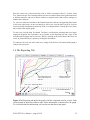
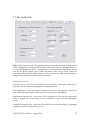
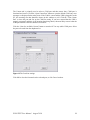
Figure 11 The Preferences Tab. The graphing preferences determine which port the displacement
sensor is plugged into , and whether the load value is based on a pressure cell plugged into port 3
or a load cell plugged into port 4. Although data is streamed drom the DAQ unit at 0.1mm
intervals the interval between saved values and plotted values can be varied. Finally the
calibration coefficents for the load and pressure cell s are input on the RHS. The should only be
changed if the transducers are replaced or the recalibrated.
Graphing Preferences:
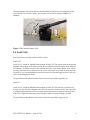
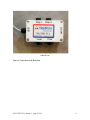
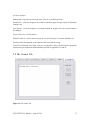
The Figure shows a top view of the DAQ/PC with the location of the 4 ports indicated. It is
imperative that each transducer be plugged into the appropriate port.
Units dropdown list – select either Metric or Imperial from the list. This preference applies only
to the values plotted on the graph. Metric values are always written to the database.
Displacement dropdown list – select Port1, Port 2 depending on which port the displacement
sensor is plugged into. Select average to use an arithmetic average from both displacement
sensors.
Load/Pressure dropdown list – select either Load cell (Port 4) or Pressure cell(port 3) depending
on which transducer the load value is based on.
PULLTEST User Manual. August 2010
16