1
Warnings
NOTE
! Do not place the unit in water greater than one inch deep, or
water may damage the electronics.
! Do not install or operate the antenna in winds of 35 mph or
greater. The antenna will roll in winds ≥35 mph.
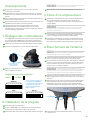
The two holes for the handle are located between the
cable connections and eyelet.
4. Tighten the two screws using a Phillips screwdriver.
Do not overtighten.
3. Choosing a Location
! Care should be taken when transporting and setting up the
antenna. Do not toss or drop the antenna.
1. Choose a location with a clear, unobstructed view of the
southern sky. Avoid obstructions such as trees, hills, vehicles,
or buildings—these can block the signal from the satellite.
! Do not paint the antenna. Painting the antenna may cause
signal degradation and will void your warranty.
! The antenna is not meant for use with the Carryout® ladder
mount. Installing the antenna on the Carryout ladder
mount may lead to serious injury and/or equipment and
property damage.
NOTE
Satellite signal will not pass through solid objects. For
this reason, it is vital to select a location with a clear,
unobstructed view of the southern sky.
2. Make sure the antenna is not placed in the path of people or
vehicles; otherwise, the antenna may be knocked off of the
signal if run into, or cables may be disconnected from the unit.
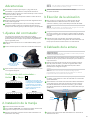
1. Switch Settings
The Carryout antenna switch settings are preset for DIRECTV
programming. To set the antenna for any other programming
provider, complete the following steps:
1. Remove the dome screws with a Phillips screwdriver, and
remove the dome.
3. Select a location that will enable the Carryout G2 antenna to
sit within three degrees of level. The antenna may take longer
to lock onto signal if the antenna is not level.
4. Wiring the Antenna
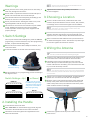
2. Locate the switches on the side of the electronics housing.
TIP
Run the coaxial cable directly from the satellite receiver to
the Carryout G2 antenna when searching for signal.
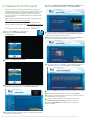
1. Connect a coax cable from the main port to the “Sat In” port
on the back of the receiver that will be used most often.
2. If hooking up the Carryout G2 antenna to two receivers,
remove the cap from the secondary port, and run a second
coaxial cable from the secondary port on the base to the “Sat
In” port on the secondary receiver.
+
Switches on side of
electronics housing
3. Set the switches for your programming provider according to
the diagram below.
Switch Settings—Up (
DIRECTV
1
2
3
4
5
6
7
8
) or Down (
The Carryout G2 is preset
for DIRECTV programming.
The switch settings must be
changed to receive DISH or
Bell TV programming.
DISH
1
2
3
4
5
)
NOTE
A 50 foot coaxial cable is included and recommended for
use with the antenna. Longer coax runs could potentially
cause intermittent problems. Maximum cable length should never
exceed 50 feet.
3. Tighten coax connections until fingertight, and then tighten a
quarter turn more with a wrench. Do not overtighten.
4. Align the arrow on the antenna end of the power cable with
the top of the power socket. Connect the end of the power
cable to the power socket, and rotate the collar of the power
cable clockwise a half turn until tight.
Power
socket
Bell TV
6
7
8
1
2
3
4
5
6
7
8
MAIN port
2. Installing the Handle
SEC port
Collar
1. Locate the two holes in the base.
2. With “WINEGARD” on the handle facing upwards, align the
two holes in the handle with the two holes in the base.
3. Thread two screws through the two aligned holes in the
bottom of the handle.
5. Connect the opposite end of the power cable to a 12 V
power source.
2